Google Retires Gemini Gems? Google has begun notifying Gemini users via in-app banners that Gems will be migrated to Skills starting November 17, 2026. Following interface code findings and community speculation, the notification confirms that Google is adjusting how users create and invoke customized artificial intelligence assistance. Historically, custom prompt bots functioned primarily as standalone conversations launched from a dedicated manager. Today, because modern workflows benefit from combining multiple instructions dynamically within ongoing projects, Google is shifting these reusable configurations toward an in-chat Skills model that can be called directly within active task threads.
Core Platform Realignment: Why Google Retires Gemini Gems for Skills
At a Glance
- Google will begin automatically migrating custom Gemini Gems into Skills starting on November 17, 2026.
- The update shifts users from launching standalone Gems toward invoking reusable Skills directly inside active Gemini chats and Spark tasks.
- Google confirms that supported knowledge files will transition automatically with Gems, while several specialized tools—including Canvas and Deep Research—await future feature parity in Skills.
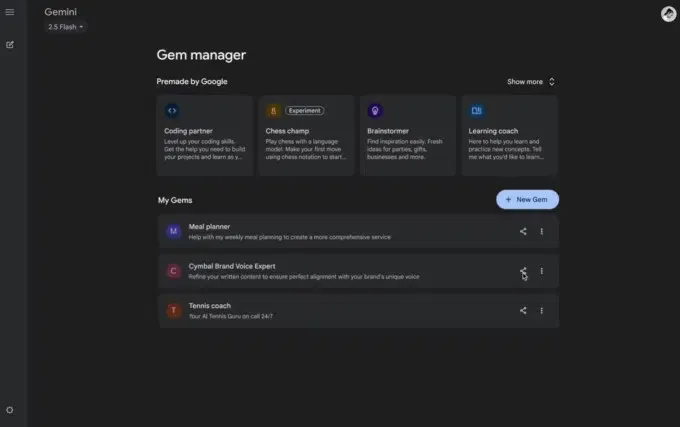
The product conventions governing personalized generative assistants are part of a broader shift in how AI platforms organize reusable customization. When Google introduced Gems in August 2024, the feature was positioned as a straightforward way to tailor Gemini for repetitive tasks. Users could configure specialized prompt setups—such as coding assistants, writing editors, brainstorming partners, or language coaches—without re-entering instructions for every session. These custom assistants could be named, augmented with uploaded reference documents, and shared with others through links.
However, the user experience of dedicated custom chatbots has revealed practical limitations in production workflows. Under the original Gems framework, custom assistants were typically launched as separate conversations. Users seeking to leverage a specific Gem had to navigate to the Gems Manager and launch a new chat session. This workflow made it less convenient to apply a Gem’s custom instructions dynamically inside another ongoing conversation without manually copying text between different windows.
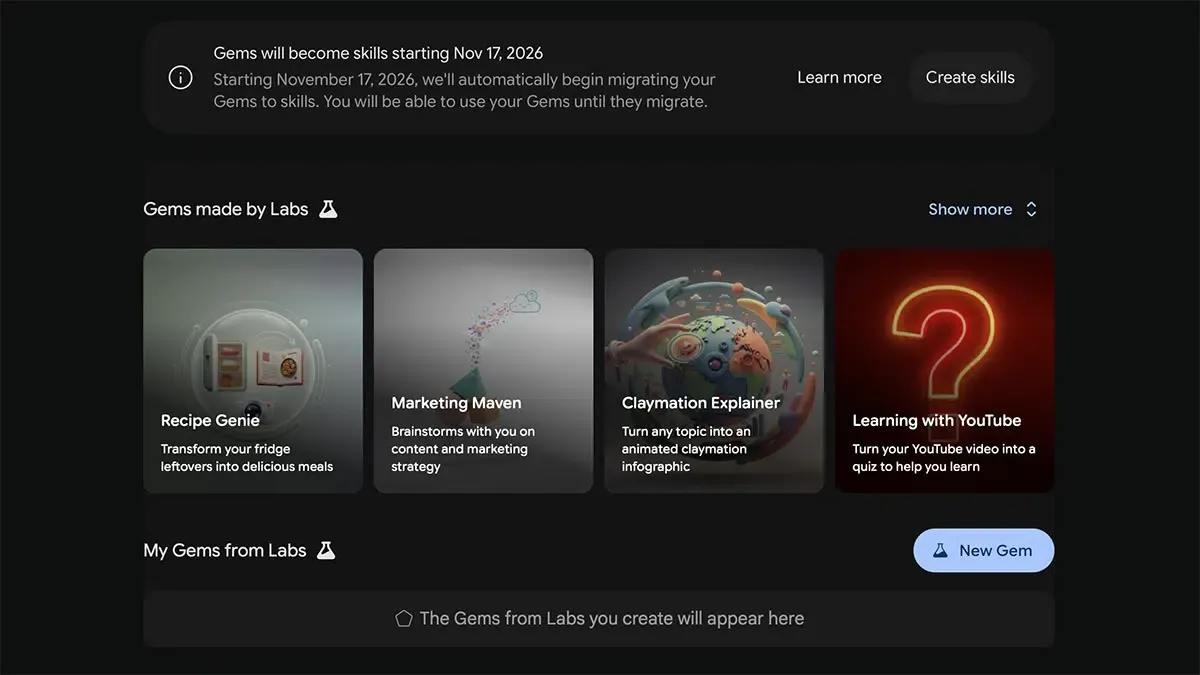
Google is now adjusting this model. As detailed in coverage by Android Authority and TechCrunch, an official notification banner inside the Gems console informs users that existing Gems will be automatically converted to Skills beginning November 17, 2026. Official guidance published in Google’s transition documentation explains that Gems will be automatically recreated as Skills, with supported knowledge files transitioned as part of the automated migration. Existing Gems will remain accessible and functional until the migration process completes for each account.
This change reflects a broader industry tendency to move reusable AI instructions closer to active task threads rather than treating them exclusively as separate destination bots. For teams managing internal AI workflows, Google’s decision illustrates an operational reality: platform design is increasingly moving reusable AI capabilities closer to users’ active working context over maintaining disconnected collections of single-purpose chatbots.
Under-the-Hood Architectural Disconnection: Standalone Bots vs. In-Chat Skills
From a functional workflow perspective, the transition from Gems to Skills represents a shift from static persona wrappers toward composable, in-thread capabilities. A traditional Gem stored a persistent set of custom instructions and was typically opened as its own dedicated conversation. Once started, that conversation remained tied to that single custom setup, making it cumbersome to bring in additional specialized instructions without starting a fresh session.
In contrast, the Skills framework integrates modular instructions directly into the primary task environment. Skills can be summoned on demand using standard forward-slash (/) commands inside supported input fields. This design enables in-thread composition, allowing users to apply specialized custom guidelines directly to active tasks without abandoning their conversation history.
Workflow Model Comparison: Dedicated Sessions vs. Composable In-Task Execution
To illustrate the practical distinction between these two models, consider how user context moves through each interface:
[Legacy Gems Workflow]
  User Navigation ──> Gems Manager ──> Dedicated Gem Conversation (Single Custom Persona)

[Modern Skills Workflow]
  Active Gemini Chat / Spark Task ──> In-line Slash Command (/skill) ──> Multiple Combined Skills ──> Shared Working Context
This streamlined execution flow allows users to combine multiple skills within a single task, reducing the need to jump between separate chatbot windows. An engineering or documentation team can invoke a structured code-formatting Skill alongside a technical writing Skill within the same operational thread, maintaining full task context throughout.
Furthermore, Skills link directly into Google’s Gemini Spark automation workspace. According to official Google Gemini Apps Help documentation, Spark can automatically select and execute a relevant Skill if it detects that the custom instructions match the task at hand. Skills can also be attached to scheduled automations, shifting user-defined prompts from static conversational templates into reusable components for automated workflows.
Decoupled Systems & Workflow Comparison: The Evolution of Custom AI Assistants
As platform providers refine their generative product suites, user interfaces are being simplified. Over recent development cycles, software vendors frequently assigned independent brand names, dedicated tabs, and separate icons to minor functional variations. This approach often produced fragmented product suites where users had to decide between standard conversational chats, specialized side-panel bots, and workspace tools before starting work.
Moving custom instructions into a standardized slash-command system streamlines daily interaction. However, this platform consolidation also introduces operational questions regarding licensing and feature parity that technical teams must consider.
The following decision matrix outlines the functional distinctions between legacy custom assistants and composable skills:
| Dimension | Gemini Gems (Legacy Model) | Gemini Skills (Modern Model) | Engineering & Workflow Impact |
|---|---|---|---|
| Execution Model | Dedicated standalone conversation threads | In-task slash-command invocation (/) |
Reduces interface navigation steps and unifies working context |
| Concurrency | Single custom persona per thread | Multiple skills combined within a single task | Enables multi-stage tasks combining domain guidelines and review steps |
| Tool Orchestration | Fixed tool bindings per Gem | Skills, schedules, and automatic invocation in Spark | Connects static prompt templates directly to background automation; parity for specialized tools rolling out |
| Platform Scope | Custom Gemini chat interface | Available directly in Gemini chats, with expanded workflow automation through Gemini Spark | Consolidates custom assistants under the broader Gemini workspace |
| Account Accessibility | Broadly available to personal-account users including free accounts | Evolving during rollout; personal accounts gaining access while documentation updates | Clarifies long-term access model across free and paid subscription tiers |
The most discussed operational aspect of the migration involves account access tiers and feature parity. Gems have historically been available to all users on standard free Google accounts. In contrast, Google’s documentation reflects an active rollout transition: while the dedicated Skills guide still describes Skills as a feature within Gemini Spark for eligible Pro and Ultra subscribers, Google’s newly published migration FAQ states that Skills are now available directly in Gemini chats for adult personal-account users.
Additionally, Google notes that while supported knowledge files will transition automatically, full parity for specialized tools is still in progress. Certain default integrations previously available in Gems—such as Canvas, Deep Research, and media generation—are not yet supported within the initial Skills release. Organizations that have standardized internal documentation or automated reporting around Gems should monitor forthcoming support updates to verify tool compatibility before November 17.
Engineering Checklist & Migration Schedules: Preparing for the November 17 Transition
To ensure workflow continuity and verify asset compatibility during the transition, prompt engineers and workspace administrators should establish a structured review. While Google has stated that existing setups will transfer automatically, maintaining independent backups ensures that complex prompt phrasing remains accessible regardless of platform updates.
Prompt Configuration & Asset Checklist
- Audit Custom System Instructions: Review active Gems in the Gems Manager and archive system prompt text into local version-controlled repositories to maintain independent documentation of key guidelines.
- Verify Knowledge File Compatibility: Ensure that all reference documents, PDFs, and data sheets attached to Gems are cataloged, noting that supported files transition automatically while GitHub files are not currently supported in Skills.
- Test Slash-Command Workflows: Begin testing forward-slash invocation patterns in platforms supporting inline commands to identify opportunities for combining complementary guidelines.
- Review Automated Task Schedules: For teams utilizing Spark automations, evaluate how Spark tasks and schedules use migrated Skills in background workflows.
Administrative & Governance Checklist
- Track Account Licensing Updates: Monitor Gemini Apps Help and relevant Google Workspace admin documentation regarding feature availability across free tiers and paid Google AI subscription plans.
- Catalog Shared Resource Links: Identify public or organizational Gems links embedded in team wikis, preparing to update documentation once new Skill locations go live.
- Update Internal User Guidelines: Prepare training material for staff on how to invoke and combine multiple Skills within unified Spark project threads.
By executing these preparatory steps, teams can transition smoothly from standalone prompt bots to modular, in-task Skills while minimizing workflow disruptions.
Frequently Asked Questions (FAQ)
Will existing custom Gems instructions and uploaded files carry over during the migration?
Will migrated Skills require a paid Google AI subscription?
How does invoking a Skill via a slash command differ from using a Gem?
Key Takeaways for Engineering Teams
The sunsetting of Gemini Gems in favor of Skills reflects an industry shift toward embedding reusable AI capabilities directly into active task threads. As generative tools mature, treating customized AI as an isolated destination chatbot is giving way to composable instructions that can be summoned dynamically within a unified workspace.
For developers and technical architects, this transition highlights the importance of modular prompt design. Structuring custom instructions as discrete, task-specific capabilities rather than rigid, monolithic personas ensures that team workflows remain flexible as platform providers continue refining their assistant interfaces.
References
-
Google Gemini Apps Help. About the transition from Gems to skills.
-
Google Gemini Apps Help. Create & manage skills in Gemini.
-
Google Gemini Apps Help. Use Gemini Spark to manage your tasks & workflows.
-
Android Authority. Google to Sunset Gemini Gems in November.
-
TechCrunch. Google Is Killing Off Gemini’s Gems in Favor of Skills.
-
Android Headlines. Google Is Killing Gemini Gems, But There’s a Replacement in Line.
-
PCWorld. Gemini Gems Appear to Be on Their Way Out, Reddit Screenshots Show.
-
SammyGuru. Gemini Gems Are Being Shut Down, Here’s What Happens Next.
Share this article