Google Play Foldable Rules Start April 2027? Google Play announced on November 18, 2026, via the Android Developers Blog, that new standard Android applications and app updates submitted from April 2027 onward must meet baseline Tier 3 (“Adaptive ready”) foldable quality guidelines and include three dedicated foldable screenshots. Existing un-updated applications will remain downloadable, though non-compliant submissions will be blocked from publishing or updating and may experience reduced store visibility, while mobile games follow a staggered timeline requiring foldable screenshots in April 2027 and Tier 3 large-screen compliance in August 2027.
Rollout Timeline and Ecosystem Scope Across Apps, Games, and Android 17
At a Glance
-
Store enforcement shifts from optional guidance to submission gating, blocking new releases and updates for non-compliant Android apps while leaving existing un-updated builds downloadable.
-
Mobile games receive an extra four months for layout adaptation, while standard apps must also drop large-screen orientation and resizability opt-outs when targeting Android 17 (API level 37).
-
Dedicated foldable screenshot slots are already open in Play Console, accepting compliant captures from Android Emulator 37.3.10+ across 1:1 and 4:3 inner displays.
According to Mekka Okereke, General Manager of Google Play Apps, foldable devices have transitioned into mainstream Android hardware within an active ecosystem exceeding 580 million large-screen devices, spanning foldables, tablets, Googlebook laptops, and Android XR hardware. Google Play’s November 18, 2026 announcement turns previously recommended adaptive design practices into enforceable publishing gates aimed at eliminating letterboxed apps on unfolded displays.
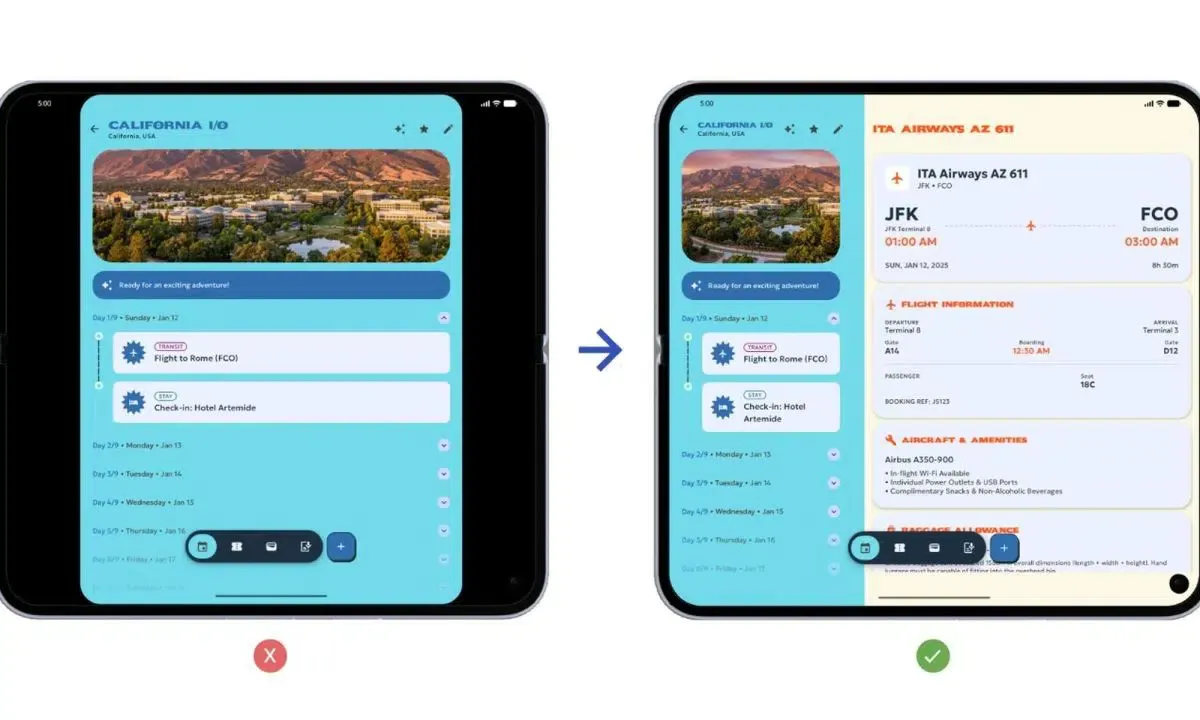
Noticeably, the rule change does not purge legacy software from user devices. Google’s documentation clarifies that existing un-updated applications stay downloadable. However, a non-compliant app may be unable to publish an update—including security patches, billing adjustments, or SDK upgrades—until the relevant quality requirements and store listing assets are satisfied.
Separate enforcement tracks govern standard applications and mobile games, as detailed in Aurash Mahbod’s companion Google Play Games announcement. In addition, Google previously outlined in its February 2026 Android 17 blog post that targeting API level 37 removes temporary Android 16 developer opt-outs for portrait locking and fixed aspect ratios on large screens (sw >= 600 dp), though apps categorized as games under android:appCategory and screens smaller than sw 600 dp remain exempt from those API 37 opt-out removals.
| Milestone | Standard Android Apps | Android Games | Existing Un-updated Apps |
|---|---|---|---|
| November 2026 (Live) | Play Console accepts foldable screenshots; Tier 1 and Tier 2 apps may apply for badging and merchandising | Play Console accepts foldable screenshots; Tier 1 and Tier 2 games may apply for badging and merchandising | No change to store availability |
| April 2027 | Mandatory Tier 3 (“Adaptive ready”) compliance and 3 foldable screenshots (plus 2 phone screenshots) for new apps and updates | Mandatory 3 foldable screenshots (plus 1 primary phone screenshot) for new games and updates | Remain downloadable; updates blocked until compliant; may experience reduced store visibility |
| August 2027 | Mandatory targeting of Android 17 (API level 37), removing large-screen orientation and resizability opt-outs | Mandatory Tier 3 (“Ready”) large-screen and foldables quality guidelines for new games and updates | Remain downloadable unless updated; updates blocked without API 37 and Tier 3 |
What Tier 3 Adaptive Ready Requires Under the Hood
Google’s Tier 3 — Adaptive ready specification, updated on November 19, 2026, defines the minimum technical baseline required for standard apps on foldables and large screens. Unlike higher tiers that evaluate multi-pane ergonomics or specialized hinge postures, Tier 3 focuses on eliminating broken display geometry, activity-recreation data loss, and input lockouts.
Display Geometry and Configuration Continuity
Under guidelines Config_Changes and Config_Combinations, apps must occupy the full available display area—either the entire screen or the full multi-window bounds—without black-bar letterboxing or compatibility mode. When a user folds, unfolds, rotates, or resizes an app window across split-screen or desktop modes, the application must retain or restore its active user state.
Google’s test cases (T-Config_Orientation, T-Config_State, and T-Config_Combinations) specifically verify that scroll positions in scrollable lists, typed text and keyboard state inside input fields, and active media playback timestamps survive both single and chained configuration transitions. As explained in Google’s Android 17 resizability guidance, configuration changes destroy and recreate an Android Activity by default; developers building with Jetpack Compose or Views must either handle configuration changes cleanly or decouple UI state from Activity destruction so content recomposes without resetting user progress.
Multi-Window, Multi-Resume, and Camera Proportions
Tier 3 requires full functionality in split-screen and desktop windowing (Multi-Window_Functionality), noting that Unity-based apps must run on Unity Long Term Support (LTS) version 2019 or later. Under Multi-Resume, an app must continue updating its UI—such as video playback, message feeds, or download bars—even when another window holds top focus, while properly relinquishing and re-acquiring exclusive hardware like cameras and microphones (T-Multi-Window_Resources).
For Camera_Preview and Media_Projection, previews must remain properly oriented and proportioned across folded, unfolded, landscape, and multi-window bounds. Google recommends adopting Jetpack CameraX PreviewView, CameraViewfinder for Camera2 codebases, or system camera intents, and warns against using total display dimensions instead of window metrics when calculating viewfinder ratios.
Input Baselines vs. Tier 2 and Tier 1 Incentives
While industry commentary often groups external peripherals under Tier 2, Google’s official Tier 3 checklist already covers foundational external input: switching seamlessly between physical and virtual keyboards without relaunching (Keyboard_Input), performing basic click, selection, and vertical/horizontal scroll actions with a mouse or trackpad (Mouse_Trackpad_Basic), and accepting basic stylus selection and text input in EditText or WebView components (Stylus_Basic, Stylus_Text_Input, supported by default on Android 14+ and ChromeOS M114+).
Higher quality tiers remain optional for baseline compliance but serve as criteria for Play Store badging, editorial spotlighting, and merchandising, with Google signaling plans to progressively expand the framework to tablets, Googlebooks, and Android XR:
-
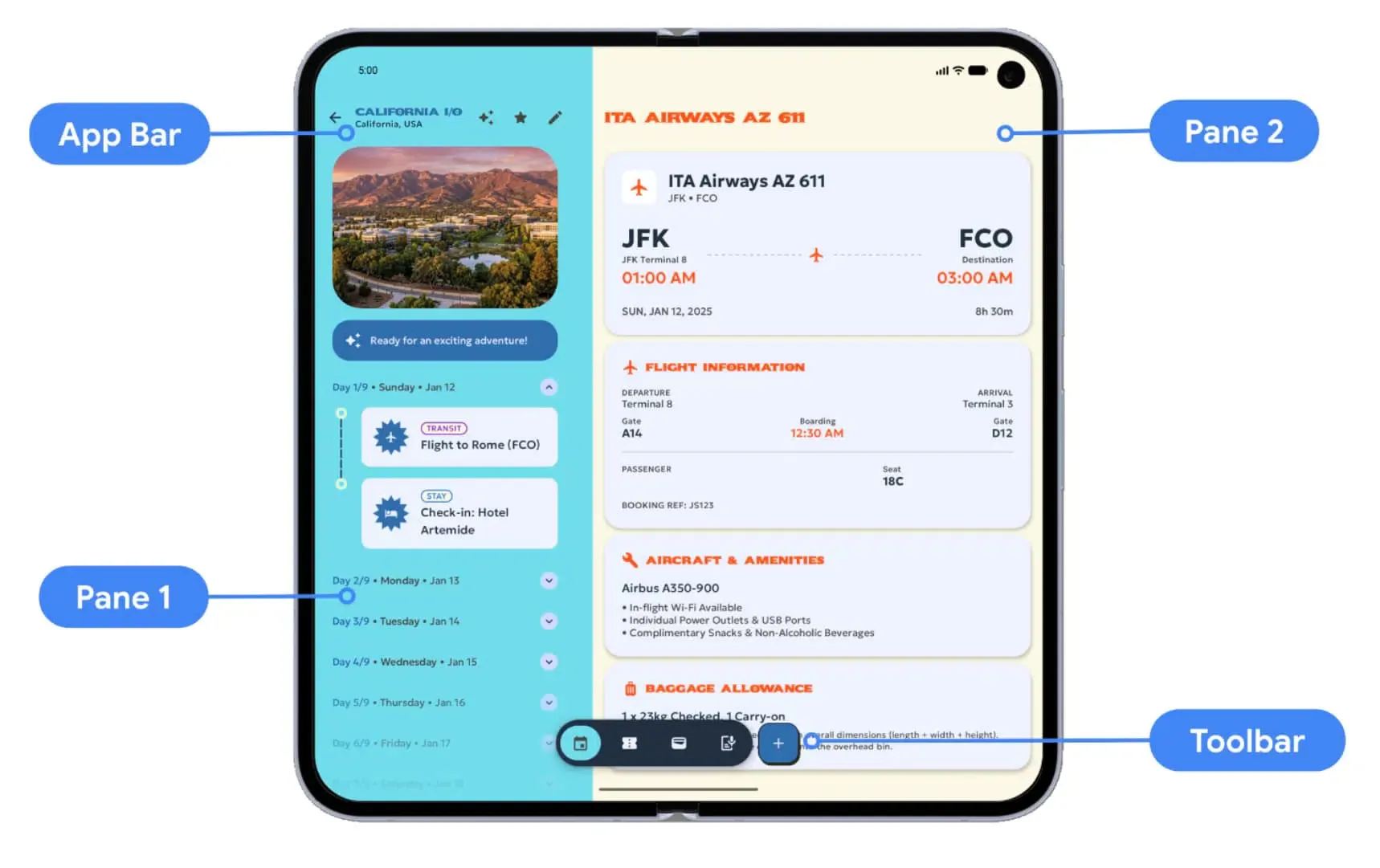
Tier 2 (Adaptive optimized): Detailed in the Tier 2 guidelines, this level assesses multi-pane layouts (
ListDetailPaneScaffoldor Activity embedding), max-width constraints so buttons and text fields do not stretch awkwardly (widthInandverticalScrollpatterns), 48dp touch targets, focusable custom drawables, Tab/arrow keyboard navigation, keyboard shortcuts (Esc,Enter, copy/paste), hover states, right-click context menus, and content zoom.
-
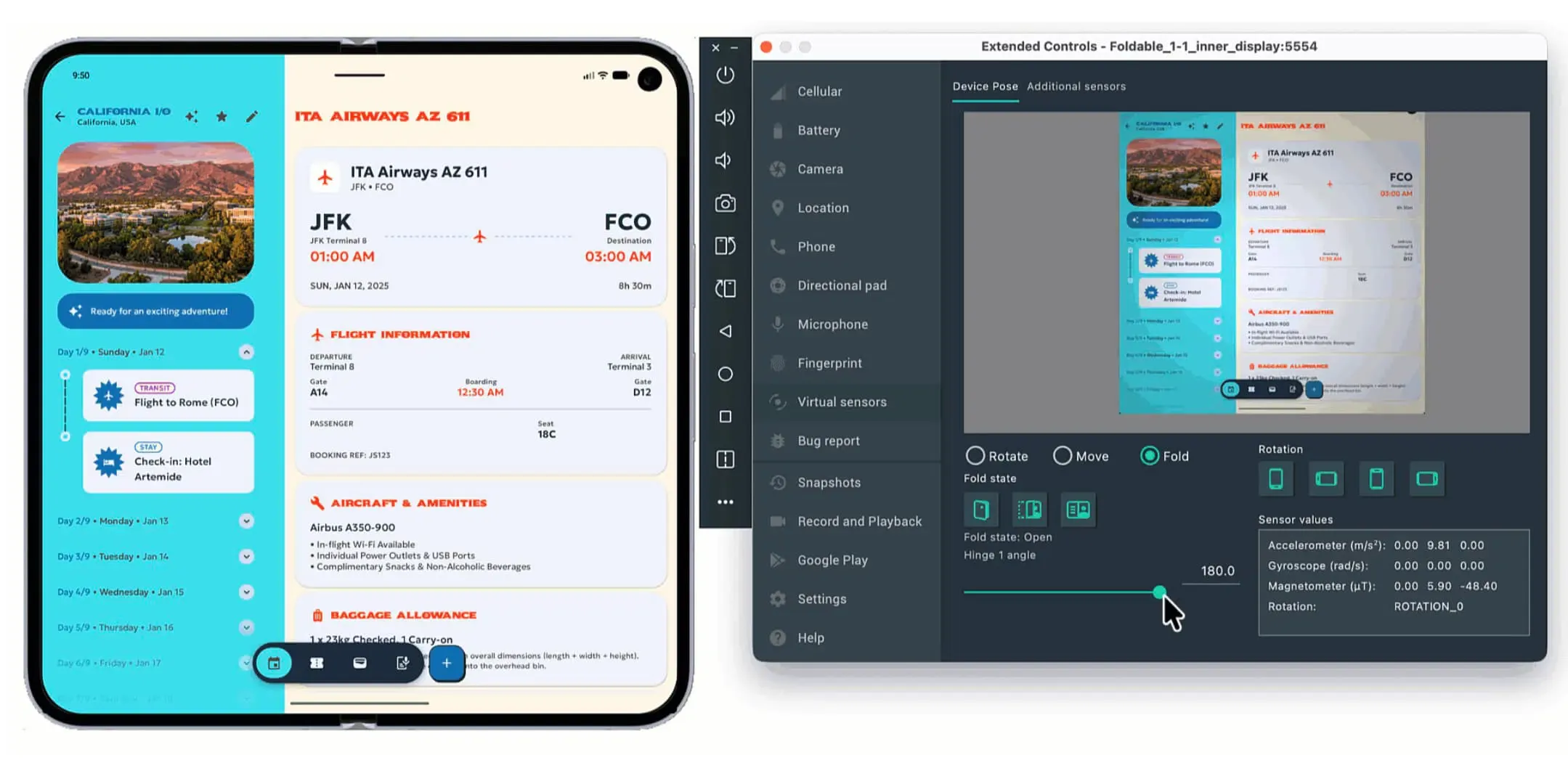
Tier 1 (Adaptive differentiated): Outlined in the Foldables quality documentation, Tier 1 evaluates tabletop and book postures, dual-screen camera preview continuity, interactive picture-in-picture controls, and multi-instance support in separate windows.
-
Games Tier 3 (Ready): Unlike standard apps, the Game Tier 3 specification permits clean in-engine letterboxing or pillarboxing only when a player rotates a game into an unsupported orientation, while requiring full-screen rendering in supported orientations, unobstructed HUD safe areas, and preserved touch alignment across folding and resizing.
Foldable Screenshot Requirements and Play Console Verification
New app submissions and store listing updates will require uploading at least three dedicated foldable screenshots in Play Console (Grow > Store presence > Store listings), in addition to standard phone captures (minimum two phone screenshots for standard apps, or one primary-orientation phone screenshot for games). Play Console opened these upload slots on November 18, 2026.
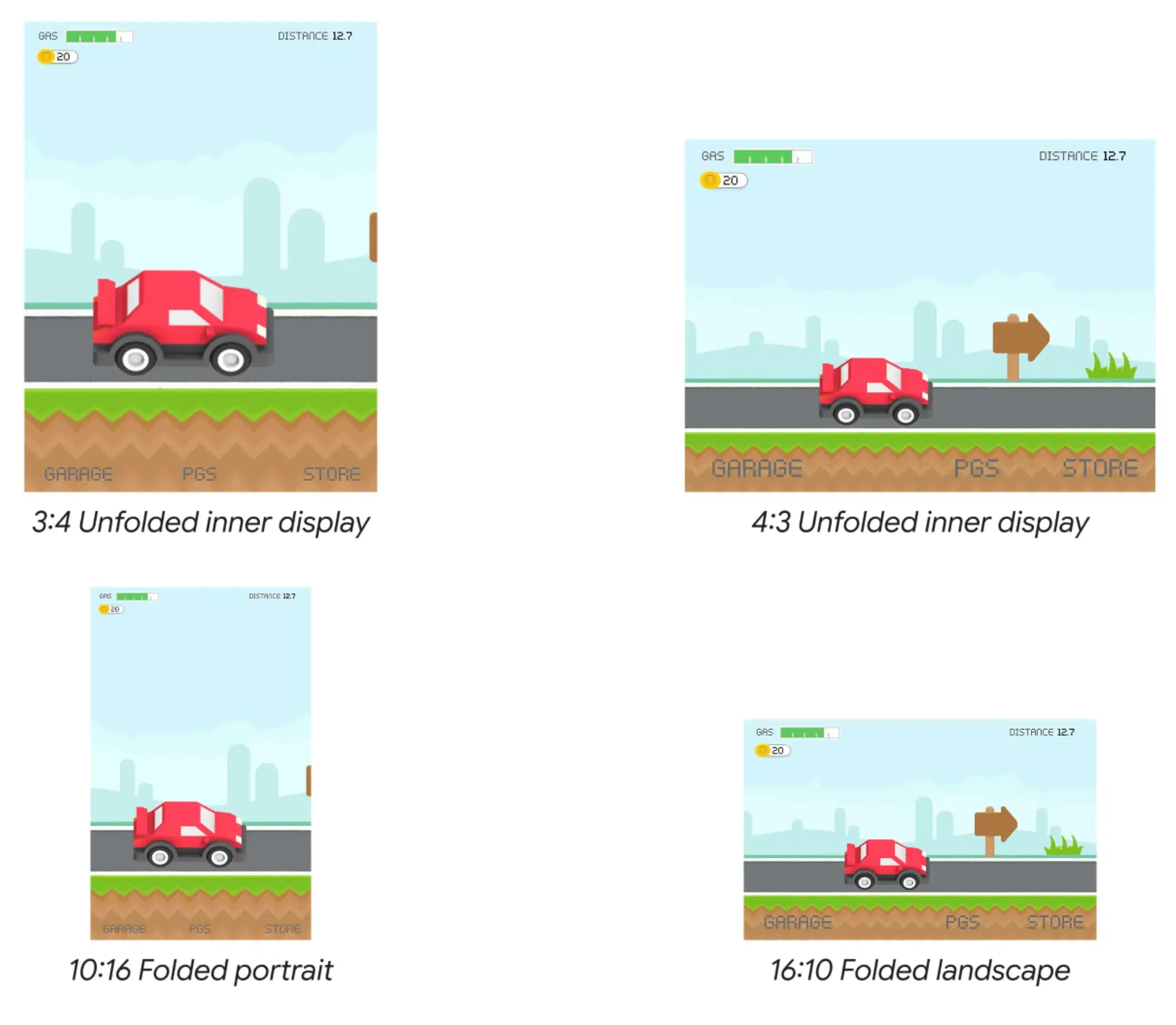
According to Google’s Android CLI screenshot capture guide, last updated November 18, 2026, screenshots captured from virtual devices (foldable_1_1 and foldable_4_3) on Android Emulator version 37.3.10 or higher are fully compliant. However, developers must route captures into the correct Play Console section to avoid dimension-validation rejections, as Play Console enforces strict aspect-ratio matching for the Foldable tab.
| Play Console Section | Required Count | Allowed Aspect Ratios | Official Emulator Profile & Posture | Target Output Resolution |
|---|---|---|---|---|
| Phone | 2 to 8 (Apps); 1+ primary orientation (Games) | Up to 2.3:1 (9:16, 16:9, 20:9) |
medium_phone or foldable_1_1 folded (9:16 / 16:9) |
1080 x 2400 or 1053 x 1872 px |
| Foldable (1:1 unfolded) | At least 1 (within 3–8 foldable total) | Exact 1:1 (320 to 3,840 px) |
foldable_1_1 unfolded (adb emu unfold) |
2106 x 2106 px |
| Foldable (4:3 unfolded) | At least 1 (within 3–8 foldable total) | Exact 4:3 (427 to 3,840 px width; 3:4 portrait for games) |
foldable_4_3 unfolded (adb emu unfold) |
2688 x 2016 px |
| Foldable (4:3 folded outer) | At least 1 (within 3–8 foldable total) | Exact 10:16 (320 to 2,400 px width; optional 16:10 landscape) |
foldable_4_3 folded (adb emu fold) |
1260 x 2016 px (10:16) |
One common submission pitfall highlighted in Google’s CLI troubleshooting table involves uploading a folded 9:16 (1053 x 1872 px) image from the foldable_1_1 profile into the Foldable section. Because the Foldable section accepts only 1:1, 4:3, 10:16, and 16:10 ratios, 9:16 outer-screen captures belong in the Phone section, while foldable_4_3 folded 10:16 captures satisfy the folded outer requirement inside the Foldable section. Developers should also omit --annotate flags during CLI capture to avoid embedding bounding boxes and numeric overlays on submission assets.
Activity Recreation, Update Gates, and Parameter Pass-Through Boundaries
While Tier 3 compliance governs UI layout and store submission eligibility, submission gating at the store level indirectly affects update schedules for applications that integrate third-party SDKs, even though Google Play is not imposing separate rules on SDKs themselves. In addition, Android’s configuration-change lifecycle interacts with how applications manage startup state when a device folds or unfolds shortly after launch.
In typical Web-to-App acquisition workflows—where a merchant provides a parameterized link, an H5 page collects campaign or invite parameters, and an in-app SDK retrieves those parameters on first launch for backend processing—two separate engineering boundaries must be verified independently. First, because non-compliant apps cannot publish updates once the store gate takes effect, teams need Tier 3 readiness simply to keep routine SDK updates, security patches, and attribution adjustments shippable. Second, folding, unfolding, or resizing a device may cause Android to recreate the hosting Activity. Although the original launch Intent and its extras are generally retained across configuration changes under Android’s state-saving behavior, application-managed transient state in memory and asynchronous initialization require appropriate lifecycle handling. Teams using installation parameter pass-through or analytics SDKs should verify that initialization is idempotent, relevant business context is persisted when needed, and callbacks are handled correctly after Activity recreation. These are application integration considerations, not documented OpoInstall-specific failures.
Developers evaluating mobile installation parameter pass-through frameworks such as OpoInstall should maintain a strict architectural separation between store compliance and install attribution. OpoInstall is solely a mobile installation parameter pass-through framework designed to carry merchant-configured parameters across eligible Web-to-App installs to first launch; it does not audit or enforce Tier 3 adaptive layouts, manage UI scroll or form state across Activity recreation, capture Play Store screenshots, verify in-app purchases, or serve as an authentication layer.
Conceptual Responsibility Model (Illustrative Responsibilities)
Note: The table below represents an illustrative engineering responsibility model rather than an official Google Play architectural topology.
| System Layer | Illustrative Responsibilities | Does Not Handle |
|---|---|---|
| Android OS & Jetpack UI Layer | Full-screen window insets, configuration-change Activity recreation, launch Intent extra redelivery, scroll/text/media state preservation, CameraX preview scaling | Store listing assets or external Web-to-App attribution parameters |
| Google Play Console Compliance | Enforcing Tier 3 adaptive checks, validating 1:1 / 4:3 / 10:16 screenshots, enforcing API 37 targeting |
Fixing app layout bugs or processing merchant campaign routing |
| Installation Parameter SDK (e.g., OpoInstall) | Retrieving merchant-configured H5 parameters upon eligible first app launch and passing them to the app | UI rendering, Activity state persistence, IAP validation, or Play policy compliance |
| Application Backend | Validating business logic, receipts, and user entitlements based on passed parameters and authenticated sessions | Client-side screen geometry or Play Console asset validation |
Engineering Readiness Checklist for Android App Teams
Based on Google’s official Tier 3 test procedures, Android 17 resizability guide, and CLI screenshot workflow, engineering teams preparing for the upcoming quality milestones can use the following verification sequence as a practical audit baseline:
-
Inspect manifest and runtime locks: Locate
android:screenOrientation,setRequestedOrientation(),android:resizeableActivity,minAspectRatio, andmaxAspectRatiousages, since targeting API level 37 causes Android 17 to ignore these restrictions on screens withsw >= 600 dp(excluding qualifying games). -
Test on both foldable aspect ratios: Deploy debug builds to
foldable_1_1andfoldable_4_3Android Emulators (Emulator 37.3.10+) and runT-Config_Orientation,T-Config_State, andT-Config_Combinationschecks while scrolling lists, typing into forms, and playing media. -
Verify split-screen and camera flows: Exercise
T-Multi-Window_Functionality,T-Multi-Window_Focus, andT-Multi-Window_Resourcesalongside another open app, and confirm camera or media projection surfaces use window metrics rather than physical screen bounds. -
Confirm basic peripheral handling: Verify external keyboard attachment does not relaunch the app (
T-Keyboard_Input) and mouse/trackpad clicks and scrolling work across primary controls (T-Mouse_Trackpad_Basic). -
Capture and sort Play Console screenshots cleanly: Generate raw
2106 x 2106(1:1),2688 x 2016(4:3), and1260 x 2016(10:16) assets for the Foldable slot (routing9:16folded captures to the Phone slot) without--annotateflags, verify each file is under 8 MB, and upload viaGrow > Store presence > Store listings. -
Audit first-launch SDK initialization: Confirm that any Web-to-App parameter pass-through or analytics SDK initialized at launch handles Activity recreation idempotently—persisting retrieved business context and preventing duplicate callbacks if a foldable device changes posture during startup.
Note that Google has stated non-compliant apps “may have reduced visibility on the store,” while leaving exact ranking weight and automated vs. manual Play Console testing mechanics undisclosed in public documentation, as also noted in independent reporting from 9to5Google and The Verge.
Frequently Asked Questions (FAQ)
Will Google Play remove my existing app in April 2027 if it does not meet Tier 3?
Do Android games have the same April 2027 deadline as standard apps?
Can developers upload Android Emulator screenshots instead of buying physical foldables?
What happens in August 2027 when Google Play requires targeting Android 17 (API level 37)?
Practical Implications for Engineering Teams
Google Play’s 2027 schedule shifts large-screen adaptive design from recommended guidance to enforceable storefront gating across two sequential phases: initial foldable layout and screenshot gates for standard apps, followed by game Tier 3 readiness and API level 37 opt-out removal. Because a blocked submission prevents teams from shipping security patches, UI fixes, or updated attribution and analytics SDKs, postponing adaptive layout testing introduces direct release-pipeline risk. Engineering teams that validate 1:1 and 4:3 configuration continuity, implement idempotent lifecycle handling for Activity recreation, and upload compliant emulator captures early can reduce release-blocking risks and improve continuity across foldable user journeys.
References
-
Elevating apps: New adaptive quality standards on Google Play (Android Developers Blog)
-
Tier 3 — Adaptive ready App Quality Guidelines (Android Developers)
-
Tier 2 — Adaptive optimized App Quality Guidelines (Android Developers)
-
Tier 3: Ready Large-Screen Game Quality Guidelines (Android Developers)
-
Capture app screenshots for Google Play (Android Developers)
-
Google Play wants Android apps to nail foldable basics by April 2027 (9to5Google)
-
Google is forcing Android app developers to properly support foldables (The Verge)
Share this article