How to set up conversion tracking for in-app events? Setting up mobile app conversion tracking requires integrating a conversion tracking SDK, implementing mobile event tracking, configuring in-app events, and connecting post-install actions with acquisition channels. This method connects post-install user milestones—such as account registrations, dynamic checkouts, and in-app purchases—to initial campaign sources across backend analytics pipelines.
Conversion tracking is the measurement mechanism that records, attributes, and analyzes key post-installation user milestones—such as registrations, checkouts, and content engagements—within a native mobile application. By logging custom event attributes, developers can link user actions back to acquisition channels.
Key Takeaways
- Granular milestone attribution: Links downstream user conversions, such as registrations and purchases, directly to initial install sources.
- Payload normalization: Converts monetary metrics into integer cents to maintain database precision across multi-currency environments.
- Asynchronous queue processing: Dispatches event logs off the main thread to preserve application UI rendering performance.
- Server-side verification: Reduces exposure to client-side event manipulation through secure webhook postbacks.
- Event identity control: Uses unique event identifiers and backend validation to reduce duplicate processing.
Why Conversion Tracking is Essential for Mobile Application Growth
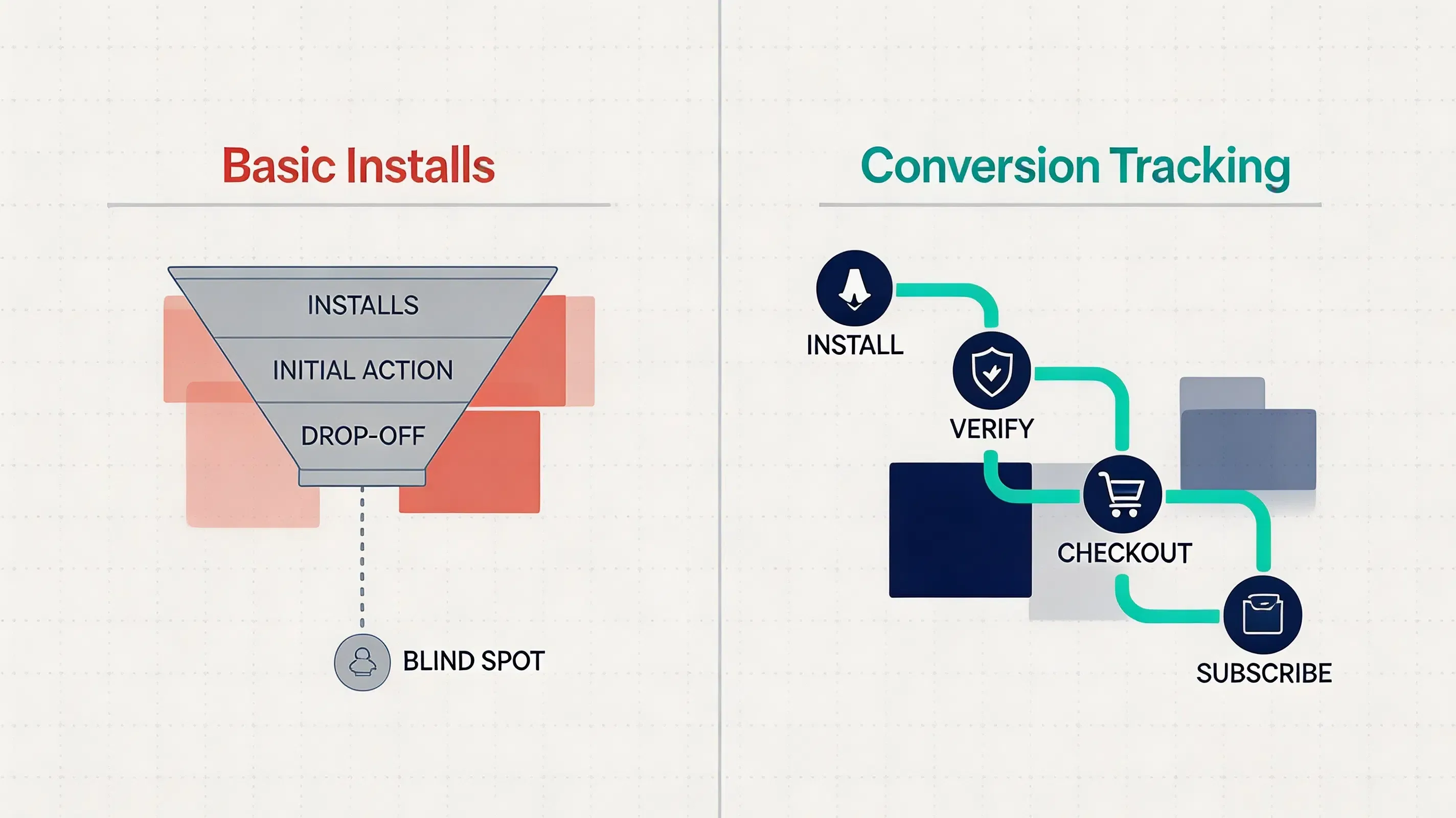
Relying solely on installation counts provides an incomplete picture of campaign performance. While Cost Per Install (CPI) measures early acquisition reach, it fails to reflect user engagement or long-term Lifetime Value (LTV). Unattributed post-install activity leaves development and growth teams unable to distinguish between high-value user cohorts and low-intent traffic.
Without structured event measurement, performance marketing models operate with data blind spots. When downstream milestones—such as completing an onboarding tutorial or executing an in-app checkout—are not linked back to the original advertising channel, campaign optimization algorithms lack the feedback required for accurate bid adjustments.
Implementing dedicated conversion tracking bridges this gap. By recording post-install milestones, engineering teams create a verifiable data stream that connects local user actions with acquisition parameters. This allows conversion events to include contextual metadata, keeping conversion data consistent across analytics platforms.
How to Implement In-App Conversion Tracking Step by Step
Executing a successful conversion tracking setup requires following a structured implementation flow from initial SDK initialization to backend verification:
- Step 1: Initialize the Mobile Attribution SDK: Integrate the client library during application startup so install attribution data and event tracking services are available before conversion events are triggered.
- Step 2: Define Conversion Event Names: Establish standardized string keys in the administrative console matching critical business milestones (e.g.,
account_signup,checkout_complete). - Step 3: Add Event Parameters: Attach contextual key-value metadata payloads, such as transaction IDs, product categories, and normalized currency values.
- Step 4: Send Events After User Actions: Trigger event logging methods immediately following successful user interaction callbacks.
- Step 5: Validate Events Through Dashboard: Verify in local debug logs and server management dashboards that dispatched payloads correctly register with corresponding install sources.
- Step 6: Configure Server-to-Server Verification: Set up secure backend S2S webhooks with HMAC signatures to authenticate high-value transactional events before issuing referral payouts.
Which Mobile Conversion Events Should Developers Track
Designing an effective event instrumentation schema requires selecting business milestones that directly correlate with retention and monetization. Development teams typically categorize in-app conversions into four operational tiers:
- Account Registration Events: Captures user onboarding completions, social logins, or profile creations, establishing the baseline activation milestone for new user cohorts.
- Purchase Events: Records transactional milestones, such as e-commerce checkouts or dynamic cart confirmations, passing item categories and monetary amounts.
- Subscription Events: Tracks recurring billing activations, free trial starts, and plan renewals to measure long-term user monetization.
- Retention Milestone Events: Logs key engagement actions, such as completing a tutorial stage, reaching a specific game level, or creating shared content.
How In-App Event Attribution Structures User Lifecycles
The lifecycle of an in-app event begins when a user triggers a key milestone within the application interface. Rather than treating these actions as isolated client-side logs, the attribution pipeline binds each event to the user’s initial installation parameters.
When an event occurs, the native client captures the event identifier alongside custom metadata attributes. This payload is transmitted to matching servers, where the user’s attribution tag is attached. This process allows analytics systems to map upper-funnel activities (such as account creation) and lower-funnel activities (such as subscription renewals) back to the original referring channel.
By structuring user lifecycles around verified milestones, development teams can analyze cohort behavior over specific retention windows. This granular visibility helps identify drop-off points within onboarding funnels and verifies the quality of acquired user segments.
Event Execution Pipeline and Asynchronous Queue Architecture
To maintain application responsiveness, event dispatches must execute without impacting user interface rendering. High-frequency actions, such as item interactions or rapid gameplay milestones, require a queuing architecture to prevent thread contention.
A common implementation pattern offloads network communication to an asynchronous background worker thread. When the event logging method is invoked, the payload is added to a local queuing system. The background service manages queue transmission, establishing encrypted connections to attribution endpoints while the main UI thread continues uninterrupted.
[User Interaction] ──> [Event Trigger] ──> [Async Worker Queue]
                                                │
                                                ▼
[CRM Sync] <── [S2S Postback] <── [Matching Server] <── [Encrypted Handshake]
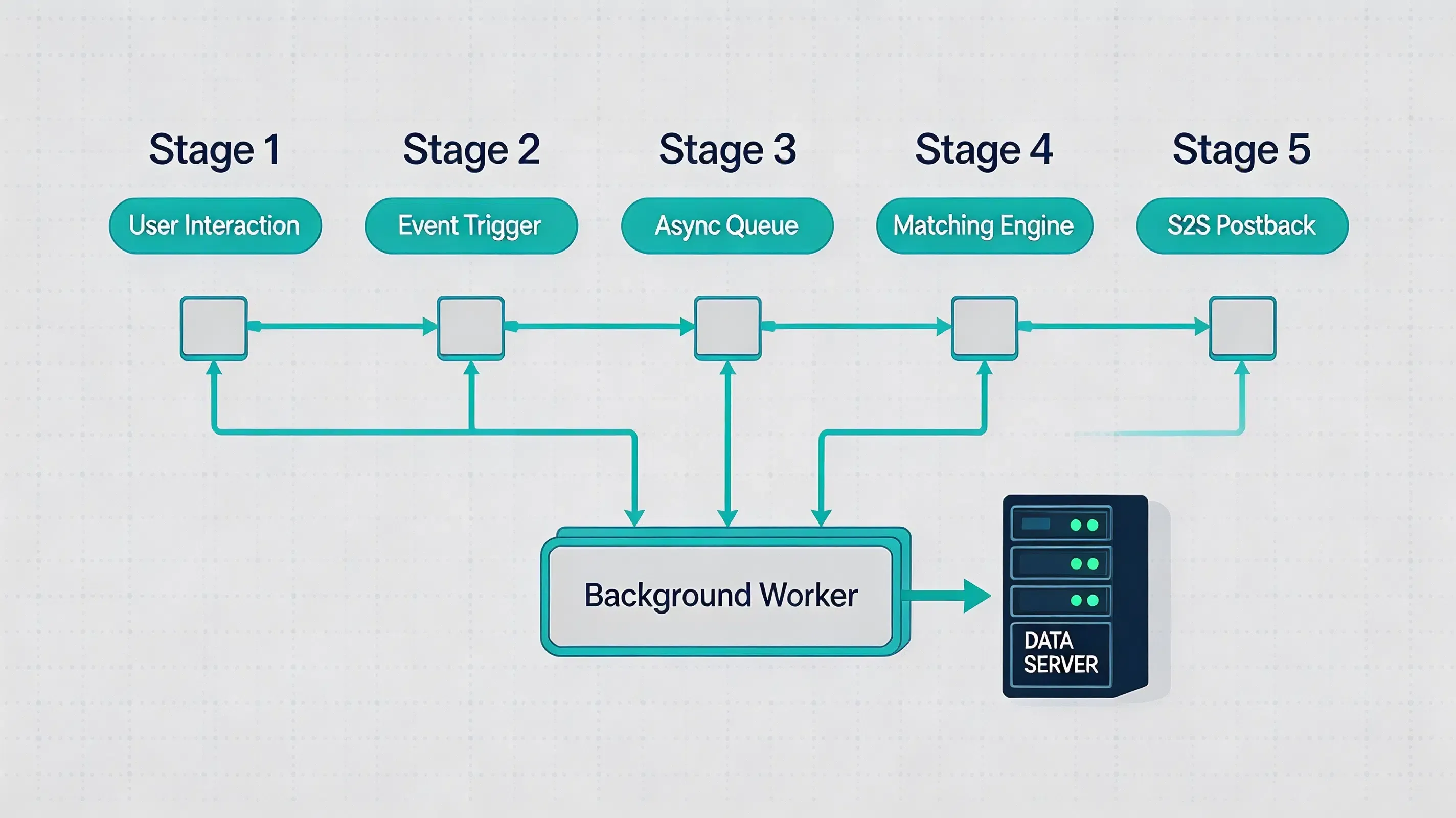
In scenarios where network connectivity is intermittent, SDK implementations that support offline buffering can cache events in local storage. An exponential backoff policy manages retry attempts, ensuring that queued conversion data is delivered once network availability is restored.
Mobile Platform Considerations for Android and iOS
Android Conversion Tracking with Google Play Install Referrer
On Android devices, conversion tracking depends on capturing native install referrer signals alongside client-side event logging. When an application is downloaded from the Google Play Store, campaign metadata is passed through Google Play’s Install Referrer service. The attribution SDK queries this native store mechanism upon startup, establishing the baseline campaign source before processing subsequent in-app event triggers.
iOS Conversion Tracking with ATT and SKAdNetwork
On iOS devices, privacy frameworks dictate how attribution data is gathered. Under Apple’s App Tracking Transparency (ATT) guidelines, accessing persistent hardware identifiers (such as the IDFA) requires explicit user consent. Modern attribution SDKs operate within these privacy requirements by processing first-party contextual signals and using SKAdNetwork postbacks for aggregated ad campaign attribution while relying on first-party session tokens for in-app event mapping.
SDK Integration Examples for Android and iOS Apps
Deploying event measurement across native mobile clients requires registering event identifiers within the administrative console before invoking client-side methods. Platforms such as OpoInstall provide mobile attribution SDKs that support custom event tracking, install attribution, and server-side postback workflows.
Prior to logging custom events, the native client SDK must complete its startup initialization. Invoking event APIs before initialization is complete can lead to dropped payloads or un-attributed data streams.
The Android example illustrates SDK initialization during application startup and event logging using abstract pseudocode notation. Replace placeholders with official SDK namespaces from platform documentation.
// File path: app/src/main/java/com/example/app/CustomApplication.kt
package com.example.app

import android.app.Application

// Example pseudocode: Replace AttributionSDK with your SDK implementation package from developer documentation
import <official_sdk_package>.AttributionSDK

class CustomApplication : Application() {
    override fun onCreate() {
        super.onCreate()
        // Initialize mobile attribution core engine on application startup
        AttributionSDK.initialize(this)
    }
}

// File path: app/src/main/java/com/example/app/PurchaseActivity.kt
package com.example.app

import android.os.Bundle
import android.util.Log
import androidx.appcompat.app.AppCompatActivity
import <official_sdk_package>.AttributionSDK

class PurchaseActivity : AppCompatActivity() {

    fun executePurchaseLogging(transactionId: String, idempotencyKey: String, amountInCents: Long) {
        val extraAttributes = HashMap<String, String>()
        extraAttributes["transaction_id"] = transactionId
        extraAttributes["event_id"] = idempotencyKey
        extraAttributes["currency"] = "USD"
        extraAttributes["category"] = "premium_subscription"

        // Example pseudocode: Submit conversion event using SDK event tracking method
        AttributionSDK.trackEvent("purchase_complete", amountInCents, extraAttributes)
        Log.d("SDK_Logging", "In-app event logged: purchase_complete with value $amountInCents cents")
    }
}
The iOS example illustrates SDK registration and event logging using abstract pseudocode notation. Replace placeholders with official SDK namespaces from platform documentation.
// File path: ios/Runner/AppDelegate.swift
import UIKit

// Example pseudocode: Replace OfficialSDKModule with your SDK implementation module from developer documentation
import <OfficialSDKModule>

@UIApplicationMain
class AppDelegate: UIResponder, UIApplicationDelegate {

    var window: UIWindow?

    func application(
        _ application: UIApplication,
        didFinishLaunchingWithOptions launchOptions: [UIApplication.LaunchOptionsKey: Any]?
    ) -> Bool {
        // Example pseudocode: Initialize SDK and register delegate
        AttributionSDK.initialize()
        return true
    }
}

// File path: ios/Runner/CheckoutViewController.swift
import UIKit
import <OfficialSDKModule>

class CheckoutViewController: UIViewController {

    func logCheckoutEvent(transactionId: String, idempotencyKey: String, amountInCents: Int) {
        let extraAttributes: [String: String] = [
            "transaction_id": transactionId,
            "event_id": idempotencyKey,
            "currency": "USD",
            "category": "in_app_purchase"
        ]

        // Example pseudocode: Submit conversion event using SDK event tracking method
        AttributionSDK.trackEvent(
            eventName: "checkout_complete",
            eventValue: amountInCents,
            metadata: extraAttributes
        )
        print("In-app event submitted: checkout_complete with value \(amountInCents) cents")
    }
}
Detailed API specifications and client libraries can be retrieved from the in-app event tracking documentation and the mobile SDK download center.
Formatting Custom Attributes and Currency Value Normalization
When passing custom metadata along with an event log, payload structure must adhere to standardized formatting rules. Attributes are structured as key-value dictionaries, where both keys and values are constrained to string representations to ensure serialization compatibility across backend databases.
Monetary transaction tracking requires value normalization. To eliminate floating-point rounding errors and multi-currency parsing discrepancies, financial amounts should be converted to integer cent values prior to transmission. For example, a transaction of $19.99 should be submitted as an integer value of 1999 cents.
{
  "event_name": "checkout_complete",
  "event_id": "evt_9b81a3f0-281b-4f9e",
  "transaction_id": "tx_8830192",
  "effect_value": 1999,
  "currency": "USD",
  "timestamp": 1730000000,
  "item_category": "electronics"
}
Standardizing parameter structures prevents payload rejection during backend processing and maintains clean data aggregation across multi-region analytics pipelines.
Server-Side Webhook Verification and S2S Postbacks
Relying exclusively on client-side event dispatches introduces security vulnerabilities, as malicious actors can attempt package spoofing or fake API requests to claim unearned referral credits. Securing conversion pipelines requires shifting final validation to backend systems.
Server-to-Server (S2S) webhooks establish communication between attribution matching servers and internal enterprise databases. When a client logs a milestone, the matching server validates the request and dispatches an HTTP POST webhook to the developer’s endpoint.
Server-side validation reduces exposure to client-side manipulation by moving verification logic into a trusted environment. Actual protection against event payload tampering relies on verifying cryptographic signatures (such as HMAC-SHA256), checking transaction receipts, and enforcing timestamp expiration windows to prevent replay attacks, adhering to standards outlined in IETF RFC 2104.
Common Mistakes in In-App Event Instrumentation
Executing event measurement across mobile applications presents several implementation pitfalls that can corrupt data accuracy:
- Premature API invocation: Calling event logging methods before the core SDK has completed initialization, resulting in un-attributed or dropped events.
- Mismatched event keys: Defining event identifiers in client code that do not match configured console parameters, leading to backend payload rejection.
- UI thread blocking: Executing synchronous network or database operations during event logging, introducing frame drops and UI latency.
- Un-normalized currency fields: Passing floating-point numbers or localized currency strings instead of normalized integer cents, causing database aggregation errors.
Example: Securing E-Commerce In-App Conversion Workflows
Simulated Scenario: Mobile E-Commerce Application Integration
Challenge
A mobile e-commerce platform experienced discrepancies between client-reported checkout numbers and backend database records. Unvalidated client-side event dispatches allowed automated scripts to simulate purchase completions, triggering unauthorized referral payouts.
Implementation
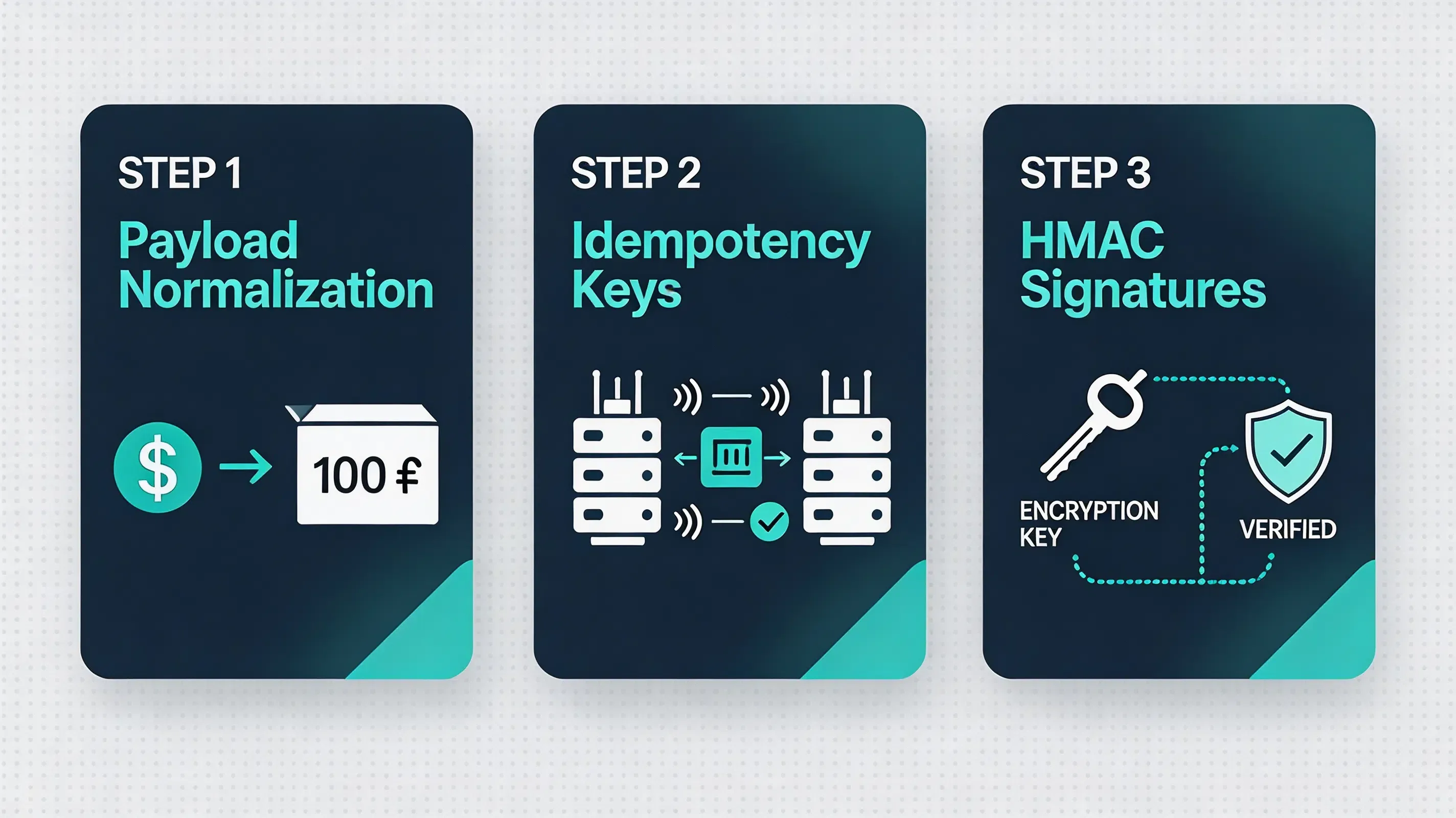
The engineering team updated their event tracking protocol by enforcing server-side signature validation, converting purchase amounts to integer cents, and routing postbacks through secure S2S webhooks using OpoInstall’s mobile attribution SDK and server-to-server conversion validation workflow. AppKeys were registered on the platform developer console.
Expected Outcomes
This implementation demonstrates how backend verification can reduce duplicate event risks and improve conversion data consistency. During the simulation, injected client-side payloads were rejected during signature verification, ensuring purchase events accurately reflected confirmed orders.
Lessons Learned
- Enforce payload normalization: Converting currency values to integer cents prevents database rounding errors.
- Verify signatures server-side: Validating HMAC signatures on backend postbacks blocks script-injected events.
- Queue event execution asynchronously: Processing events off the main UI thread preserves app performance.
Conversion Tracking SDK vs Firebase Analytics vs Mobile Attribution Platforms
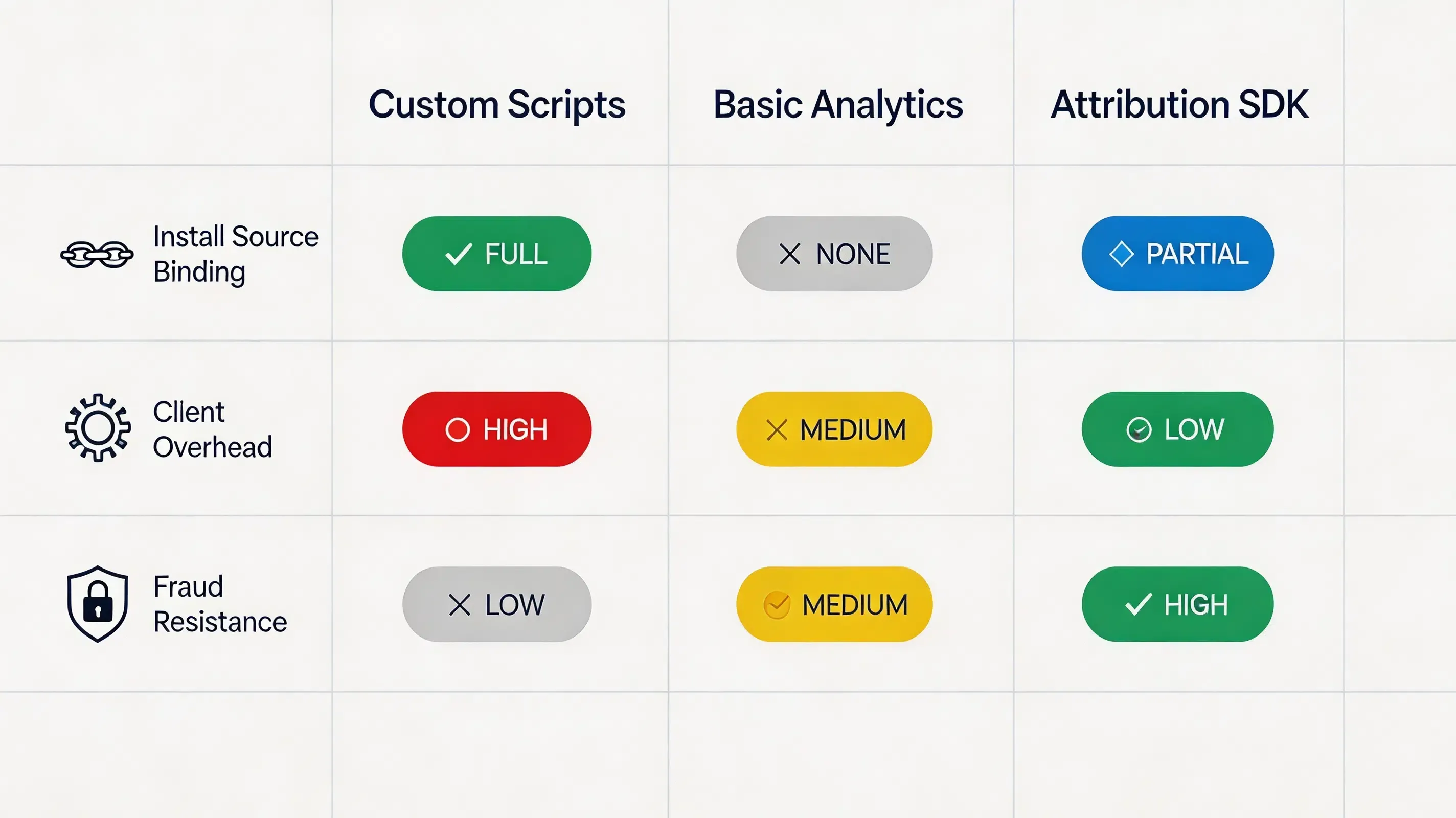
Different technical approaches solve event measurement with varying levels of complexity. The comparison below summarizes common event tracking implementations:
| Evaluation Attribute | Custom Event Tracking | Firebase Analytics | Conversion Tracking SDKs |
|---|---|---|---|
| Representative Platforms | Custom SQL scripts | Google Firebase | OpoInstall, Branch, AppsFlyer |
| Install Source Binding | Complex (Manual linking) | Limited | Automatic (Linked to Install Origin) |
| Client Overhead | High (Custom APIs required) | Low | Minimal (Single API Method) |
| Fraud Resistance | Low (Vulnerable to spoof) | Moderate | Depends on backend validation design |
| S2S Postback Support | Custom Development | Limited | Native Webhook Integration |
Frequently Asked Questions
How do mobile apps track conversions after installation?
How should mobile applications design conversion event schemas?
How do developers prevent duplicate conversion callbacks?
When should in-app events be logged asynchronously?
Can in-app conversion tracking operate offline?
How do I debug custom event payloads during testing?
What is the difference between install attribution and conversion tracking?
How do server postbacks prevent event payload tampering?
What is the best mobile app conversion tracking SDK?
Does conversion tracking work without third-party cookies?
How does conversion tracking improve mobile advertising ROI?
Summary and Decision Framework
Choose an automated conversion tracking SDK when your technical environment matches the following functional criteria:
- ✓ Campaign Performance Requires Granular Attribution: Product analytics and attribution systems require downstream event visibility across acquisition channels.
- ✓ Client-Side Event Spoofing Must Be Prevented: Payout processing requires cryptographically signed, server-validated event payloads.
- ✓ Multi-Currency Transactions Need Standardization: In-app purchase amounts require normalized cent-based formatting across global regions.
- ✓ Application UI Performance Must Be Preserved: Event logging workflows must execute asynchronously without introducing main-thread latency.
In these scenarios, integrating an event attribution SDK provides a practical architecture. A dedicated conversion tracking SDK enables development teams to verify post-install engagement while maintaining data control. Solutions such as OpoInstall implement this framework, supporting client libraries and backend postback workflows.
Entity Glossary
| Term | Definition | Related Entity | Search Intent Role |
|---|---|---|---|
| Conversion Tracking | The measurement process matching post-install user actions to acquisition sources. | Mobile Attribution | Technical |
| Event Tracking API | The native client SDK method invoked to log custom in-app milestones. | Developer API | Implementation |
| Event Metadata | Key-value string pairs appended to an event payload to provide contextual detail. | Data Payload | Technical |
| Event Value / Effect Value | A numerical value assigned to a conversion event, usually representing revenue expressed in cents. | Revenue Measurement | Technical |
| S2S Webhook | A backend communication protocol used to transmit real-time conversion callbacks. | Server Architecture | Technical |
| HMAC Signature | A cryptographic token verifying the authenticity and data integrity of an event payload. | Security | Compliance |
Related Materials
Related Concepts
- Install Attribution: The foundational measurement pipeline identifying application download sources.
- User Lifetime Value: The projected cumulative revenue generated by a user cohort over time.
- SDK Spoofing: An ad fraud attack vector where malicious scripts simulate client-side event API calls.
Related Technologies
- Google Play Install Referrer: Google’s native API passing install-time campaign metadata on Android.
- Universal Links: Apple’s native deep linking standard bridging web actions to native screens.
- App Links: Google’s verified deep linking protocol handling custom web URLs on Android.
Standards Referenced
- IETF RFC 2104: Keyed-Hashing for Message Authentication specification for HMAC security.
- IETF RFC 4122: Universally Unique Identifier (UUID) URN Namespace standard.
Primary APIs
trackEvent: The native mobile SDK method used to upload custom in-app conversion milestones.getInstallParam: The native mobile SDK method utilized to query custom installation parameters on first boot.
Official Documentation / References
Share this article



