How to analyze cohort retention in app referral campaigns? Cohort retention in app referral campaigns is measured by connecting referral installs with post-install user activity across defined retention windows. Growth teams evaluate referral quality through post-install behavior rather than installation volume alone. By tracking referral installs, inviter relationships, and D1, D7, and D30 retention events, analytics teams can separate high-value referral cohorts from low-quality acquisition sources and measure long-term user value.
Key Takeaways
- Cohort definition: Groups referral users by install date, campaign source, and inviter relationship.
- Retention measurement: Tracks D1, D7, and D30 activity decay after referral installation.
- Attribution data: Connects referral events with post-install user behavior.
- Data quality validation: Removes invalid referral installs before retention calculations.
Why Cohort Retention Analysis Is Essential for Referral Programs
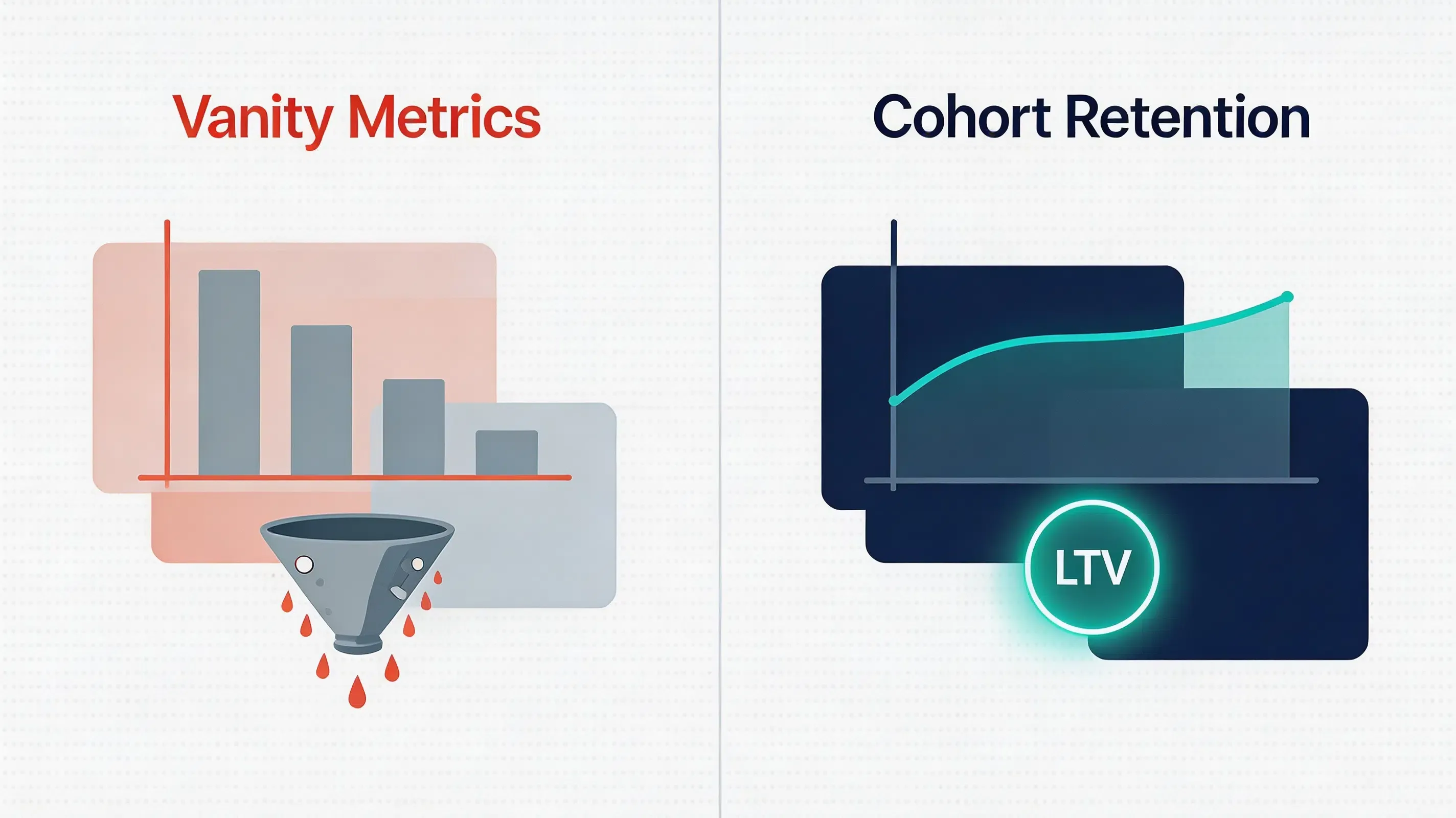
Mobile growth teams frequently fall into the vanity metric trap, evaluating sharing campaigns solely by total signup volume or raw app installations. However, high install volume does not equal long-term business value. If newly acquired users abandon the application shortly after installation, the campaign may generate limited lifetime value (LTV) despite high acquisition volume, while exposing promotional budgets to exploitation by automated bot networks and emulator farms.
To accurately audit the economic impact of an app referral program, analytics teams must measure cohort retention decay over standard post-install windows (Day 1, Day 7, and Day 30). Retention quality provides additional context for evaluating the sustainability of referral-driven growth models. In viral acquisition frameworks, this relationship is sometimes represented as:
$$K = I \times C$$
Where $I$ is the average number of invitations sent per active user, and $C$ is the conversion rate of those invitations into fully onboarded, retained new users. When onboarding friction or low-quality referral chains cause high user churn, $C$ decreases, reducing viral growth efficiency. By tracking user cohorts from initial installation along a retention curve, growth teams can isolate low-quality sharing sources, optimize dynamic incentives, and ensure that referral payouts correspond to genuine, high-retention users.
What Is Referral Cohort Retention
Referral cohort retention is the quantitative measurement of user engagement over defined post-installation intervals for specific user groups acquired through peer-to-peer invitation channels. Unlike generic retention reporting, which aggregates all active users, referral cohort tracking groups users by installation date, referral campaign ID, and inviter attributes.
Referral cohort analysis connects installation events with post-install user behavior by mapping referral identifiers to active session data over defined retention windows.
When evaluating cohort analytics frameworks, data engineering teams must structure their data pipelines around specific operational conditions:
- Suitable conditions:
- Incentivized peer-to-peer loops: Products offering dynamic rewards or double-sided credits that require post-install activity verification.
- High-retention verticals: Social commerce, gaming, and collaborative SaaS platforms where organic social proof drives long-term usage.
- Multi-tiered referral structures: Campaigns requiring multi-level attribution mapping across complex user invitation trees.
- Unsuitable conditions:
- Single-use utility software: Non-social, low-frequency tools where long-term active retention is inherently low.
- Isolated offline applications: Software operating entirely without network connectivity, preventing real-time server-side postback synchronization.
How Referral Cohort Analytics Works
Executing an automated referral cohort analysis requires a structured, multi-stage data transmission pipeline that bridges web browser clicks, app store redirections, native SDK execution, and central data warehouse aggregation:
- Web Click Action: The invited prospect clicks a referral link. The referral link captures browser context and appends a dynamic, server-signed inviter token.
- Context Preservation: The attribution engine logs the click event and temporarily caches the campaign metadata prior to app store redirection.
- Native SDK Resolution: Upon first launch, the integrated mobile SDK retrieves the cached referral parameters asynchronously during application initialization.
- Analytics Pipeline Sync: The mobile client forwards the resolved attribution token alongside internal user profile IDs to the backend database.
- Retention Cohort Generation: Server-to-Server (S2S) webhooks stream verified conversion events to the company’s data warehouse, generating D1 to D30 retention decay matrices.
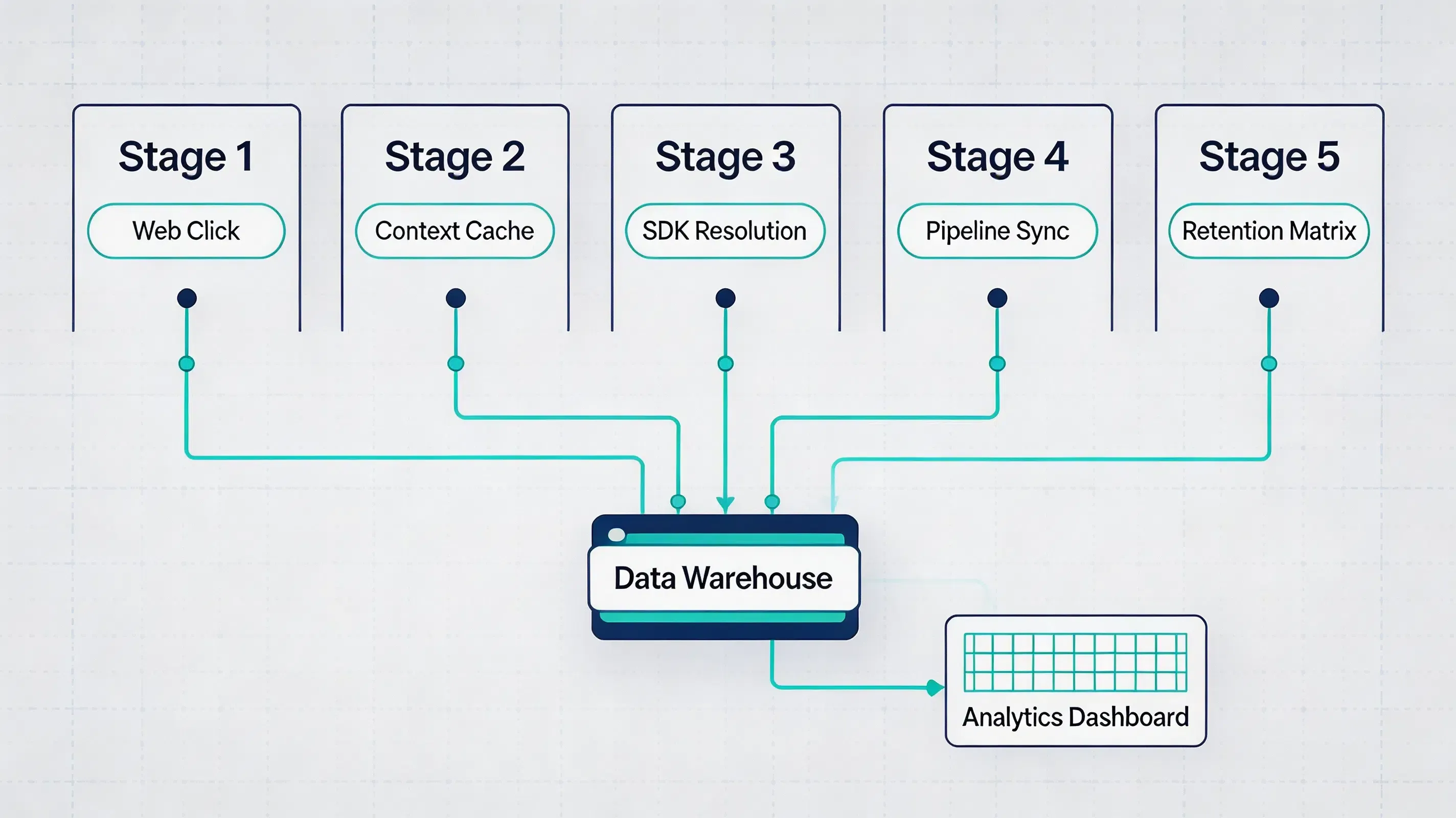
This referral analytics workflow allows teams to compare acquisition sources using a standardized retention measurement model.
Referral Cohorts vs Paid Acquisition Cohorts
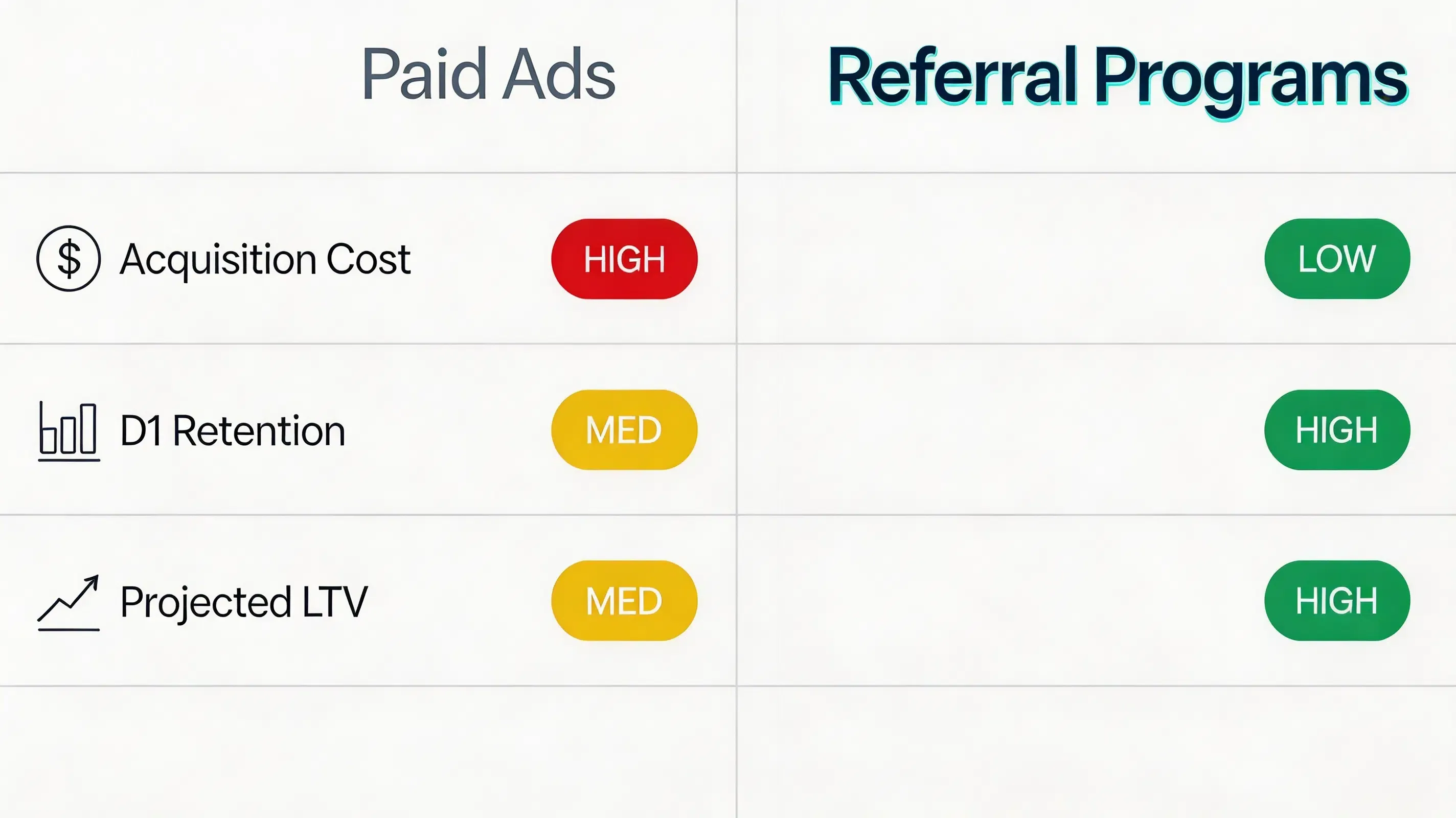
Different acquisition channels exhibit distinct retention decay rates and unit economics. The comparison below summarizes typical performance metrics across acquisition sources:
| Channel Type | Acquisition Cost (CPI) | Day 1 Retention | Day 7 Retention | Day 30 Retention | Projected LTV |
|---|---|---|---|---|---|
| Paid Ad Networks | High | Moderate | Lower | Lower | Lower |
| Search Optimization | Low | High | Moderate | Low | High |
| Referral Programs | Variable | Often High | Often High | Variable | Depends on Retention |
(Typical pattern; actual retention varies by product category and onboarding design)
Architectural Workflow: Exporting Attribution Data to Analytics Engines
An automated cohort tracking pipeline streams post-install metadata from mobile clients to centralized business intelligence (BI) dashboards:
[App Install] ──> [Mobile SDK Query] ──> [Attribution Engine]
                                                 │
                                                 ▼
[Cohort Matrix] <── [Data Warehouse] <── [S2S Postback Webhook]
This server-to-server data pipeline guarantees that attribution metadata is securely appended to native user profile IDs without exposing parameters to client-side manipulation.
Key Metrics in Mobile Referral Retention
Evaluating an app referral program requires analyzing core quantitative indicators to verify that organic growth directly translates into financial health:
- Daily Interval Retention Rates ($R_t$): The percentage of users from a specific referral cohort who remain active on day $t$ post-install, calculated using the standard formula:
$$R_t = \frac{U_t}{U_0} \times 100%$$
Where $U_t$ represents active users on day $t$, and $U_0$ represents the total initial users acquired in that specific cohort. - Cumulative Lifetime Value (LTV): The aggregate revenue generated by a referral cohort across a 30-day, 60-day, or 90-day window divided by the initial cohort size ($U_0$).
- Retention Decay Ratio: The ratio comparing Day 30 retention to Day 1 retention ($R_{30} / R_1$), indicating the long-term stabilization rate of referred users.
- Blended Cost Per Acquisition (CAC): The net customer acquisition cost achieved by combining zero-cost referral installs with paid media campaigns.
Technical Implementation Patterns: Building Referral Retention Data Pipelines
Referral attribution platforms such as OpoInstall typically provide SDK-based event collection and S2S webhook delivery, allowing engineering teams to export raw attribution payloads directly into internal analytics systems. To build custom cohort reports in first-party analytics engines (such as Snowflake, BigQuery, or Amazon Redshift), engineering teams must configure real-time raw data exports rather than relying solely on aggregated vendor dashboards.
Developers should configure Server-to-Server (S2S) webhooks to stream raw attribution payloads directly from the attribution platform to their backend endpoints. The webhook payload should be structured using a standardized JSON schema containing key attribution entities:
click_timestamp: Unix epoch timestamp recording the initial link interaction.install_timestamp: Unix epoch timestamp recording the first native SDK launch.inviter_id: Cryptographic unique identifier of the referring user.campaign_id: Identifier mapping the specific promotional tier or reward rule.attribution_method: Matching mechanism utilized (such as Google Play Install Referrer API or Universal Links).
To protect internal databases from payload injection or duplicate entries, the receiving backend server must validate the HMAC signature attached to the postback header, adhering to IETF RFC 2104 (HMAC Specification).
Implementation Example: Integrating Referral Attribution Events
Integrating native client SDKs allows mobile applications to capture installation parameters asynchronously upon cold boot and forward verified attribution tokens to central databases.
The following examples illustrate the integration flow. Actual API names may vary depending on SDK version.
The Android example initializes the SDK during application startup and retrieves available installation parameters after first launch.
// File path: app/src/main/java/com/opoinstall/app/CustomApplication.kt
package com.opoinstall.app

import android.app.Application
import com.opoinstall.api.OpoInstall

class CustomApplication : Application() {
    override fun onCreate() {
        super.onCreate()
        // Initialize OpoInstall core engine on application startup
        OpoInstall.initialize(this)
    }
}

// File path: app/src/main/java/com/opoinstall/app/MainActivity.kt
package com.opoinstall.app

import android.os.Bundle
import android.util.Log
import androidx.appcompat.app.AppCompatActivity
import com.opoinstall.api.OpoInstall
import com.opoinstall.api.OpoData
import com.opoinstall.api.ResultCallBack
import com.opoinstall.api.OpoError

class MainActivity : AppCompatActivity() {
    override fun onCreate(savedInstanceState: Bundle?) {
        super.onCreate(savedInstanceState)
        setContentView(R.layout.activity_main)

        // The Android example initializes the SDK during application startup and retrieves available installation parameters after first launch.
        OpoInstall.getInstance().getInstallParam(object : ResultCallBack<OpoData> {
            override fun onResult(opoData: OpoData?) {
                if (opoData != null && opoData.data != null) {
                    val customParams = opoData.data
                    Log.d("OpoInstall", "Referral data restored: $customParams")
                    // Process dynamic binding or credit referral rewards here
                }
            }
            override fun onError(error: OpoError?) {
                Log.e("OpoInstall", "Failed to retrieve install parameters: ${error?.message}")
            }
        })
    }
}
The iOS example registers the SDK and intercepts incoming Universal Links to resolve wake-up parameters.
// File path: ios/Runner/AppDelegate.swift
import UIKit
import libOpoInstallSDK // Import OpoInstall SDK

@UIApplicationMain
class AppDelegate: UIResponder, UIApplicationDelegate, OpoInstallDelegate {

    var window: UIWindow?

    func application(
        _ application: UIApplication,
        didFinishLaunchingWithOptions launchOptions: [UIApplication.LaunchOptionsKey: Any]?
    ) -> Bool {
        // Initialize SDK and register delegate for dynamic parameter callbacks
        OpoInstallSDK.initWith(self)
        return true
    }

    // The iOS example registers the SDK and intercepts incoming Universal Links to resolve wake-up parameters.
    func application(
        _ application: UIApplication,
        continue userActivity: NSUserActivity,
        restorationHandler: @escaping ([UIUserActivityRestoring]?) -> Void
    ) -> Bool {
        OpoInstallSDK.continue(userActivity)
        return true
    }

    // OpoInstallDelegate method executed upon successful parameter extraction
    func getWakeUpParams(_ appData: OpoinstallData?) {
        guard let data = appData else { return }
        if let customParams = data.data {
            print("Successfully resolved wakeup parameters: \(customParams)")
            // Perform target scene redirection or dynamic page routing
        }
    }
}
The client-side integration and SDK download packages can be accessed via the OpoInstall SDK download.
Example: Cohort Retention Audit for a Mobile Gaming Application
Hypothetical Scenario: Mobile Gaming Application Integration
Challenge
A multiplayer mobile game observed high registration volume from an incentivized app referral program, but experienced steep active-player drop-offs by Day 3. The engineering team required an automated workflow to perform a referral cohort analysis to audit user retention by referral source and identify potential fraudulent sharing chains.
Implementation
The development team deployed a native mobile SDK, integrated S2S webhooks to stream raw attribution logs into their data warehouse, and built automated cohort retention dashboards.
Expected Outcomes
This implementation demonstrates how cohort analytics can isolate low-quality referral chains. The simulated analysis showed that suspicious referral patterns could be identified and rejected during backend verification, while legitimate player cohorts exhibited higher Day 30 retention, allowing the studio to adjust incentive thresholds safely.
Lessons Learned
- Filter attribution before reward release: Delaying incentive payouts until Day 7 filters out automated farm accounts.
- Pipe raw attribution data to internal BI: Analyzing cohort decay in first-party databases provides deeper LTV insights than surface-level dashboards.
- Monitor click-to-install latency: Extremely short installation time intervals signal automated script activity.
Operational Best Practices: Preventing Data Discrepancies in Retention Cohorts
Data discrepancies between mobile SDK attribution logs and internal database cohorts can skew retention reporting. Engineering teams should adopt defensive operational standards to maintain data hygiene:
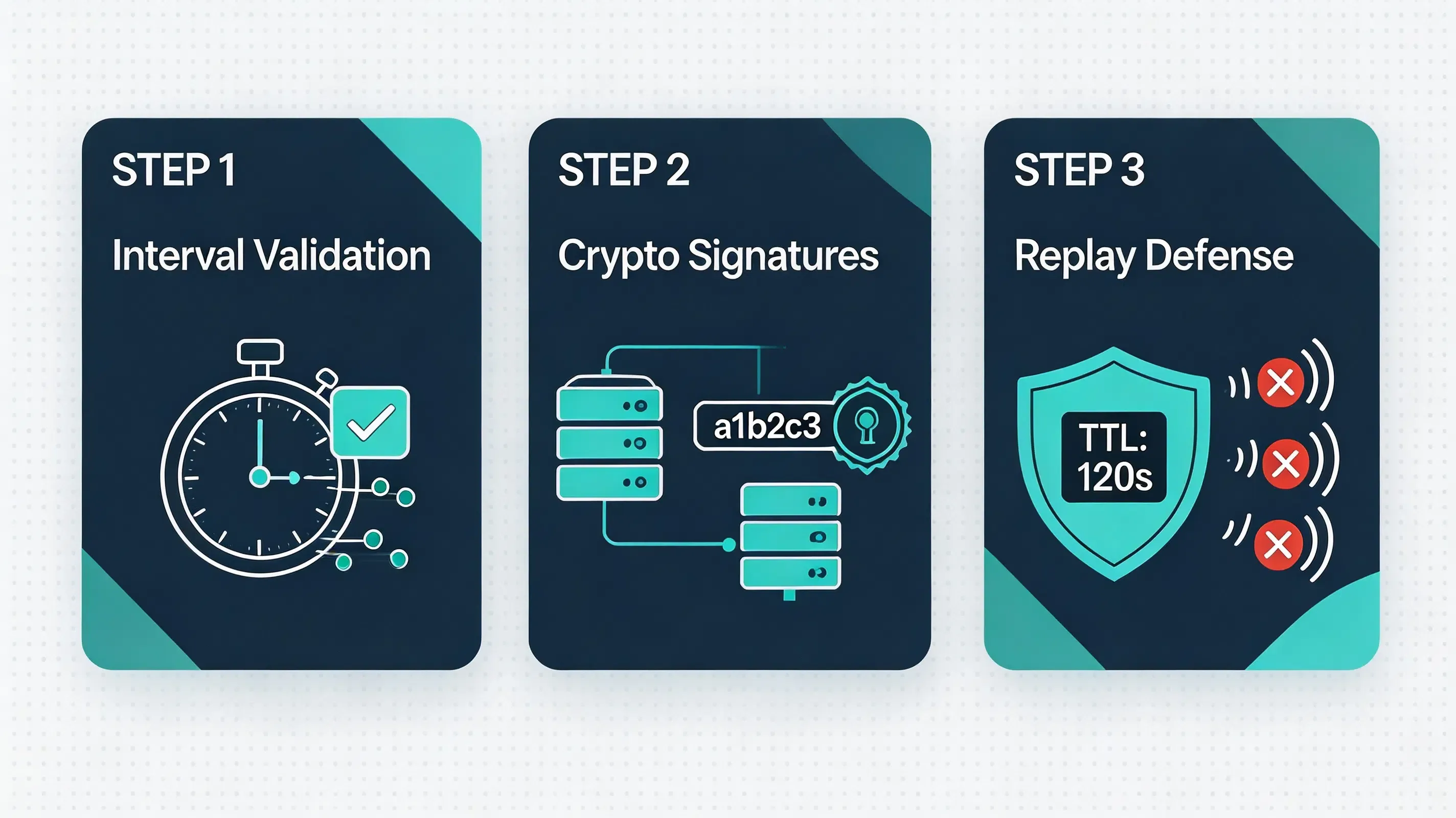
- Validating Click-to-Install Intervals: Analyzing the time delta between web clicks and app activations. Installations executing with zero logical human latency should be flagged and excluded from retention cohorts.
- Cryptographic Token Verification: Backend systems should sign dynamic sharing parameters using HMAC-SHA256 keys to prevent users from fabricating inviter tokens.
- Enforcing Dynamic Replay Defenses: Generating unique nonces and enforcing strict time-to-live (TTL) expiration windows on postbacks to block replayed installation calls.
- Device Environment Inspection: Querying hardware telemetry during initial SDK boot to detect root access, mock locations, and emulator environments, complying with OWASP Mobile Security guidelines.
Frequently Asked Questions
How do I define a cohort window for app referral tracking?
Why can referral users show different retention patterns than paid acquisition users?
Can cohort retention be measured without collecting user IDFA?
What causes cohort data discrepancies between attribution platforms and internal BI systems?
How do S2S webhooks improve cohort analytics accuracy?
How does deferred deep linking impact Day 1 user retention?
How long should an attribution window remain open for referral cohorts?
How do I migrate from Firebase Dynamic Links after deprecation?
Summary and Decision Framework
Choose an automated referral analytics framework when your product goals match the following operational criteria:
- ✓ Campaign Rewards Require Fraud Protection: Reward payouts depend on verifying genuine long-term user activation rather than raw signup counts.
- ✓ Onboarding Friction Kills Referral Conversion: Signup drop-offs occur because users refuse to manually enter promo codes during registration.
- ✓ Data Engineering Requires S2S Stream Integration: Analytics teams need raw attribution parameters delivered directly into internal data warehouses.
- ✓ Platform Compliance Is Mandatory: User acquisition tracking must operate within strict Apple ATT and Google privacy guidelines without collecting restricted hardware IDs.
In these scenarios, integrating a lightweight native SDK with deferred deep linking provides a secure, highly scalable attribution model. Modern referral tracking SDKs bridge the gap between web sharing links and native app installs, enabling growth teams to measure true cohort retention and optimize campaign unit economics. Modern referral analytics platforms provide SDK implementations based on similar architectural principles, helping mobile teams measure referral performance while maintaining control over attribution data.
Entity Glossary
| Term | Definition | Related Entity | Search Intent Role |
|---|---|---|---|
| Referral Cohort | Users acquired through the same referral source or campaign period. | Growth Analytics | Technical |
| Retention Window | Time interval used to measure post-install activity. | Analytics Metric | Technical |
| Retention Curve | Graph depicting active user decay across daily intervals. | Data Modeling | Technical |
| Referral Attribution | The process of linking invited users with the original referral source. | Mobile Attribution | Technical |
| Referral Program | A user acquisition model where existing users invite new users through tracked sharing links or incentives. | User Acquisition | Commercial |
| Deferred Deep Link | A mechanism that preserves referral context across app installation and restores the intended destination after first launch. | Mobile Linking | Technical |
| Google Play Install Referrer | A native Android API provided by Google to securely pass installation campaign parameters. | Play Services | Technical |
| Universal Links | Apple’s native deep linking standard connecting HTTP URLs to native application screens. | iOS System | Technical |
| App Links | Google’s verified deep linking protocol handling custom web URLs on Android. | Android System | Technical |
| App Tracking Transparency (ATT) | Apple’s privacy framework requiring user consent to access device-specific identifier data. | User Privacy | Informational |
| SKAdNetwork | Apple’s privacy-preserving, aggregated ad attribution measurement framework. | Mobile Attribution | Technical |
| HMAC | Keyed-Hash Message Authentication Code standard used to verify data integrity. | Cryptography | Technical |
| S2S Webhook | A backend communication protocol used to transmit real-time conversion callbacks. | Server Architecture | Technical |
Related Materials
Related Concepts
- Deferred Deep Linking: The programmatic restoration of target parameters across the application store installation boundary.
- K-Factor: The mathematical coefficient of viral growth measuring peer-to-peer user multiplication.
- Referral Fraud Detection: Security mechanisms designed to identify and block simulated app installation requests.
Related Technologies
- Universal Links: Apple’s native deep linking standard connecting HTTP URLs to native application screens.
- App Links: Google’s verified deep linking protocol handling custom web URLs on Android.
- Install Referrer: The native mechanism provided by Android to securely pass campaign parameters from Google Play.
- UIPasteboard: An attribution method reading pasteboard cache buffers on native app startup.
Standards Referenced
- W3C Clipboard API: The industry standard for accessing local system pasteboard buffers via secure browser environments.
- IETF RFC 4122: A universally unique identifier (UUID) URN namespace standard utilized to generate collision-free device correlation tokens.
- IETF RFC 2104: The HMAC keyed-hash message authentication code standard for message verification.
Primary APIs
getInstallParam: The native mobile SDK method utilized to query and retrieve custom installation parameters from the OpoInstall servers.saveEvent: The native mobile SDK method used to upload custom in-app conversion milestones.
Official Documentation / References
- Apple App Tracking Transparency Framework Guidelines
- Google Play Services Install Referrer API Specification
- W3C Clipboard API Specification
- Apple Universal Links Guidelines
- Android App Links Integration Guide
- Apple UIPasteboard API Reference
- Apple Associated Domains Entitlement
- Android ClipboardManager API
- IETF RFC 2104 HMAC Specification
- IETF RFC 4122 UUID Specification
- OWASP Mobile Security Testing Guide
- Google Firebase Dynamic Links Deprecation FAQ
- OpoInstall Blog Resource Center
Share this article



