How do you measure Day 1 and Day 7 mobile app retention on Android and iOS? First-week user retention is calculated by dividing the count of active entities logging a qualifying session at a designated milestone (
User retention measures the proportion of an acquired mobile user cohort that returns to and actively engages with an application over a designated time interval. In mobile analytics, first-week user retention (
) provides an early behavioral input for later customer-lifetime-value analysis, evaluating whether new users successfully transition from initial installation to habitual product usage.
| Term | Definition | Related Entity | Search Intent Role |
|---|---|---|---|
| User Retention | The measurement of recurring user engagement across designated time intervals. | Retention Rate | Informational / Commercial |
| Retention Rate | The mathematical percentage of an initial cohort active on a specific elapsed day. | App Analytics | Technical / Informational |
| Cohort Analysis | The grouping of users by a shared temporal or behavioral anchor to track retention over time. | User Journey | Informational |
Why the First Week Governs Mobile App User Retention Lifecycles
The Critical Window: Why the First Week Is an Important Early Retention Observation Window
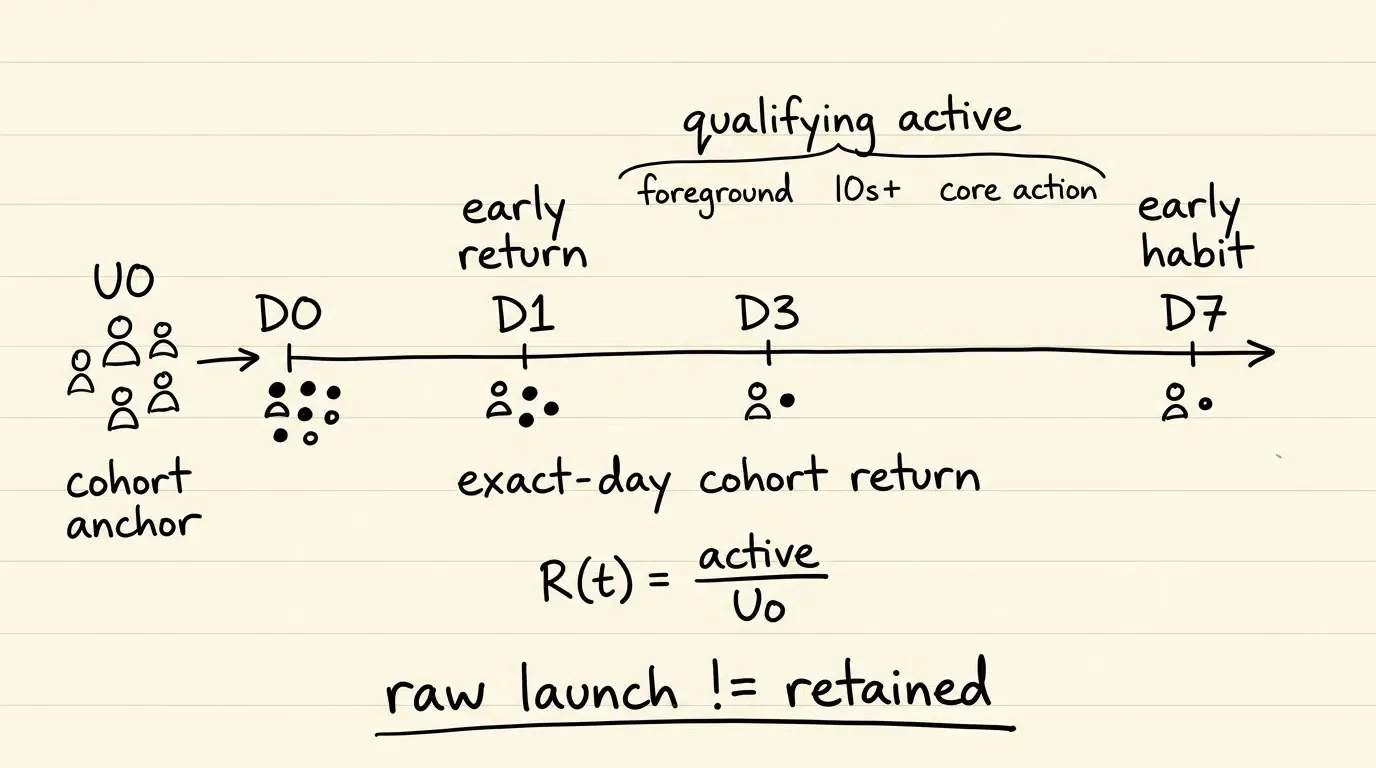
The first seven days following an application download are commonly used as an early retention observation window because many teams track Day 1, Day 3, and Day 7 milestones before longer-term cohort data becomes available. The shape and steepness of early decay vary substantially by product cadence, monetization model, and category.
First-week retention provides an early signal of cohort behavior, but it does not dictate long-term retention outcomes independently. Day 7 provides an additional early retention checkpoint, but it does not determine subsequent Day 30 or Day 90 outcomes. Longer-term cohorts must be measured independently. Tracking early retention curves allows engineering and growth teams to identify early deterioration patterns and determine whether onboarding, acquisition quality, product stability, or other factors require investigation before scaling spend.
Defining Active Engagement: Distinguishing Meaningful Sessions from Transient Background Launches
Accurately measuring first-week retention requires establishing unambiguous active-state criteria within client-side telemetry. Counting every raw application launch or background execution as an active retention event introduces measurement distortion.
Operating systems execute background tasks—such as content pre-fetching, push token synchronization, or periodic background refreshes—that initialize application processes without active user presence. Similarly, brief accidental opens dismissed within seconds may not satisfy a product-defined engagement criterion.
Mobile analytics pipelines define active-state qualification using explicit multi-factor criteria:
- Minimum Foreground Duration: Sustained foreground UI activity meeting an illustrative product-defined threshold (e.g.,
of continuous execution). - Foreground State Verification: Confirmation that the application transitioned into an interactive UI state (
ProcessLifecycleOwnerDefaultLifecycleObserver.onResumeon Android or application-level active state on iOS). - Qualifying Event Execution: Successful completion of an essential in-app milestone (e.g., executing a search query, streaming content, or updating a profile).
The Relationship Between Day 1 Drop-Off and Day 7 Retention Stability
Day 1 retention (
Day 7 retention evaluates early habituation. Between Day 1 and Day 7, initial novelty subsides, and user retention becomes dependent on recurring utility, notification relevance, and organic product workflows. A strong Day 1 result followed by weak Day 7 retention identifies an early-to-midweek deterioration pattern, but additional segmentation by acquisition channel, app version, and feature engagement is required before attributing the pattern to onboarding quality or product value delivery.
How to Formulate and Calculate Day One to Day Seven Retention Rates
Set-Theoretic Definition of the Baseline Cohort and Active Return Sets
To ensure mathematical precision across analytics engines and data warehouse models, early retention metrics are formulated using formal set notation.
Let
Where
Let
Where
Calculating Classic Exact-Day Retention for First-Week Milestones
Classic N-Day retention evaluates engagement strictly on specific calendar-day boundaries relative to Day 0.
The exact Day
Key first-week milestones include:
- Day 1 Retention Rate (
): Evaluates the proportion of the cohort active on exactly Day 1 ( ):
- Day 3 Retention Rate (
): Evaluates the proportion of the cohort active on exactly Day 3 ( ):
- Day 7 Retention Rate (
): Evaluates the proportion of the cohort active on exactly Day 7 ( ):
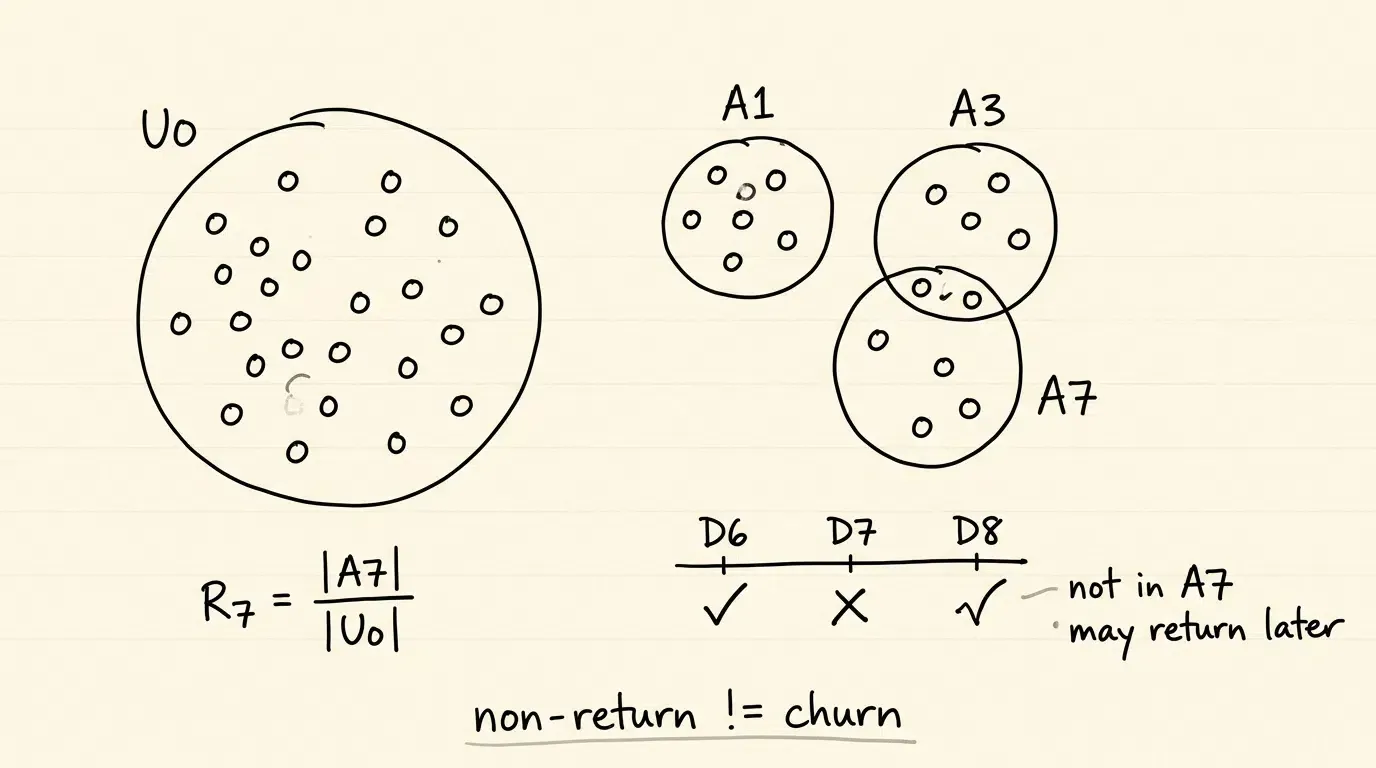
In exact-day modeling, a user who is active on Day 6 and Day 8, but inactive on Day 7, is excluded from
Differentiating Day-N Non-Return from Operational Lifecycle Churn
In first-week analytics, it is critical to distinguish between single-day non-return shares and operational lifecycle churn. In exact-day retention, the complement value (
Operational lifecycle churn is defined through sustained inactivity thresholds (e.g., zero qualifying sessions recorded across 14 or 30 consecutive days) or explicit terminal events (such as account deletion). Treating Day 1 non-return as permanent churn leads to inaccurate lifecycle modeling and premature re-acquisition spending.
Architecting First Week Telemetry Pipelines across Android and iOS SDKs
Instrumenting Process-Level Session State Machines
Building an accurate retention measurement pipeline requires capturing application-level foreground transitions without introducing artificial session splits during internal screen navigation.
To ensure telemetry integrity:
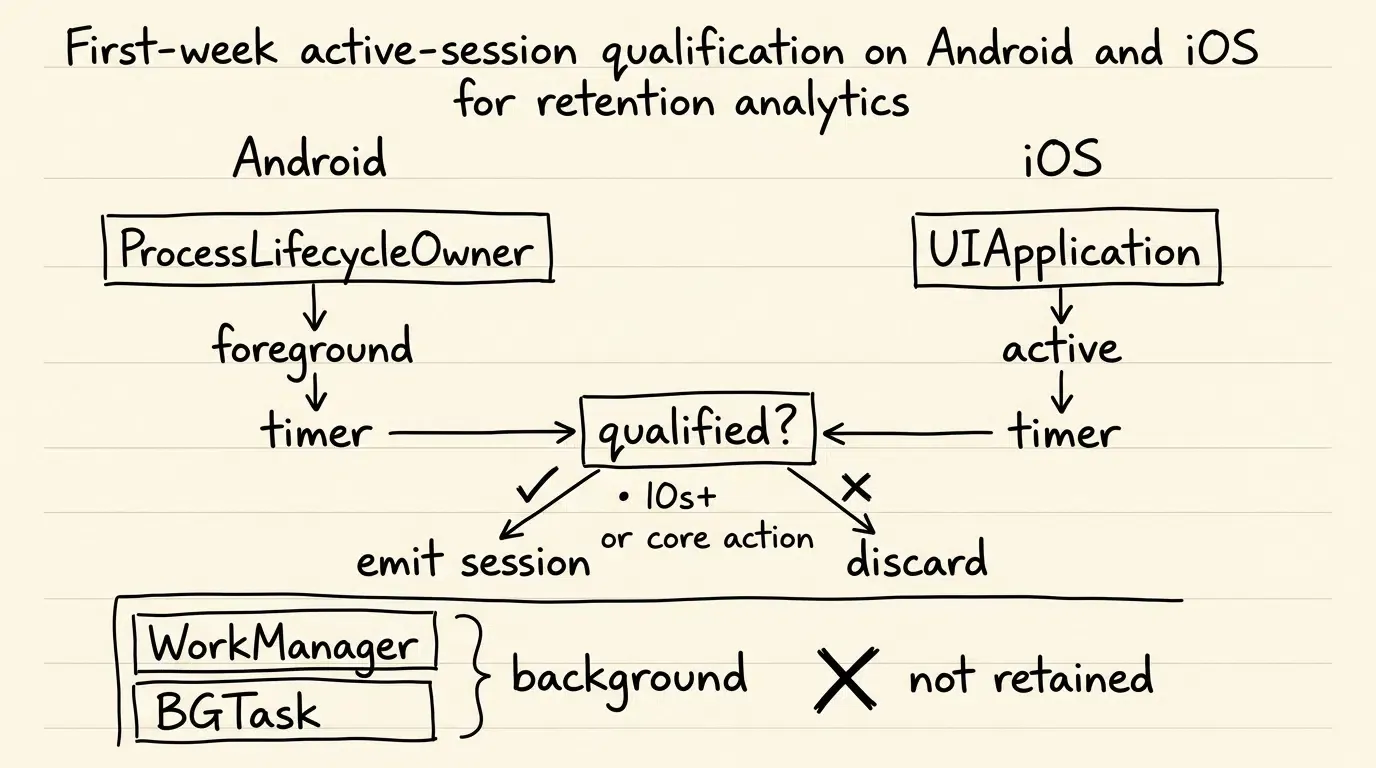
- Application-Level Lifecycle Tracking: The client monitors overall application foreground state, avoiding premature session termination when users navigate between individual views or activities. Process-level callbacks are appropriate for coarse session qualification; products requiring high-precision interaction timing should use a more granular foreground timing source.
- Decoupled Active Qualification: Entering the foreground records a raw lifecycle timestamp, but an active retention event is marked as qualified only when the session duration meets the product threshold (
) or when an essential business event occurs. - Local Event Queuing: Telemetry events are stored in durable local queues and dispatched asynchronously with idempotent retry tokens to prevent event loss during network outages.
Developers can reference the mobile analytics SDK package to evaluate client binaries and implementation modules.
Android Implementation: Process-Level Lifecycle Observation and Parameter Ingestion
On Android, application-level foreground tracking is implemented using androidx.lifecycle.ProcessLifecycleOwner (part of the androidx.lifecycle:lifecycle-process artifact) to observe composite process state transitions. This avoids false session splits when transitioning between separate Activities. Note that ProcessLifecycleOwner monitors only the current application process in multi-process architectures.
The Kotlin implementation below demonstrates process-level lifecycle observation combined with deferred installation parameter retrieval targeting the OpoInstall Android SDK (verify method signatures against the installed SDK version). Note that production queue persistence and retry transport are omitted for brevity:
```kotlin
// Android Kotlin Implementation
package com.example.analytics.lifecycle

import android.app.Application
import android.os.SystemClock
import android.util.Log
import androidx.lifecycle.DefaultLifecycleObserver
import androidx.lifecycle.LifecycleOwner
import androidx.lifecycle.ProcessLifecycleOwner
import com.opoinstall.api.OpoInstall
import com.opoinstall.api.OpoData
import com.opoinstall.api.OpoError
import com.opoinstall.api.ResultCallBack

// Note: Requires androidx.lifecycle:lifecycle-process artifact.
// Note: In multi-process architectures, ProcessLifecycleOwner tracks only the current process.
class AnalyticsApplication : Application(), DefaultLifecycleObserver {

    private var sessionStartElapsedMs: Long = 0
    private var isCoreActionCompletedInSession: Boolean = false

    override fun onCreate() {
        super.onCreate()

        // Register process-level lifecycle observer to capture application-wide foreground transitions
        ProcessLifecycleOwner.get().lifecycle.addObserver(this)

        // Initialize OpoInstall core SDK
        OpoInstall.initialize(this)

        // Retrieve deferred installation parameters on initial Day 0 launch
        fetchDeferredInstallationParameters()
    }

    private fun fetchDeferredInstallationParameters() {
        OpoInstall.getInstance().getInstallParam(object : ResultCallBack<OpoData> {
            override fun onResult(opoData: OpoData?) {
                opoData?.let { data ->
                    val customParams = data.data // Dynamic parameters (e.g., inviter_token, promo_code)
                    val channelCode = data.channelCode // Acquisition channel identifier

                    // Log sanitized metadata rather than raw dynamic payload
                    val hasPayload = !customParams.isNullOrEmpty()
                    Log.i(TAG, "Parameter restoration complete: payload_present=$hasPayload, channel=$channelCode")

                    // Route user directly to intended content or pre-fill referral credentials
                    applyOnboardingContext(customParams, channelCode)
                }
            }

            override fun onError(error: OpoError?) {
                Log.w(TAG, "Parameter restoration bypassed or timed out: ${error?.errorMsg}")
            }
        })
    }

    private fun applyOnboardingContext(customParams: String?, channelCode: String?) {
        // Business logic to populate referral codes and route to designated workspace
    }

    override fun onResume(owner: LifecycleOwner) {
        // Application entered interactive foreground state at process level
        // Use monotonic clock to prevent wall-clock time jump distortion
        sessionStartElapsedMs = SystemClock.elapsedRealtime()
        isCoreActionCompletedInSession = false
        Log.d(TAG, "Process entered interactive foreground. Session timer started.")
    }

    override fun onPause(owner: LifecycleOwner) {
        // Application exited interactive foreground state at process level
        val sessionDurationSeconds = (SystemClock.elapsedRealtime() - sessionStartElapsedMs) / 1000

        // Evaluate active retention qualification: duration >= 10s OR core milestone execution
        val isQualifiedActiveSession = sessionDurationSeconds >= 10 || isCoreActionCompletedInSession

        if (isQualifiedActiveSession) {
            emitQualifiedRetentionSession(durationSeconds = sessionDurationSeconds)
        } else {
            Log.d(TAG, "Transient session (<10s, no core action) excluded from active retention.")
        }
    }

    fun markCoreActionCompleted() {
        isCoreActionCompletedInSession = true
    }

    private fun emitQualifiedRetentionSession(durationSeconds: Long) {
        // Dispatch structured telemetry event to analytics ingestion broker
        Log.i(TAG, "Logging qualified active session: duration=${durationSeconds}s")
    }

    companion object {
        private const val TAG = "RetentionAnalytics"
    }
}
iOS Implementation: Scene Lifecycle Tracking and Dynamic Context Retrieval
On modern iOS architectures (iOS 13+), UISceneDelegate manages scene-specific lifecycle events and Universal Link routing. To track whole-app aggregate session state accurately across multi-scene or multi-window environments (such as iPadOS), the telemetry layer listens to UIApplication lifecycle notifications (didBecomeActiveNotification, willResignActiveNotification, and didEnterBackgroundNotification) to accumulate interactive active intervals and finalize session qualification upon entering the background.
The Swift implementation below demonstrates scene-level routing, Universal Link handling, and aggregate application session tracking targeting the OpoInstall iOS SDK (verify method signatures against the installed SDK version). Note that production queue persistence and retry transport are omitted for brevity:
// iOS Swift Implementation
import UIKit
import libOpoInstallSDK

// Dedicated singleton to coordinate aggregate application-level session telemetry across scenes
final class AppSessionTracker {
    static let shared = AppSessionTracker()

    private var activeIntervalStartTime: Date?
    private var accumulatedActiveDuration: TimeInterval = 0
    private var isCoreActionCompletedInSession: Bool = false
    private var isSessionInProgress: Bool = false

    private init() {
        // Observe application-level active/inactive and foreground/background state boundaries
        NotificationCenter.default.addObserver(
            self,
            selector: #selector(handleAppDidBecomeActive),
            name: UIApplication.didBecomeActiveNotification,
            object: nil
        )
        NotificationCenter.default.addObserver(
            self,
            selector: #selector(handleAppWillResignActive),
            name: UIApplication.willResignActiveNotification,
            object: nil
        )
        NotificationCenter.default.addObserver(
            self,
            selector: #selector(handleAppDidEnterBackground),
            name: UIApplication.didEnterBackgroundNotification,
            object: nil
        )
    }

    @objc private func handleAppDidBecomeActive() {
        if !isSessionInProgress {
            isSessionInProgress = true
            accumulatedActiveDuration = 0
            isCoreActionCompletedInSession = false
            print("Application entered foreground. Session lifecycle started.")
        }
        activeIntervalStartTime = Date()
        print("Active interval started.")
    }

    @objc private func handleAppWillResignActive() {
        if let startTime = activeIntervalStartTime {
            accumulatedActiveDuration += Date().timeIntervalSince(startTime)
            activeIntervalStartTime = nil
            print("Active interval paused. Accumulated active duration: \(accumulatedActiveDuration)s")
        }
    }

    @objc private func handleAppDidEnterBackground() {
        guard isSessionInProgress else { return }

        // Ensure any ongoing active interval duration is accumulated
        if let startTime = activeIntervalStartTime {
            accumulatedActiveDuration += Date().timeIntervalSince(startTime)
            activeIntervalStartTime = nil
        }

        let totalActiveDuration = accumulatedActiveDuration

        // Evaluate active retention qualification: active duration >= 10s OR core milestone execution
        let isQualifiedActiveSession = totalActiveDuration >= 10.0 || isCoreActionCompletedInSession

        if isQualifiedActiveSession {
            emitQualifiedRetentionSession(duration: totalActiveDuration)
        } else {
            print("Transient session (<10s active, no core action) excluded from active retention.")
        }

        // Finalize and reset session state upon backgrounding
        isSessionInProgress = false
        accumulatedActiveDuration = 0
        activeIntervalStartTime = nil
        isCoreActionCompletedInSession = false
    }

    func markCoreActionCompleted() {
        isCoreActionCompletedInSession = true
    }

    private func emitQualifiedRetentionSession(duration: TimeInterval) {
        // Dispatch structured telemetry event to analytics ingestion gateway
        print("Logging qualified active session: duration=\(duration)s")
    }
}

class SceneDelegate: UIResponder, UIWindowSceneDelegate, OpoInstallDelegate {

    var window: UIWindow?

    func scene(_ scene: UIScene, willConnectTo session: UISceneSession, options connectionOptions: UIScene.ConnectionOptions) {
        guard let _ = (scene as? UIWindowScene) else { return }

        // Initialize aggregate session tracker
        _ = AppSessionTracker.shared

        // Initialize OpoInstall delegate
        OpoInstallSDK.initWith(self)

        // Process Universal Links when launched from a terminated state
        for userActivity in connectionOptions.userActivities {
            OpoInstallSDK.continue(userActivity)
        }

        // Retrieve deferred installation parameters on Day 0
        fetchDeferredInstallationParameters()
    }

    private func fetchDeferredInstallationParameters() {
        OpoInstallSDK.defaultManager()?.getInstallParmsCompleted({ [weak self] (appData: OpoinstallData?) in
            guard let self = self, let data = appData else { return }

            let customParams = data.data // Custom dynamic parameters dictionary
            let channelCode = data.channelCode // Acquisition channel identifier

            // Log sanitized metadata rather than raw dynamic payload
            let hasPayload = customParams != nil
            print("Restored iOS parameters complete: payload_present=\(hasPayload), channel=\(String(describing: channelCode))")

            // Execute automated onboarding routing and reward binding
            self.applyOnboardingContext(customParams: customParams, channelCode: channelCode)
        })
    }

    private func applyOnboardingContext(customParams: [AnyHashable: Any]?, channelCode: String?) {
        // Business logic to route returning user directly to intended content
    }

    func scene(_ scene: UIScene, continue userActivity: NSUserActivity) {
        // Handle Universal Links when app transitions to foreground from background
        OpoInstallSDK.continue(userActivity)
    }

    // MARK: - OpoInstallDelegate Callbacks
    func getWakeUpParams(_ appData: OpoinstallData?) {
        if let data = appData {
            print("One-click launch wakeup params received: channel=\(String(describing: data.channelCode))")
        }
    }
}
Excluding Background System Wakes and OS Pre-Warming from Active Retention Metrics
Operating systems routinely initialize applications in the background without user presence. On iOS, the system may pre-warm an application process before launch, invoking application(_:didFinishLaunchingWithOptions:) without triggering an active scene transition. On Android, background receivers and worker threads can initialize the Application class.
Telemetry SDKs enforce strict filters to ensure these background executions do not corrupt retention metrics:
- Interactive State Gates: Process initialization or background execution must not be counted as active retention unless an interactive UI state is confirmed (
ProcessLifecycleOwneron Android or an active application state on iOS) and the product-defined engagement criterion is satisfied. - Background Task Exclusion: Background task executions managed via Android Jetpack
WorkManageror AppleBGTaskSchedulermust be tagged explicitly and excluded from user-active retention calculations.
How Does Parameterized Onboarding Improve First Week Active Engagement
The Day 0 Friction Barrier: Onboarding Obstacles and Early Non-Return
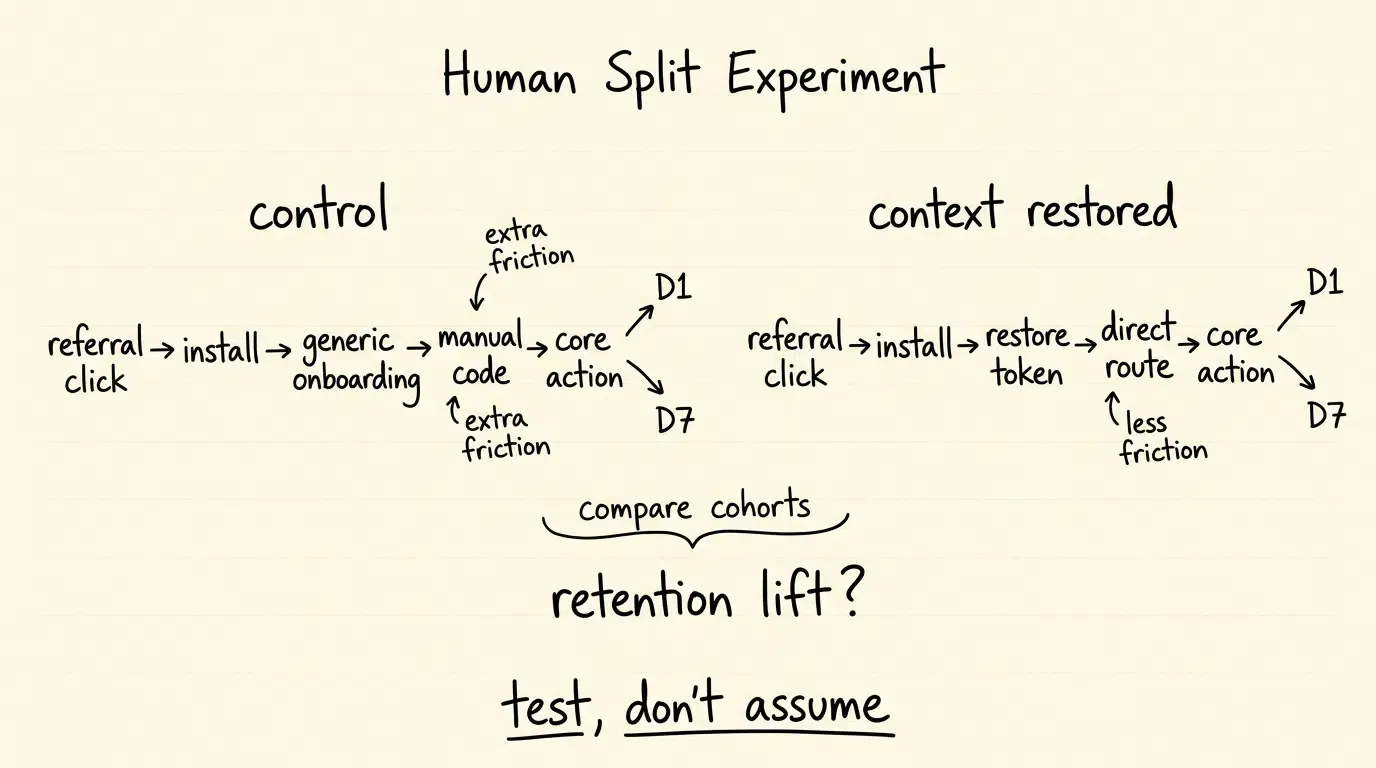
Onboarding friction is one potential contributor to early non-return, particularly when users must manually reconstruct referral or destination context after installation. In traditional acquisition flows, users clicking promotional links, referral invites, or influencer campaigns are routed to the app store. Upon opening the app, they encounter a generic onboarding flow requiring manual input of promo codes or team IDs.
Requiring manual form entry forces users to switch between applications to copy codes, introducing procedural friction. When onboarding fails to deliver the context that motivated the download immediately, Day 1 return rates can suffer.
Dynamic Context Stitching: Retrieving Referral Tokens and Deep Link Routing Context on Launch
Parameterized onboarding reduces manual input friction by programmatically preserving and restoring marketing context across the installation barrier.
OpoInstall, a mobile attribution and deep linking platform, implements deferred deep linking by capturing URL query parameters (such as ?inviter_id=usr_9988&coupon=SAVE20) on web landing pages. When the user installs and opens the application for the first time, the native mobile SDK queries the attribution backend to retrieve the cached context.
Engineers can consult the parameter restoration documentation for technical specifications on parsing dynamic payload dictionaries within native lifecycle callbacks.
Automated Welcome States: Delivering Personalized Initial Experiences via OpoInstall SDK
Restoring parameters upon first launch allows applications to automate account setup and render personalized welcome states. Instead of presenting a generic signup screen, the application parses the restored payload and automatically applies the referral code, joins the designated team workspace, or displays the specific product item from the initial web click.
The diagram below illustrates the end-to-end data pipeline from initial referral link click to early retention measurement:
[User Clicks Referral Link] ──> [Web SDK Stages Context & Tokens]
             │                                │
             ▼                                ▼
   [Store Install & Open]   ──> [OpoInstall SDK Retrieves Payload]
             │                                │
             ▼                                ▼
 [Zero-Code Parameter Bind] ──> [Direct Routing to Content/Reward]
             │                                │
             ▼                                ▼
    [Day 0 Core Action]     ──> [Measure D1 & D7 Retention vs Control]
Restoring pre-install context reduces procedural friction, enabling product teams to evaluate whether seamless Day 0 onboarding improves Day 1 and Day 7 active return rates compared to unassisted control cohorts.
Comparative Evaluation of First Week Retention Measurement Methodologies
Contrasting Classic N-Day, Rolling, and Bracketed Measurement Models for Early Retention
Selecting the appropriate retention calculation model depends on product category, natural engagement frequency, and lifecycle characteristics. For detailed mathematical formulations of rolling and bracketed retention curves across 30-to-90 day windows, refer to the dedicated lifecycle retention documentation.
The matrix below contrasts the primary early retention methodologies:
| Retention Metric Type | Calculation Basis | Common Use Cases | Inherent Diagnostic Bias |
|---|---|---|---|
| Classic N-Day ( |
High-frequency tools, social apps, mobile games | Penalizes users with irregular 2–3 day usage cadences | |
| Rolling / Unbounded ( |
Returns on or after Day 7 | E-commerce, travel booking, episodic utilities | Back-fills historically as users return in subsequent weeks |
| Bracketed Window ( |
Returns at least once in Days 1–7 | B2B SaaS, productivity suites, financial tools | Masks multi-day dormancy occurring within the 7-day bracket |
When Are In App Re Engagement Triggers Effective for Early Retention
Choosing Re-Engagement Timing from Product Cadence and User State
Automated re-engagement mechanisms—such as contextual push notifications, in-app tooltips, and transactional emails—can support early retention when triggered by explicit user behavior rather than arbitrary time windows. Trigger timing should be derived from expected product usage cadence and observed inactivity rather than a rigid universal schedule.
Re-engagement messages should deliver functional utility, such as alerting the user to an unread message, highlighting an incomplete setup task, or providing relevant product guidance.
Contextual Deep Linking: Re-Engaging Dormant Users by Routing Directly to Incomplete Workflows
Generic re-engagement notifications that launch users to the default home screen create navigation friction. Effective re-engagement utilizes contextual deep links (Universal Links on iOS, App Links on Android) that route returning users directly to the specific interface where value can be realized immediately.
For example, if a user created an account on Day 0 but did not complete project setup, a re-engagement notification should deep link directly to the project configuration screen with pre-populated parameters.
Consent and Permission Boundaries: Complying with System Notification Grants and Opt-Outs
All re-engagement workflows must strictly adhere to operating system permission frameworks and applicable communication laws. On iOS, applications must request authorization before presenting user-facing alerts, sounds, or badges through UNUserNotificationCenter.current().requestAuthorization(options: [.alert, .badge, .sound]). On Android 13+, applications must obtain the android.permission.POST_NOTIFICATIONS runtime permission.
Furthermore, engineering teams must maintain persistent opt-out state management and frequency capping to prevent notification fatigue. Dispatching high-frequency, non-contextual notifications without user consent can create notification fatigue and may contribute to disengagement or opt-outs. Requirements may also vary by jurisdiction and message type; legal and compliance review should be obtained for specific marketing campaigns.
Suitable vs Unsuitable Interventions for First-Week Retention Optimization
- Suitable Interventions: Action-triggered re-engagement prompts, personalized welcome routing via restored parameters, dynamic in-app onboarding assistance, and context-rich deep links.
- Unsuitable Interventions: High-frequency broadcast messaging, premature permission requests presented before demonstrating value, and forcing manual verification codes during initial launch.
Frequently Asked Questions (FAQ)
What is a typical benchmark for Day 1 and Day 7 mobile app user retention?
Why is Day 1 retention often significantly higher than Day 7 retention?
How does deferred deep linking impact first week user retention?
Summary and Decision Framework
Measuring and improving first-week user retention requires a unified approach combining precise mathematical formulation, resilient client telemetry, and friction-free onboarding. Evaluating Day 1 through Day 7 retention using exact-day, rolling, or bracketed models enables engineering and product teams to localize where early retention deterioration occurs and prioritize hypotheses such as onboarding friction or insufficient recurring utility.
Optimizing the critical first week depends on establishing explicit active-state criteria and eliminating procedural barriers. By leveraging lightweight SDK integration and contextual parameter restoration, platforms like OpoInstall provide the infrastructure required to support measurement and lower-friction first-launch experiences for newly acquired users.
To evaluate how unified attribution and parameter-passing infrastructure can support your application’s first-week user retention, explore the mobile attribution implementation reference or register on the OpoInstall developer console.
Related Materials
-
Concepts: First-Week User Retention, N-Day Retention Rate, Bracketed Retention, Contextual Parameter Restoration
-
Technologies: Mobile App Analytics, Client Lifecycle Telemetry, Deferred Deep Linking, S2S Webhooks
-
APIs & Data Interfaces: Android
ProcessLifecycleOwner(androidx.lifecycle:lifecycle-process), iOSUIApplicationLifecycle Notifications andUIWindowSceneDelegate, OpoInstall SDKgetInstallParamAPI -
Official Documentation & References:
Share this article



