OpenAI Tests Sponsored Agents in ChatGPT Ads? On September 16, 2026, OpenAI officially announced a major expansion of its advertising platform, introducing a pilot test of Sponsored Agents alongside native integrations for Shopify and HubSpot. For marketing architects, digital strategists, and growth engineers, this launch marks a distinct evolutionary step in conversational marketing. Rather than relying solely on traditional search links or display units, ChatGPT users in the United States can now interact directly with advertiser-sponsored dialogue agents after engaging with an ad. Once user queries regarding product specifications, sizing, or styling are addressed, the agent provides a link directing the customer to the merchant’s website. However, shifting from static ad placements to multi-turn conversational engagements introduces critical architectural questions: how do Sponsored Agents fit alongside tools like Ads Manager, how do Shopify Catalog and HubSpot CRM integrations operate, and how should engineering teams manage data continuity when moving users from conversational environments to external web and mobile applications?
Expanding ChatGPT Ads: Sponsored Agents, Ads Manager, and Platform Integrations
Digital advertising has operated on the same foundational premise for decades: an intent engine or social feed serves an impression, a user executes an unguided click, and an external destination page attempts to convert that visitor before attention wanes.
At a Glance
- Dedicated Conversational Agents: Select US advertisers are testing Sponsored Agents, enabling users to click an ad and enter a separate, clearly labeled dialogue to ask follow-up questions before visiting the merchant website.
- Native CRM and Commerce Integrations: Shopify becomes OpenAI’s first ecommerce partner, enabling catalog syncing and campaign management via the Shopify App Store, while HubSpot serves as the first CRM partner for lead tracking.
- Conversational Prompt-Based Ad Management: Marketers can create, update, and analyze ad campaigns using natural-language prompts within ChatGPT Work, supported by AI-assisted creative suggestions and automated text localization.
- Decoupled Downstream Architecture: Sponsored Agents link outward to merchant websites; preserving user intent or managing transitions into uninstalled native mobile apps requires merchant-side session handling and conditional deferred routing.
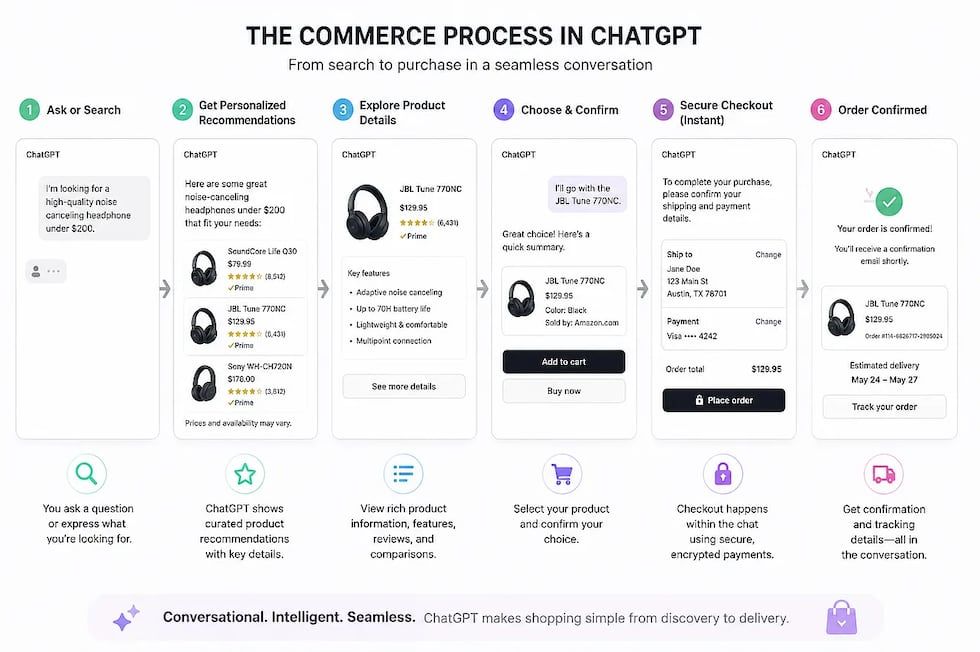
As reported across industry disclosures and detailed in OpenAI’s official announcement, Reimagining advertising with AI, Sponsored Agents fundamentally alter the top-of-funnel discovery loop. Instead of navigating away to an unfamiliar mobile website to parse dense spec sheets, users can ask situational questions—such as whether a modular dining table fits a specific room layout or how to care for a particular furniture finish—directly within ChatGPT.
To support this ecosystem, OpenAI introduced the ChatGPT Ads Manager plugin within ChatGPT Work. Advertisers can now use simple natural-language prompts to build, update, and evaluate campaigns without navigating a traditional advertising console. In parallel, Ads Manager features creative assistance that suggests copy and imagery based on an advertiser’s landing page and campaign objective, alongside optional AI text customization that dynamically adapts headlines and descriptions to conversation contexts.
OpenAI enforces a strict operational separation: conversations with Sponsored Agents remain structurally isolated from ChatGPT’s independent answers and separate from the user’s primary chat history. Advertisers do not receive access to a user’s broader private conversations, personal memories, or account details, and commercial placements do not influence organic model outputs.
Commercial Workflow Integrations: How Shopify and HubSpot Connect
A core objective of OpenAI’s advertising rollout is embedding ChatGPT Ads into the platforms that businesses already use to operate. Rather than requiring marketers to construct disconnected operational pipelines, OpenAI launched day-one integrations with Shopify and HubSpot.
The Shopify Integration
Shopify serves as OpenAI’s initial ecommerce partner. US-based merchants can install the ChatGPT Ads app directly from the Shopify App Store, with international availability rolling out on September 23. Because participating merchants’ inventories connect via Shopify Catalog, product information synchronizes to help items appear accurately within relevant shopping conversations. Merchants can launch campaigns, monitor ad performance, and manage budgets without rebuilding their product feeds.
It is important to understand the technical boundary: the Shopify integration focuses on inventory synchronization and campaign management. Sponsored Agents themselves do not process payments or autonomously execute checkouts inside the chat container. Instead, once the consumer is satisfied with product answers, the agent surfaces an outbound link directing them to the merchant’s storefront to complete the transaction.
The HubSpot Integration
HubSpot represents OpenAI’s initial CRM partner. Businesses managing leads and customer interactions in HubSpot can link their ChatGPT Ads accounts directly. This connection allows growth teams to create ads, track conversion metrics, and manage inbound leads within HubSpot, utilizing existing customer context to inform ongoing sales workflows.
| Platform Component | Primary Operational Role | Data Exchange Mechanism | Downstream User Destination |
|---|---|---|---|
| Sponsored Agents | Interactive product discovery and pre-purchase qualification | Isolated conversational container within ChatGPT | Outbound URL link to business website |
| Shopify App | Automated merchant campaign creation and product feed sync | Shopify Catalog inventory mapping | Merchant online storefront checkout |
| HubSpot Integration | Lead generation tracking and CRM pipeline synchronization | Authenticated API connector between Ads Manager and CRM | Merchant lead capture and follow-up flows |
| Ads Manager Plugin | Prompt-driven campaign creation, optimization, and reporting | Natural-language interface inside ChatGPT Work | Internal campaign management dashboard |
Architectural Boundary: Managing Handoffs and Attribution Integrity
The introduction of conversational ad formats creates a new handoff boundary between the AI conversation container and the merchant’s digital storefront. In standard keyword search, ad clicks follow a simple path: a user clicks a sponsored link with attached query parameters (such as utm_campaign or click IDs), and the merchant’s analytics infrastructure records the arrival.
OpenAI’s advertising architecture already supports standard digital advertising measurement, including impressions, clicks, conversions, Cost-Per-Click (CPC), Cost-Per-Mille (CPM), conversion-optimized bidding, and static tracking parameters on landing-page URLs. Advertisers can append standard UTM parameters, which persist through ad clicks for traffic attribution.
However, moving a user from an in-depth dialogue with a Sponsored Agent to an external website introduces a distinct challenge: stateful intent continuity.
During a multi-turn consultation, a shopper may specify detailed configuration parameters: a specific product variant, a matching accessory, and a preference for express shipping. If the outbound handoff link directs the user to a generic product landing page, those pre-selected options are lost, forcing the user to manually re-filter variants on the merchant’s site.
Engineering Scope Note: The following pattern is an illustrative merchant-side reference architecture. OpenAI has not published a proprietary handoff-token protocol, and standard web links remain the default destination format.
+-------------------------------------------------------------------------+
|      ILLUSTRATIVE MERCHANT-SIDE CONVERSATIONAL HANDOFF PIPELINE         |
+-------------------------------------------------------------------------+
|                                                                         |
|  [ ChatGPT Platform: In-Chat Product Exploration with Sponsored Agent ] |
|                                |                                        |
|                                |-- (User signals intent to purchase)    |
|                                v                                        |
|  [ Outbound Handoff Link: Destination URL with Context Parameters ]     |
|  Example: https://store.example.com/cart?sku=OAK-108&payload=TOKEN_DATA |
|                                |                                        |
|         +----------------------+----------------------+                 |
|         |                                             |                 |
|         v (Standard Browser Session)                  v (Mobile App Funnel)
|  [ Merchant Web Landing Page ]               [ Mobile Routing Layer ]   |
|  - Ingests UTMs for analytics tracking       - Checks native app state  |
|  - Ingests signed payload token              - Preserves context if app |
|  - Pre-populates selected cart variants        requires installation    |
|  - Guides user directly to checkout          - Routes to native views   |
|                                                                         |
+-------------------------------------------------------------------------+
To maintain intent without compromising security, merchants can distinguish between non-sensitive analytics tracking and authoritative commercial claims:
- Analytics Attribution: Standard, unsigned UTM parameters (such as
utm_source=chatgpt&utm_medium=sponsored_agent) are fully appropriate for reporting traffic sources in Google Analytics, Shopify Analytics, or HubSpot. - Authoritative Commerce State: If the outbound link applies dynamic discount codes, reserves limited inventory, or assigns partner commissions, merchants should verify these claims server-side using cryptographic tokens (such as HMAC-SHA256 signatures) to prevent parameter tampering.
// Illustrative Merchant-Side Reference Architecture — Non-OpenAI-Proprietary Example:
// The following TypeScript middleware demonstrates how a merchant backend can ingest,
// verify, and validate signed handoff tokens to prevent parameter tampering on custom landing pages.
// It is not an OpenAI-published API specification.

import { Request, Response, NextFunction } from 'express';
import * as crypto from 'crypto';

export interface CommerceHandoffPayload {
  sessionId: string;
  sku: string;
  variantId?: string;
  campaignId: string;
  issuedAt: number;
}

export class MerchantHandoffVerifier {
  private readonly secretKeyBuffer: Buffer;
  private readonly maxTokenAgeSeconds: number;

  constructor(secretKey: string, maxTokenAgeSeconds: number = 900) {
    this.secretKeyBuffer = Buffer.from(secretKey, 'utf-8');
    this.maxTokenAgeSeconds = maxTokenAgeSeconds;
  }

  /**
   * Verifies the cryptographic HMAC-SHA256 signature and validity window of an incoming handoff token.
   * Token format expected: "base64Payload.hexSignature"
   */
  public verifyToken(rawToken: string): CommerceHandoffPayload {
    const segments = rawToken.split('.');
    if (segments.length !== 2) {
      throw new Error('MALFORMED_TOKEN_STRUCTURE');
    }

    const [encodedPayload, providedSignature] = segments;

    // 1. Calculate expected signature using merchant secret
    const expectedSignature = crypto
      .createHmac('sha256', this.secretKeyBuffer)
      .update(encodedPayload)
      .digest('hex');

    const expectedBuffer = Buffer.from(expectedSignature, 'utf-8');
    const providedBuffer = Buffer.from(providedSignature, 'utf-8');

    // 2. Perform constant-time comparison to prevent timing attacks
    if (
      expectedBuffer.length !== providedBuffer.length ||
      !crypto.timingSafeEqual(expectedBuffer, providedBuffer)
    ) {
      throw new Error('INVALID_CRYPTOGRAPHIC_SIGNATURE');
    }

    // 3. Decode payload
    let payload: CommerceHandoffPayload;
    try {
      const decodedJson = Buffer.from(encodedPayload, 'base64url').toString('utf-8');
      payload = JSON.parse(decodedJson);
    } catch {
      throw new Error('PAYLOAD_DECODING_FAILED');
    }

    // 4. Verify token issuance freshness
    const currentTimestamp = Math.floor(Date.now() / 1000);
    const tokenAge = currentTimestamp - payload.issuedAt;

    if (tokenAge > this.maxTokenAgeSeconds || tokenAge < -60) {
      throw new Error(`TOKEN_EXPIRED: Age (${tokenAge}s) exceeds threshold`);
    }

    return payload;
  }

  /**
   * Express middleware to validate incoming referral tokens before rendering customized checkout
   */
  public middleware() {
    return (req: Request, res: Response, next: NextFunction): void => {
      const token = req.query.handoff_token as string;

      // If no signed token is present, continue as standard unauthenticated traffic
      if (!token) {
        return next();
      }

      try {
        const verifiedPayload = this.verifyToken(token);
        // Attach verified commercial claims to the request context
        (req as any).verifiedCommerceContext = verifiedPayload;
        next();
      } catch (error: any) {
        // Log verification failure and proceed without granting privileged state
        console.warn(`Handoff verification failed: ${error.message}`);
        res.status(403).json({ error: 'INVALID_COMMERCE_HANDOFF_TOKEN' });
      }
    };
  }
}
Downstream Mobile Journeys: The Native App Installation Boundary
While Sponsored Agents route traffic directly to external business websites, enterprise retailers frequently operate native mobile applications where customer lifetime value (LTV) and engagement are substantially higher. When prospective customers click an outbound link on a mobile device, merchant growth infrastructure may evaluate whether to transition that customer into a native application experience.
This scenario introduces a decoupled, conditional architecture:
If the customer already has the merchant’s native application installed, verified deep linking protocols—such as Apple Universal Links or Android App Links—can intercept the HTTPS web destination and route the user directly to a native in-app view.
However, if the customer does not have the merchant’s application installed, the handoff encounters the App Store Installation Boundary:
- The user lands on the merchant’s mobile web page and is presented with an option to download the native app from the App Store or Google Play.
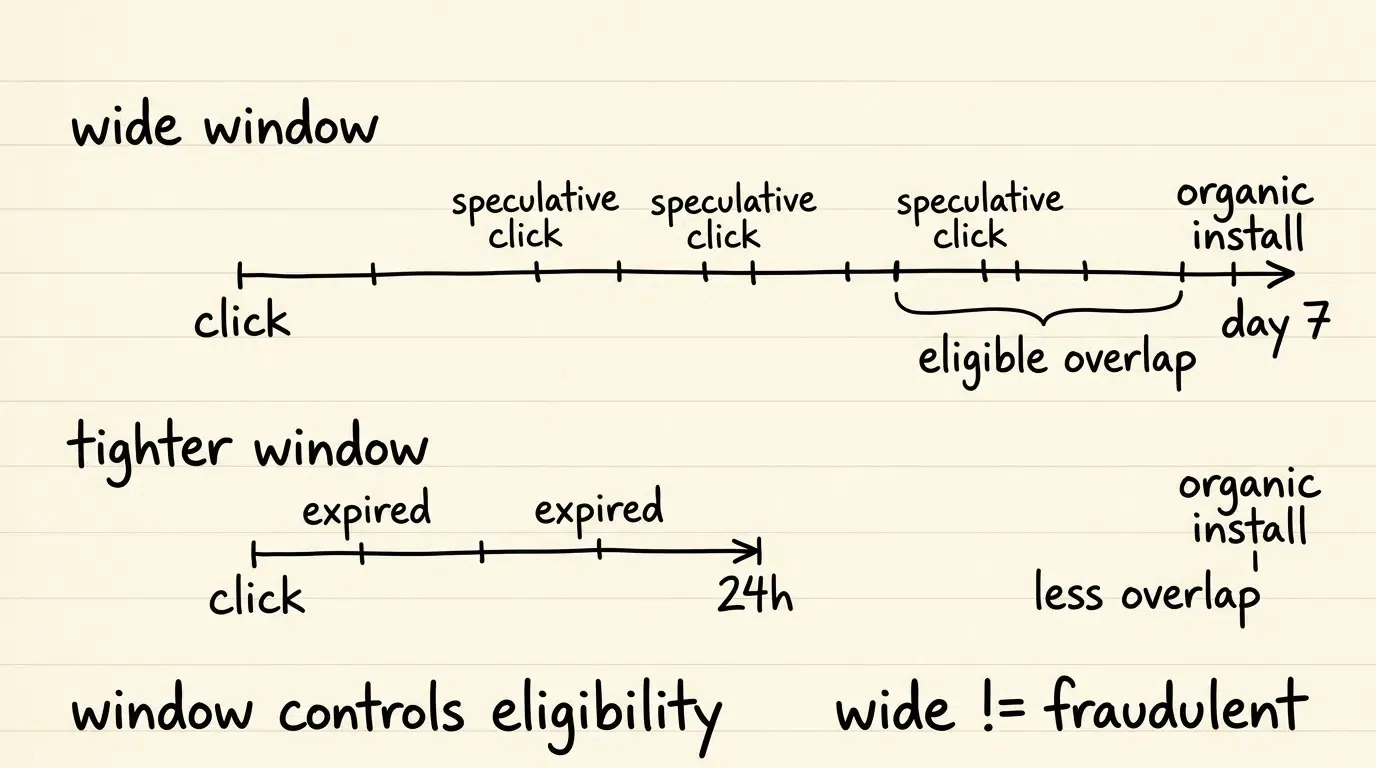
- Standard app-store installation flows do not provide a universal cross-platform mechanism for restoring arbitrary custom commerce state after installation; platform-specific referrer mechanisms may expose limited install metadata.
- Upon cold boot after installation, the application launches into a generic home screen, losing the user’s specific product context unless a deferred mechanism is present.
To bridge this gap in mobile acquisition funnels, engineering teams implement Deferred Deep Linking (DDL) solutions, such as Branch, AppsFlyer, Adjust, or Opoinstall.
In an advanced mobile acquisition funnel, the deferred deep linking workflow operates as an independent bridge:
- Pre-Install Context Staging: When the customer arrives on the merchant’s mobile landing page from ChatGPT, the web tier records eligible campaign parameters (such as campaign IDs, selected SKU references, or referral codes) before directing the user to the app store.
- First-Launch Parameter Restoration: When the user opens the application for the first time, the client SDK queries the attribution service to retrieve the cached parameters. According to platform documentation on the Opoinstall homepage, this deferred parameter restoration framework can pair pre-install click metadata with initial cold boot sessions in up to 98% of eligible instances (vendor claim), providing an automated alternative to manual promotional codes.
- In-App Cart Reconstruction: The native application takes the restored parameter claims and presents the relevant product screen or pre-hydrated cart.
It is critical to maintain architectural precision: deferred deep linking does not access, read, or infer private dialogue histories from ChatGPT. It simply preserves the explicit, structured parameters that the merchant chose to attach to the outbound referral link before the user navigated to the app store.
Frequently Asked Questions (FAQ)
Do Sponsored Agents have access to users' private chat histories in ChatGPT?
What pricing and campaign models does ChatGPT Ads support for advertisers?
Can merchants rely on standard UTM parameters to track Sponsored Agent traffic?
Strategic Guidance for Growth and Engineering Teams
OpenAI’s testing of Sponsored Agents, alongside direct integrations with Shopify and HubSpot, highlights the maturation of ChatGPT Ads into a multi-faceted advertising channel. For technical and marketing teams preparing for conversational advertising, infrastructure planning should focus on three core areas:
-
Leverage Native Platform Connectors: Retailers running on Shopify should utilize Shopify Catalog synchronization to ensure accurate product representations in ad placements, while B2B organizations should link HubSpot to capture lead events directly within existing CRM pipelines.
-
Decouple Analytics from Commercial Validation: Continue using standard UTM parameters and conversion pixels for top-of-funnel traffic reporting, but implement backend cryptographic verification for any URLs that unlock proprietary discounts, referral credits, or automated cart mutations.
-
Plan for Downstream Mobile Routing Conditionally: Recognize that Sponsored Agents terminate at external web landing pages. If your growth model includes converting web visitors into native mobile app users, deploy verified Universal Links and deferred deep linking pipelines to ensure campaign parameters survive the app installation barrier.
References
-
OpenAI. (2026). Reimagining advertising with AI. OpenAI Newsroom.
-
Reuters. (2026). OpenAI tests advertiser-sponsored agents, expands AI tools for ChatGPT ads.
-
Search Engine Land. (2026). OpenAI is turning ChatGPT ads into conversations.
-
Shopify App Store. (2026). ChatGPT Ads for Shopify Merchants. Shopify Documentation.
-
OpenAI Help Center. (2026). Ads in ChatGPT and Campaign Tracking Overview.
-
Apple Developer. (2026). Supporting Universal Links in your app. Apple Documentation.
-
Android Developers. (2026). Verify Android App Links. Android Documentation.
-
Opoinstall. (2026). Deferred Deep Linking and Parameterized App Installation Overview.
Share this article