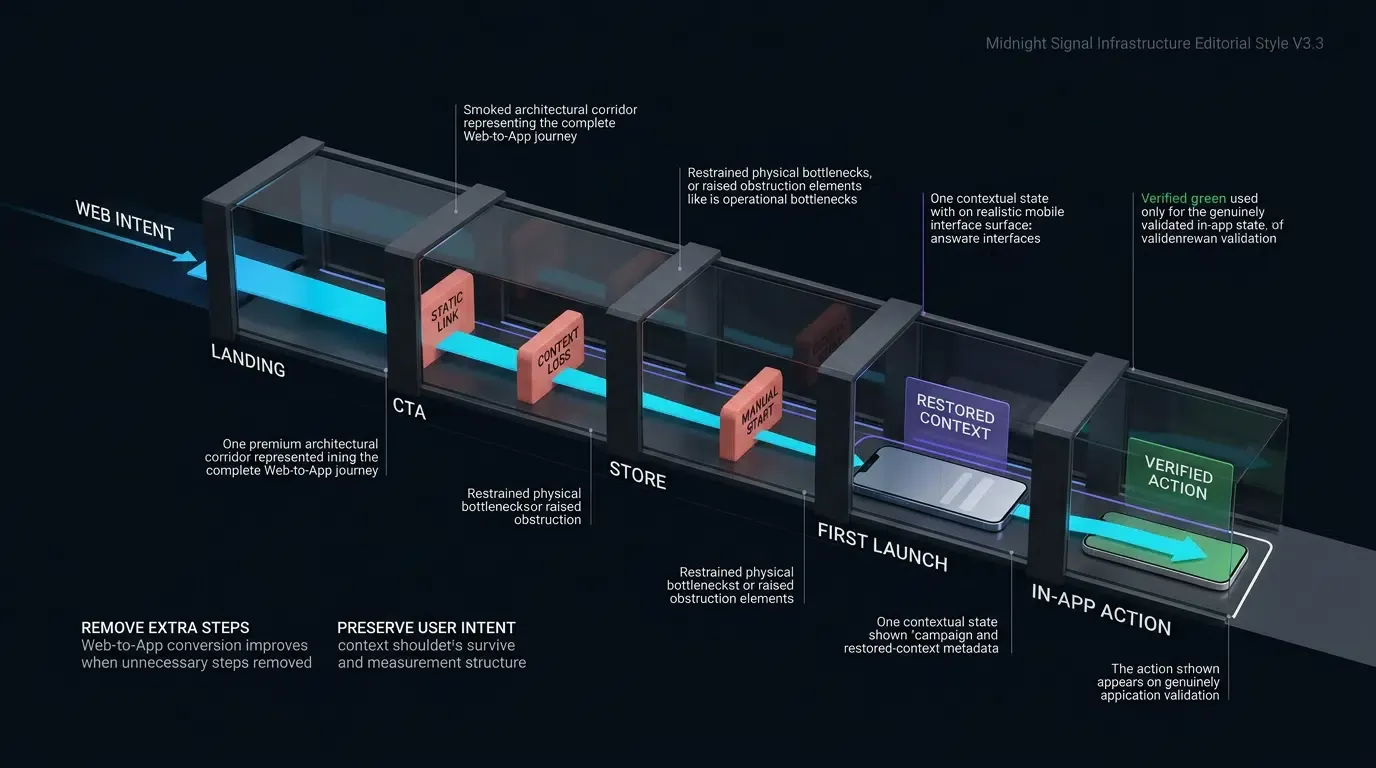
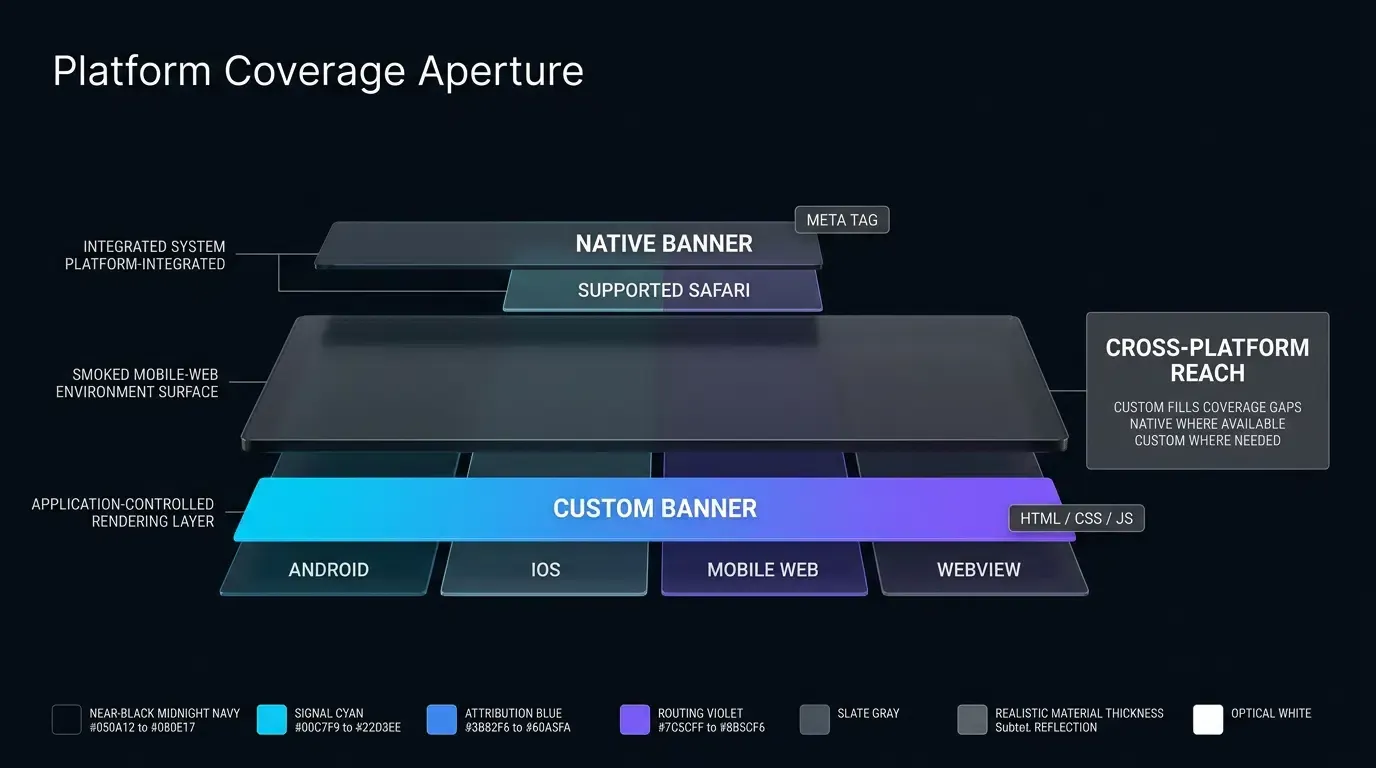
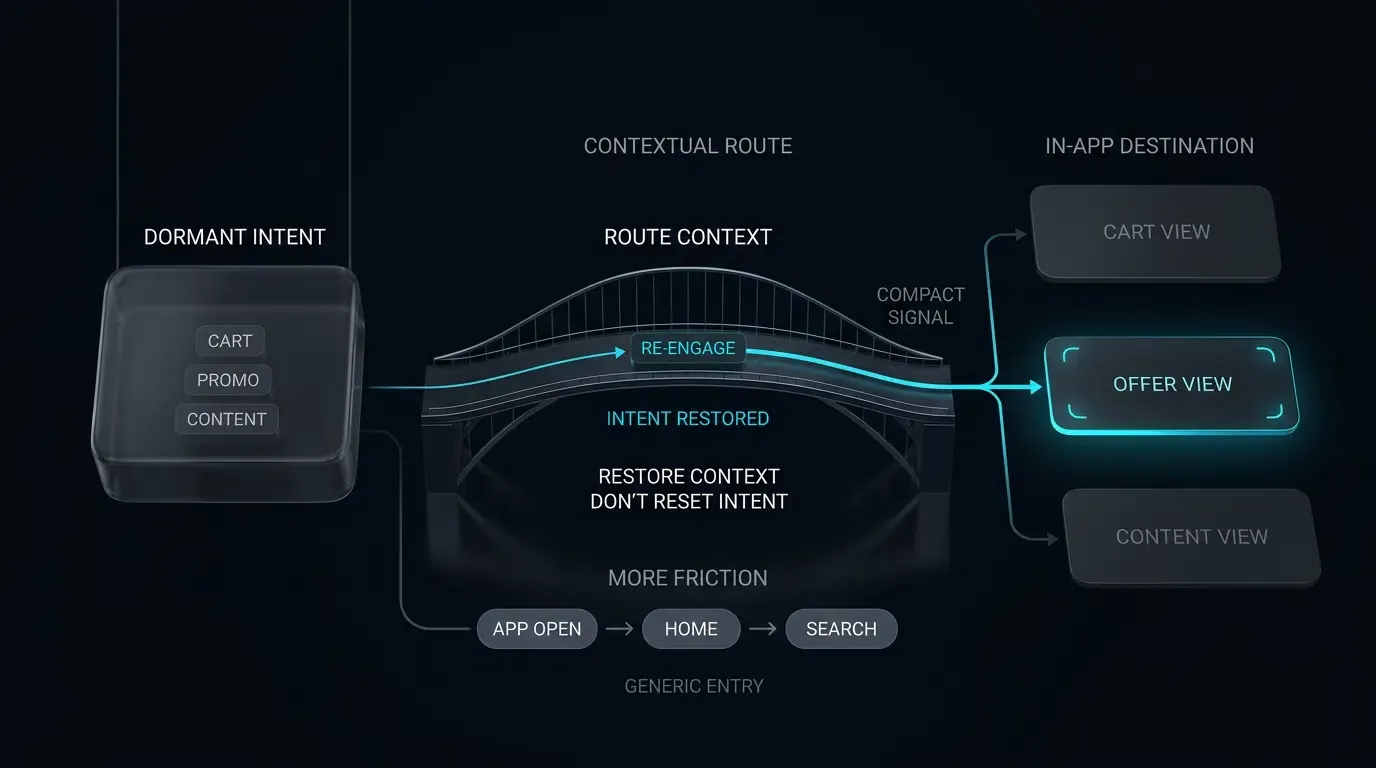
How do game operations teams improve player lifecycle? Game operations teams improve player lifecycle by deploying contextual deep links in re-engagement campaigns to bypass home screens, routing authenticated players directly into targeted events, matches, or guild routes after backend authorization.
Game operations refers to the ongoing operational practices, event management, and technical strategies deployed after a mobile game’s release to support player engagement, retention programs, and lifetime-value optimization. By incorporating contextual deep links into LiveOps campaigns, operations teams direct authenticated players straight to specific in-game matches, guild lobbies, or promotional events, eliminating lobby friction.
| Term | Definition | Related Entity | Search Intent Role |
|---|---|---|---|
| Game Operations | The strategic execution of live events, updates, and re-engagement campaigns in mobile games. | LiveOps Strategy | Informational / Commercial |
| Scene Restoration | The technical capability to pass validated routing parameters through an app open flow to load a target scene. | Deferred Deep Linking | Technical / Informational |
| App Engagement | The depth and frequency of player interactions within a game over time. | User Retention | Informational |
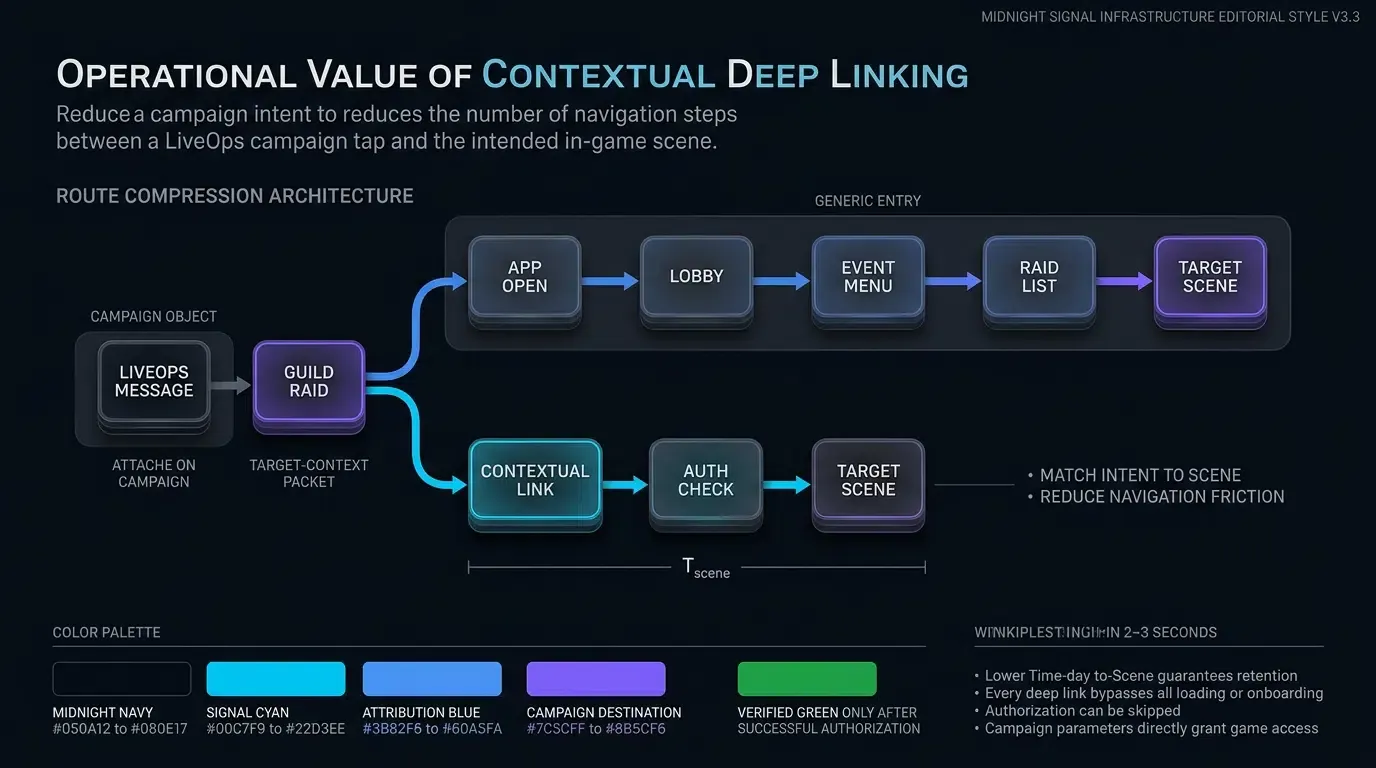
Why Modern Game Operations Depend on Contextual In-Game Redirection
The Navigation Friction Barrier: How Generic Home Screen Redirects Increase Attrition
Traditional re-engagement campaigns frequently rely on non-contextual push notifications or broadcast SMS messaging that direct returning users to a mobile game’s main menu. When a player taps a notification announcing a time-sensitive guild tournament or a limited-time boss raid, a non-contextual link triggers the default application startup sequence: splash screens, asset loading bars, patch notes, and the general lobby interface.
From the main lobby, the returning player must manually locate the event menu, select the appropriate sub-tab, and search for the specific match or guild room. This multi-step navigation introduces cumulative drop-off points. When returning players are forced to navigate complex UI menus manually, a significant portion of campaign clickers abandon the session before reaching the advertised event. This friction inflates re-engagement Customer Acquisition Costs (CAC) and depresses Return on Ad Spend (ROAS) for LiveOps marketing campaigns.
Transitioning from Non-Contextual Push Messaging to Parameterized Deep Links
Modern mobile game operations require a transition from non-contextual broadcast messaging to parameterized deep linking architectures. Rather than treating all re-engagement traffic as generic app launches, contextual deep linking embeds dynamic destination parameters directly within campaign URLs.
When a player taps a deep link, the operating system delivers the URL context to the application. The mobile SDK parses routing parameters—such as room keys, match IDs, or store item tokens—and passes them to the game’s routing manager. OpoInstall, an independent mobile measurement platform, enables LiveOps teams to attach custom key-value pairs to sharing URLs, enabling parameterized routing to application-managed target scenes. Eliminating unnecessary UI navigation steps ensures that player intent matches the immediate in-game experience.
Evaluating Time-to-Scene (
Player Lifetime Value (LTV) is influenced by early session gratification and sustained engagement loops. The operational metric Time-to-Scene (
In conventional re-engagement flows without direct routing,
How Scene Restoration Bypasses Game Home Screens Safely
Dissecting OS-Level Routing Semantics for Installed vs. Uninstalled Players
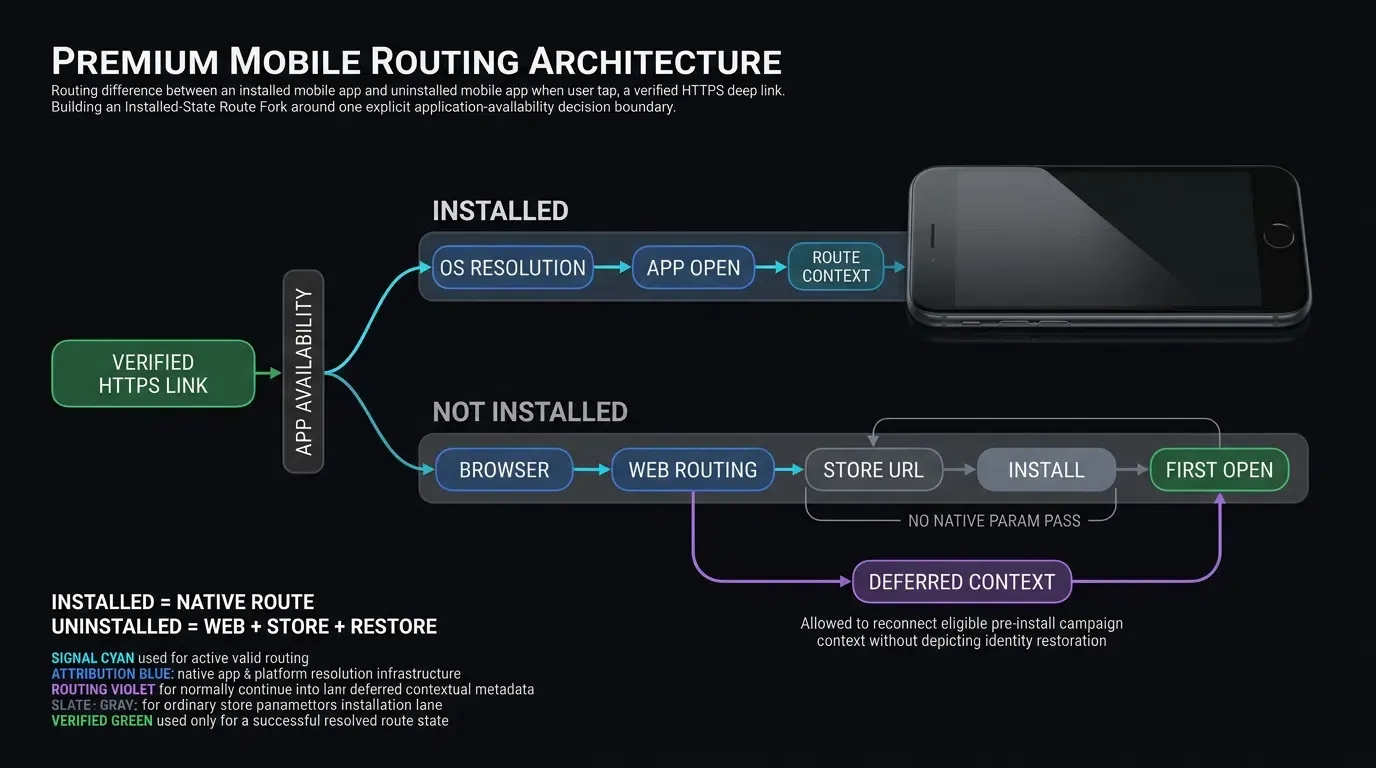
A common misconception in mobile deep linking is that iOS Universal Links or Android App Links natively redirect uninstalled users directly to the Apple App Store or Google Play Store. In technical reality, operating systems execute strict routing boundaries based on application availability:
- App Installed State: The system resolves the association using the app’s Associated Domains entitlement together with the website-hosted apple-app-site-association file. If verified and eligible, the OS bypasses the browser and delivers the URL intent directly to the native app.
- App Not Installed State: The operating system does not route uninstalled users to a store automatically. Instead, the OS opens the verified HTTPS link in the default web browser. A web routing landing page or edge routing service must then present or execute an explicit redirection to the appropriate store URL while capturing eligible campaign context for post-install restoration.
- Safari Same-Domain Navigation Constraint: As outlined in Apple Developer Documentation on Allowing Apps and Websites to Link to Your Content, Safari normally continues navigation within the website for same-domain Universal Links, reflecting the user’s apparent intent to remain in the browser rather than opening the native app.
The Critical Role of the Web Routing Layer in Uninstalled User Store Fallbacks
Because operating systems do not natively convert uninstalled deep link taps into store redirects, game operations architectures require a resilient web routing layer. When an uninstalled user taps a LiveOps link, the Web JS SDK records eligible campaign parameters and dynamic route keys on the attribution backend where permitted by platform privacy policies.
The web routing landing page then directs the browser to the explicit App Store or Google Play Store listing. Upon initial app installation and launch, the native SDK queries the attribution backend to perform deferred context restoration, retrieving the original campaign parameters to route the new player appropriately.
Handling Onboarding Prerequisites, Privacy Consent, and Authentication Gates Before Route Execution
Deep links cannot execute scene restoration unconditionally on cold starts or deferred installations. Modern mobile applications must complete any applicable consent, notice, terms, age, or account prerequisites before processing routing data subject to those requirements:
- Privacy and Terms Consent: Complete any applicable privacy, notice, or terms prerequisites before processing routing data subject to those requirements.
- Age Verification Gates: Title-specific age restrictions must be satisfied before entering online multiplayer or social environments.
- Account Authentication: If a deep link routes to a private guild battle or player account dashboard, the game must verify user authentication credentials before granting entry.
- Mandatory Tutorial Sequences: New players receiving a deferred deep link to an advanced multiplayer raid must complete basic game tutorials before being dropped into complex scenes.
The game router must persist the extracted route payload in memory, present the required onboarding or authentication flows, and resume the target route only after all prerequisites are satisfied.
How OpoInstall Restores Eligible In-Game Destination Context
OpoInstall provides context restoration capabilities that bridge the gap between pre-install campaign clicks and post-install first launches. Where permitted by platform privacy settings and device capabilities, the SDK matches click-time web context with post-install launch signals.
This mechanism enables LiveOps teams to pass customized payloads—such as referral tokens, promotional bundle IDs, or match room keys—through the store download process, delivering a personalized onboarding experience on first launch.
Technical Architecture and Security Gates of Parameter-Passing Game Re-Engagement
Treating Deep Link Parameters as Untrusted Inputs: OWASP Input Validation Guidelines
In accordance with OWASP Mobile Application Security Testing Guide Guidance on Insecure Deep Links, all data originating from deep link query strings, Universal Link URLs, or system clipboards must be treated as untrusted, attacker-controlled input. Operating systems deliver URL strings to applications without validating the integrity, authorization, or safety of the parameter payload.
Game clients must sanitize and validate all incoming routing parameters before passing them to internal game engines or scene controllers. Parameter strings must be validated for expected data types, length limits, allowed character sets, and schema compliance. Parameter payloads should never directly alter sensitive client state, such as setting player currency balances (currency=9999) or overriding access privileges (role=admin).
Server-Side Authorization Gates: Separating Token Verification from Resource Entitlement
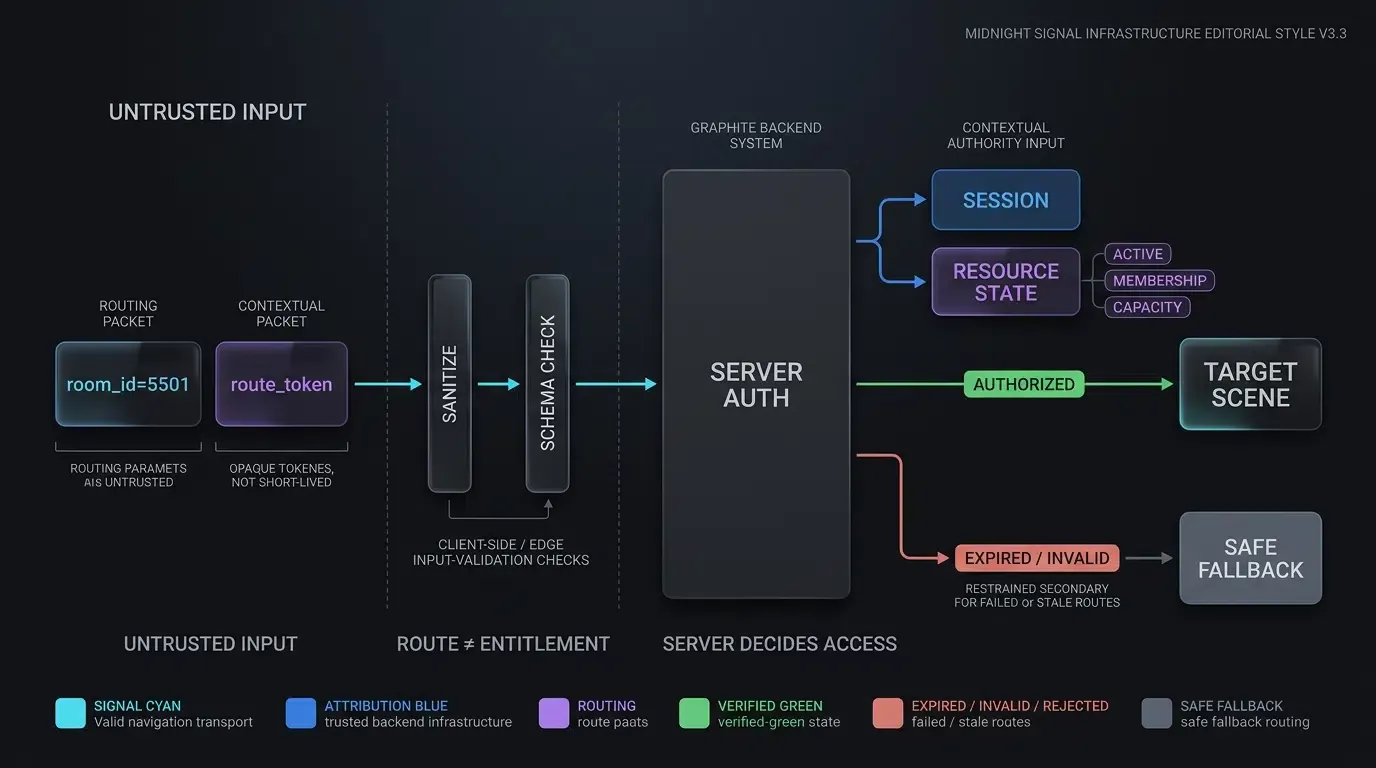
A valid deep link URL structure does not guarantee that the current player is authorized to access the requested resource. For example, a link containing room_id=5501 must not bypass backend membership checks.
Game architectures must implement a two-step validation model:
- Syntax and Token Parsing: The client SDK extracts the routing payload and validates its formatting.
- Server Authorization Check: The game client submits the payload token alongside the player’s authenticated session token (retrieved securely from the app’s logged-in session state, not the URL) to the game backend. The backend verifies whether the match room is active, whether the room is full, and whether the player possesses the required level, guild membership, or ticket entitlement.
Only after receiving an explicit success response from the server authorization check does the client router trigger the scene transition.
Preventing Replay Attacks with Short-Lived Server-Authenticated Routing Tokens
To secure sensitive LiveOps routes—such as VIP tournament access or exclusive promotional rewards—operations teams should deploy short-lived, server-signed routing tokens (route_token) rather than static URL parameters.
A trusted game server constructs the routing payload, attaches an expiration timestamp (for example, a short expiry window appropriate to the route’s threat model), and signs the payload using a server-held signing secret. The client application receives the signed token within the deep link URL and passes it to the backend for verification during route execution. Embedding signing secrets within the mobile app binary is strictly prohibited, as client-side binaries can be reverse-engineered to extract secrets and forge unauthorized route signatures.
Managing Stale Targets: Implementing Safe Fallbacks for Expired Matches and Deleted Lobbies
LiveOps environments are highly dynamic. By the time a player taps a deep link in an SMS or social post, the underlying target resource may no longer exist. Common stale-target scenarios include:
- Expired Events: A time-limited weekend raid has concluded.
- Full or Terminated Lobbies: A multiplayer match room has filled up or been canceled by the host.
- Obsolete Promotional Offers: A special discount bundle has expired or reached its claim limit.
Game routers must implement graceful fallback mechanisms. If the server authorization check indicates that a target scene is stale or invalid, the app should display a clear explanatory toast message (e.g., “This match room is no longer active”) and redirect the player safely to the general event hub or main lobby.
How Contextual Links Drive Monetization and Player Lifetime Value
Directing Players to Store Offers Safely Without Pre-Authorizing Purchases
Contextual deep links enhance LiveOps monetization by directing players straight to relevant offer surfaces or store interfaces (target=store_offer&offer_id=bundle_summer). Bypassing general store menus ensures that interested players immediately see the advertised item.
However, deep links must never execute, pre-authorize, or finalize financial transactions directly from link parameters. All purchases initiated after a deep link transition must proceed through standard in-app purchase (IAP) validation flows, requiring explicit user confirmation, store kit dialogs, and backend receipt verification.
Pre-Populating Social Referral Invites with Server-Validated Guild and Friend Binding
Viral player acquisition relies on frictionless referral programs. Traditional referral programs require invited players to copy and paste alphanumeric codes during registration, creating input friction and high drop-off rates.
Parameter-passing deep links streamline this flow by encoding the inviter’s user ID (inviter_uid=USR_8820) into the campaign URL. Upon installation and initial launch, the game client extracts the inviter payload and presents a pre-populated invitation prompt. The backend validates the inviter account before establishing friend connections or awarding guild bonuses, ensuring a smooth onboarding experience while preventing referral abuse.
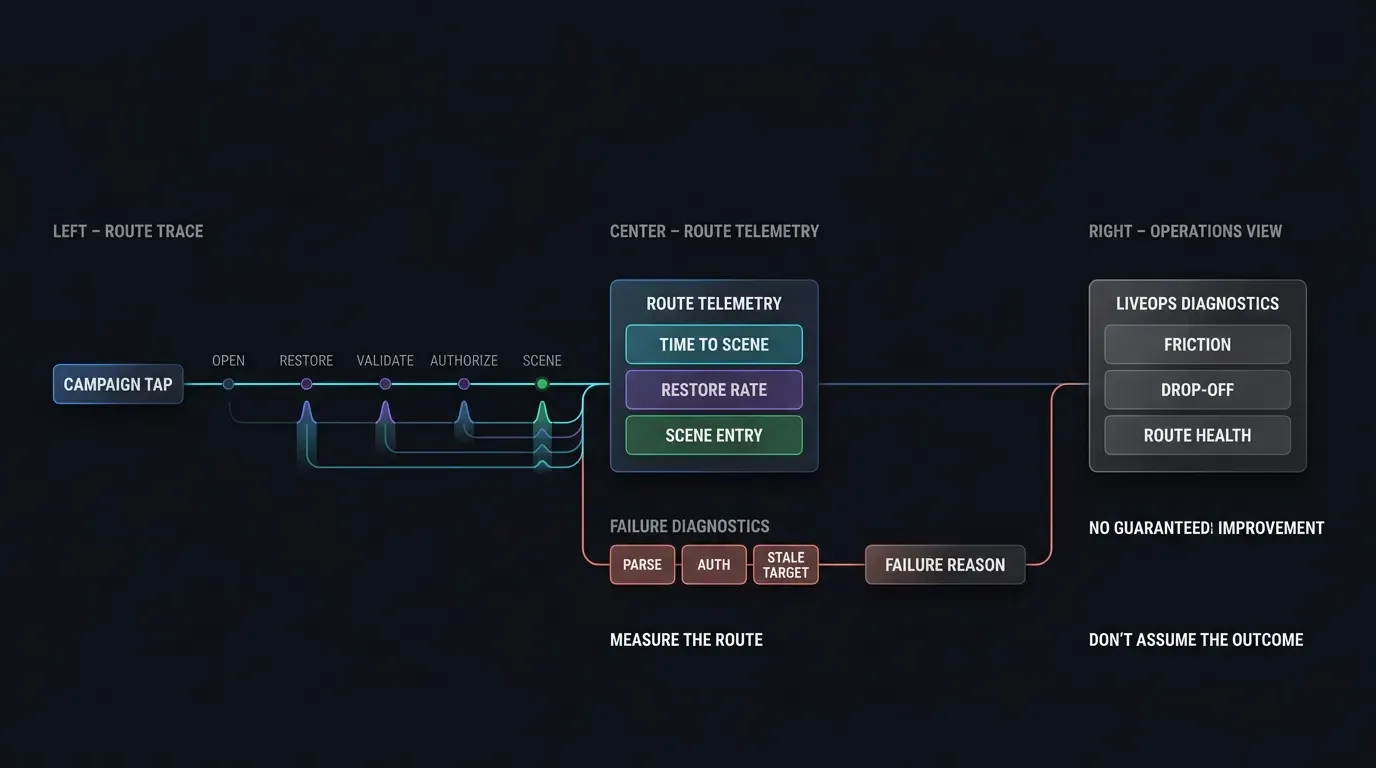
Establishing Re-Engagement Telemetry: Tracking Conversion from Push Click to Event Entry
To evaluate LiveOps effectiveness objectively, game operations teams should establish end-to-end telemetry across the re-engagement funnel. Key metrics to track include:
-
Click-to-Open Rate: The proportion of campaign link impressions or push notifications that result in an app launch.
-
Scene Restoration Success Rate: The percentage of deep-linked sessions that successfully pass validation and load the target scene.
-
Stale Target Rate: The frequency with which deep link attempts land on expired or invalid resources, signaling campaign timing issues.
-
Downstream Action Rate: The proportion of restored sessions that execute target actions, such as completing a match or purchasing an offer.
-
Route Diagnostics Context: Logging granular events including
time_to_scene_ms,authorization_result, androute_failure_reasonto isolate operational drop-offs.
[User Taps Verified Campaign Link]
               │
               ▼
[OS / Browser Resolution]
   ┌───────────┴───────────┐
   ▼                       ▼
[App Installed]     [App Not Installed]
   │                       │
   ▼                       ▼
[Verified Link]     [Web Routing Landing Page]
   │                       │
   ▼                       ▼
[App Opens]         [Explicit Store URL Redirect]
   │                       │
   │                [Install & First Launch]
   │                       │
   └───────────┬───────────┘
               ▼
[SDK Parameter Extraction]
               │
               ▼
[Untrusted Input Sanitization]
               │
               ▼
[Server Authorization & State Gate]
   ┌───────────┴───────────┐
   ▼                       ▼
[Valid & Authorized] [Expired / Invalid]
   │                       │
   ▼                       ▼
[Target Event Scene] [Safe Event / Lobby Fallback]
Implementing Dual-Platform Scene Restoration in Mobile Engines
Configuring Intent Filters and Domain Entitlements Across Android and iOS
Integrating native deep linking requires configuring domain verification rules across both major mobile platforms:
- iOS Associated Domains: As detailed in Apple Developer Guidance on Supporting Universal Links, enable Associated Domains in Xcode project entitlements, declaring
applinks:game.domain.com. Host a validapple-app-site-association(AASA) JSON file on the domain athttps://game.domain.com/.well-known/apple-app-site-association. - Android App Links: Following Android Developers Guide on Verifying App Links, configure intent filters in
AndroidManifest.xmlwithandroid:autoVerify="true". Host a valid Digital Asset Links JSON file athttps://game.domain.com/.well-known/assetlinks.json. Also review Android Developers Guide on Troubleshooting App Links for domain verification diagnostics.
Separating Verified App Link Intent Filters from Custom URI Schemes in Android
In accordance with Android Developers Guide on Adding Intent Filters for App Links, applications should isolate verified HTTP/HTTPS App Link intent filters from custom scheme fallbacks. Combining custom schemes (scheme://) within the same intent filter block as autoVerify="true" HTTPS domains can break Android domain verification or expose the app to intent hijacking.
<!-- AndroidManifest.xml: Verified App Link Intent Filter -->
<intent-filter android:autoVerify="true">
    <action android:name="android.intent.action.VIEW" />
    <category android:name="android.intent.category.DEFAULT" />
    <category android:name="android.intent.category.BROWSABLE" />
    <data android:scheme="http" />
    <data android:scheme="https" />
    <data android:host="game.domain.com" />
</intent-filter>

<!-- Separate Intent Filter for Custom Fallback Scheme -->
<intent-filter>
    <action android:name="android.intent.action.VIEW" />
    <category android:name="android.intent.category.DEFAULT" />
    <category android:name="android.intent.category.BROWSABLE" />
    <data android:scheme="mycustomgame" />
</intent-filter>
Handling Application Lifecycle Callbacks Across Android Intents and iOS Universal Link Delegates
When an application receives a deep link, the native code must process the incoming URI string, extract payload parameters, sanitize inputs, and pass the validated route object to the game engine (e.g., Unity, Unreal Engine, or custom C++ core).
For scene-based iOS applications, implement equivalent Universal Link handling in scene(_:willConnectTo:options:) and scene(_:continue:) within your UIWindowSceneDelegate.
The code implementation below demonstrates native Android (Kotlin) and iOS (Swift) integration patterns for receiving deep links, executing basic schema validation, and safely dispatching payloads. Reference integration examples are shown below; exact package names, callback types, and method signatures must be validated against the currently deployed OpoInstall SDK release versions.
// Android: MainActivity.kt - Input Validation and Thread-Safe Intent Delegation
// Reference integration example; verify exact package names and method signatures against deployed SDK release.
package com.example.game.ui

import android.content.Intent
import android.os.Bundle
import android.util.Log
import androidx.appcompat.app.AppCompatActivity
import com.opoinstall.api.OpoInstall
import com.opoinstall.api.listener.AppWakeUpAdapter
import com.opoinstall.api.model.AppData
import org.json.JSONObject

class MainActivity : AppCompatActivity() {

    override fun onCreate(savedInstanceState: Bundle?) {
        super.onCreate(savedInstanceState)
        setContentView(R.layout.activity_main)

        // Process cold-start deep link intent
        intent?.let { handleDeepLinkIntent(it) }
    }

    override fun onNewIntent(intent: Intent) {
        super.onNewIntent(intent)
        setIntent(intent)
        // Process warm-resume deep link intent when Activity launch mode retains instance
        handleDeepLinkIntent(intent)
    }

    private fun handleDeepLinkIntent(intent: Intent) {
        OpoInstall.getInstance().getWakeUp(intent, object : AppWakeUpAdapter() {
            override fun onWakeUp(appData: AppData?) {
                if (appData == null) return

                val rawData = appData.data
                if (rawData.isNullOrEmpty()) return

                // Process untrusted input payload safely
                processAndValidateRoute(rawData)
            }
        })
    }

    private fun processAndValidateRoute(jsonString: String) {
        try {
            val payload = JSONObject(jsonString)

            // Step 1: Schema & Parameter Sanitization (Extracting short-lived route_token)
            val targetScene = payload.optString("target_scene", "")
            val roomId = payload.optString("room_id", "")
            val routeToken = payload.optString("route_token", "")

            // Step 2: Validate against allowed routing whitelist
            val allowedScenes = setOf("pvp_arena", "guild_hall", "event_hub")
            if (!allowedScenes.contains(targetScene)) {
                Log.w("Security", "Unauthorized or invalid target scene rejected: $targetScene")
                runOnUiThread { navigateToLobbyFallback("Invalid destination target.") }
                return
            }

            // Step 3: Delegate payload to backend server authorization before launching scene
            // Note: GameBackendClient supplies current authenticated app session automatically; routeToken comes from URL
            GameBackendClient.verifyRouteAuthorization(targetScene, roomId, routeToken) { isAuthorized ->
                // Ensure UI or Game Engine scene transitions execute safely on the main UI thread
                runOnUiThread {
                    if (isAuthorized) {
                        GameRouter.navigateToScene(targetScene, roomId)
                    } else {
                        navigateToLobbyFallback("Event or room is no longer accessible.")
                    }
                }
            }
        } catch (e: Exception) {
            Log.e("Security", "Failed to parse deep link JSON payload", e)
            runOnUiThread { navigateToLobbyFallback("Malformed navigation request.") }
        }
    }

    private fun navigateToLobbyFallback(reason: String) {
        Log.i("GameRouter", "Executing safe fallback to main lobby: $reason")
        GameRouter.navigateToLobby()
    }
}
// iOS: AppDelegate.swift - Universal Link Processing & Validation Gate
// Reference integration example; verify exact package names and method signatures against deployed SDK release.
import UIKit
import libOpoInstallSDK

@main
class AppDelegate: UIResponder, UIApplicationDelegate, OpoInstallDelegate {

    var window: UIWindow?

    func application(_ application: UIApplication, didFinishLaunchingWithOptions launchOptions: [UIApplication.LaunchOptionsKey: Any]?) -> Bool {
        // Initialize OpoInstall SDK Delegate
        OpoInstallSDK.initWith(self)
        return true
    }

    // Handle Universal Links delegate on iOS 9+ (AppDelegate Path)
    func application(_ application: UIApplication, continue userActivity: NSUserActivity, restorationHandler: @escaping ([UIUserActivityRestoring]?) -> Void) -> Bool {
        // Delegate universal link processing to SDK
        OpoInstallSDK.continue(userActivity)
        return true
    }

    // OpoInstallDelegate Wakeup Callback
    func getWakeUpParams(_ appData: OpoInstallData?) {
        guard let data = appData, let rawJson = data.data, !rawJson.isEmpty else {
            return
        }

        // Process untrusted input payload safely
        processAndValidateRoute(rawJson: rawJson)
    }

    private func processAndValidateRoute(rawJson: String) {
        guard let jsonData = rawJson.data(using: .utf8) else {
            DispatchQueue.main.async {
                self.navigateToLobbyFallback(reason: "Invalid UTF-8 string encoding")
            }
            return
        }

        do {
            if let payload = try JSONSerialization.jsonObject(with: jsonData, options: []) as? [String: Any] {
                let targetScene = payload["target_scene"] as? String ?? ""
                let roomId = payload["room_id"] as? String ?? ""
                let routeToken = payload["route_token"] as? String ?? ""

                // Step 1: Allowlist validation
                let allowedScenes = ["pvp_arena", "guild_hall", "event_hub"]
                guard allowedScenes.contains(targetScene) else {
                    DispatchQueue.main.async {
                        self.navigateToLobbyFallback(reason: "Target scene not in allowlist")
                    }
                    return
                }

                // Step 2: Validate route authorization with backend server
                // Note: GameBackendClient supplies logged-in user session internally; routeToken comes from deep link
                GameBackendClient.shared.verifyRouteAuthorization(scene: targetScene, room: roomId, routeToken: routeToken) { isAuthorized in
                    DispatchQueue.main.async {
                        if isAuthorized {
                            GameSceneRouter.shared.navigateTo(scene: targetScene, room: roomId)
                        } else {
                            self.navigateToLobbyFallback(reason: "Server authorization failed or target expired")
                        }
                    }
                }
            }
        } catch {
            DispatchQueue.main.async {
                self.navigateToLobbyFallback(reason: "JSON deserialization failed")
            }
        }
    }

    private fun navigateToLobbyFallback(reason: String) {
        print("GameSceneRouter: Fallback to main lobby executed - \(reason)")
        GameSceneRouter.shared.navigateToLobby()
    }
}
Measuring Performance Across Game Operations Re-Engagement Channels
Comparative Analysis of Re-Engagement Delivery Frameworks
Different operational delivery channels exhibit distinct routing characteristics and technical prerequisites. Evaluating these channels helps game operations teams choose the appropriate transport mechanism for specific LiveOps goals.
Illustrative Operational Channel Evaluation Framework
The table below presents a qualitative framework evaluating common re-engagement channels across operational metrics:
| Channel Type | OS Resolution Pathway | Primary Re-Engagement Metric | Key Operational Risk | Fallback Strategy |
|---|---|---|---|---|
| Non-Contextual Push | Native App Launch | Click-to-App-Open Rate | Main menu abandonment | Default Lobby |
| Verified App / Universal Link | OS Native App Routing | Time-to-Scene ( |
Domain verification failure | Web Routing Landing Page |
| Deferred Campaign Link | Web Routing |
Install-to-First-Open Restoration | Context loss / Privacy restriction | Onboarding Gate |
| Social Referral Link | In-App Webview |
Verified Referral Conversion | Invalid inviter token | Clean Registration |
Frequently Asked Questions (FAQ)
How do game operations teams use deep links to reduce churn?
Can deep links pass dynamic match room IDs without manual user input?
What happens if an uninstalled player clicks a Universal Link or App Link?
Summary and Decision Framework
Optimizing mobile game operations requires minimizing the steps between a player’s intent to play and active participation in an in-game scene. Replacing non-contextual redirects with parameter-passing deep links helps LiveOps teams reduce drop-off, reactivate churned player cohorts, and improve overall campaign ROI.
Because deep link payloads originate from client-side environments, architectures must treat all incoming parameters as untrusted inputs. Implementing robust server-side authorization gates, schema validation, and stale-target fallbacks ensures that deep-linked re-engagement remains secure while delivering smooth player experiences. By removing routing friction, LiveOps teams create measurable opportunities to improve re-engagement efficiency and player retention; downstream ROI and retention impacts should be validated empirically by title-specific experiments.
To learn how contextual routing can enhance your LiveOps strategy, consult the game deep linking documentation, explore the mobile growth platform, or register your title on the OpoInstall developer console.
Related Materials
-
Concepts: Game Operations, LiveOps Strategy, Scene Restoration, Player Lifecycle Management, Untrusted Input Validation
-
Technologies: Universal Links, App Links, Deferred Context Restoration, Server-Signed Tokens
-
Standards: IETF RFC 3986 Uniform Resource Identifier, Apple Associated Domains Specification, Android Digital Asset Links Protocol, OWASP Mobile Application Security Testing Guide (MASTG)
-
APIs: OpoInstall Dynamic Routing API, Android getIntent Intent Processing, iOS continueUserActivity Delegate
-
Official Documentation & References:
Share this article