How to link custom parameters when creating QR codes? Linking custom parameters for app routing requires appending structured URL query keys to a hosted landing-page link, capturing those keys via a web integration layer, and dispatching the validated payload to native navigation controllers upon direct app wakeup or post-install launch.
In-app routing via QR codes is a client-server navigation architecture that embeds structured destination parameters into a two-dimensional barcode URL. By resolving these parameters through direct operating-system deep links when the application is installed, or through platform-supported deferred recovery when the application is newly installed from an app store, engineering teams can route users directly to specific in-app screens rather than the default home view.
| Term | Definition | Related Entity | Search Intent Role |
|---|---|---|---|
| Create QR Code for App | The engineering workflow of encoding actionable routing URLs into 2D barcodes for mobile navigation. | Scene Restoration | Informational / Technical |
| app qr code | A barcode asset configured to trigger native application launch or store onboarding. | Universal Links / App Links | Technical / Commercial |
| dynamic qr code | A barcode pointing to an intermediary routing endpoint whose destination payload can be updated server-side. | URI Indirection | Commercial |
| qr code tracking | The measurement of routing ingress requests and downstream in-app screen activations. | Channel Statistics & Tracking | Commercial |
Architecture Overview: How to Create QR Code for App Scene Restoration
The Home Screen Drop-Off Problem: Why Generic Store Redirects Break High-Intent User Journeys
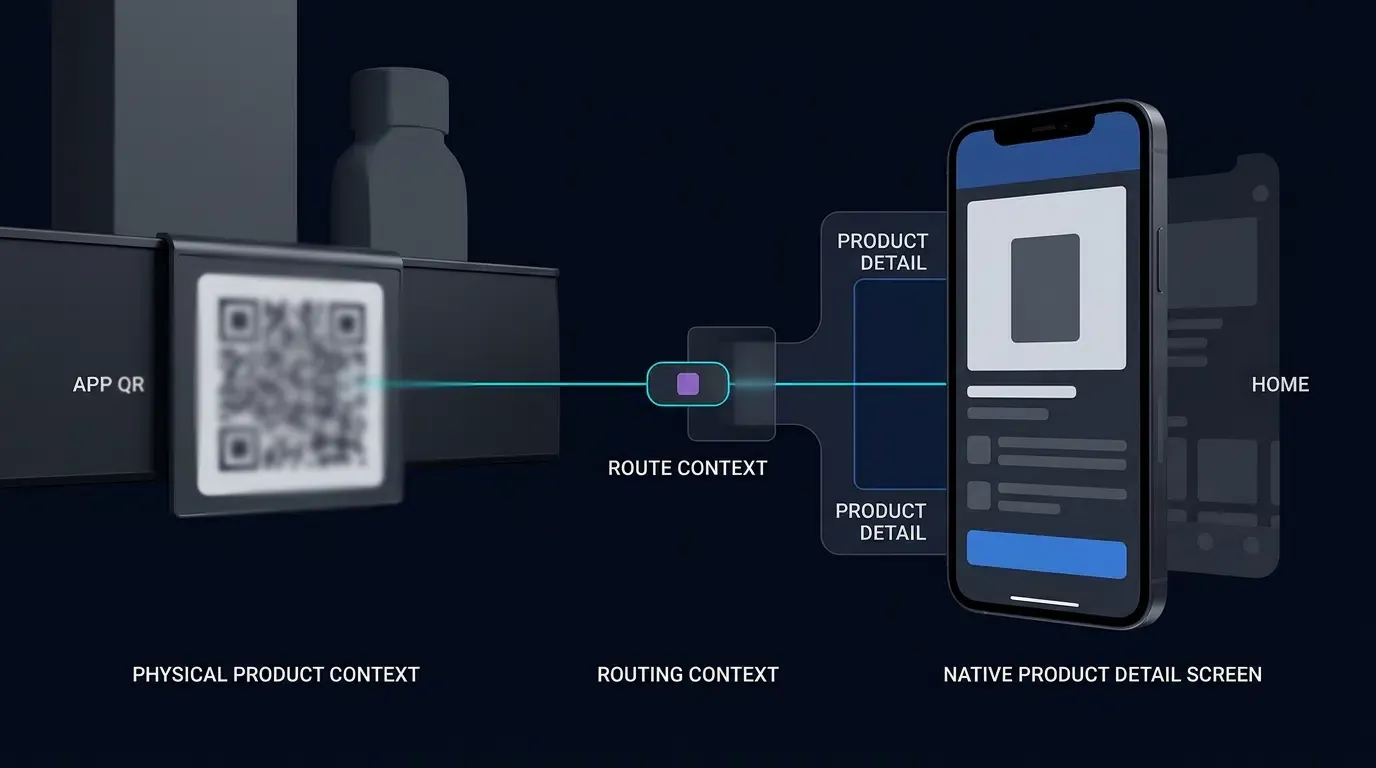
Physical QR codes are frequently deployed in high-intent contextual environments: a retail shopper scans a shelf tag to view product specifications, a diner scans a table tent to order from a specific menu category, or a player scans an invitation barcode to join a multiplayer game lobby. When the barcode encodes a generic app store link or an unparameterized domain, the user’s contextual intent is lost during the transition from the physical scan to the native application runtime.
Upon launching the application, the user is dropped onto the default top-level home screen. Forcing the user to manually navigate complex category trees, re-enter search queries, or type room identifiers introduces substantial cognitive and mechanical friction. In-app scene restoration addresses this drop-off by encoding the destination state into the QR code URL and programmatically reconstructing that target view inside the native client.
Dual-State Routing Mechanics: Direct Wakeup vs. Deferred Scene Restoration
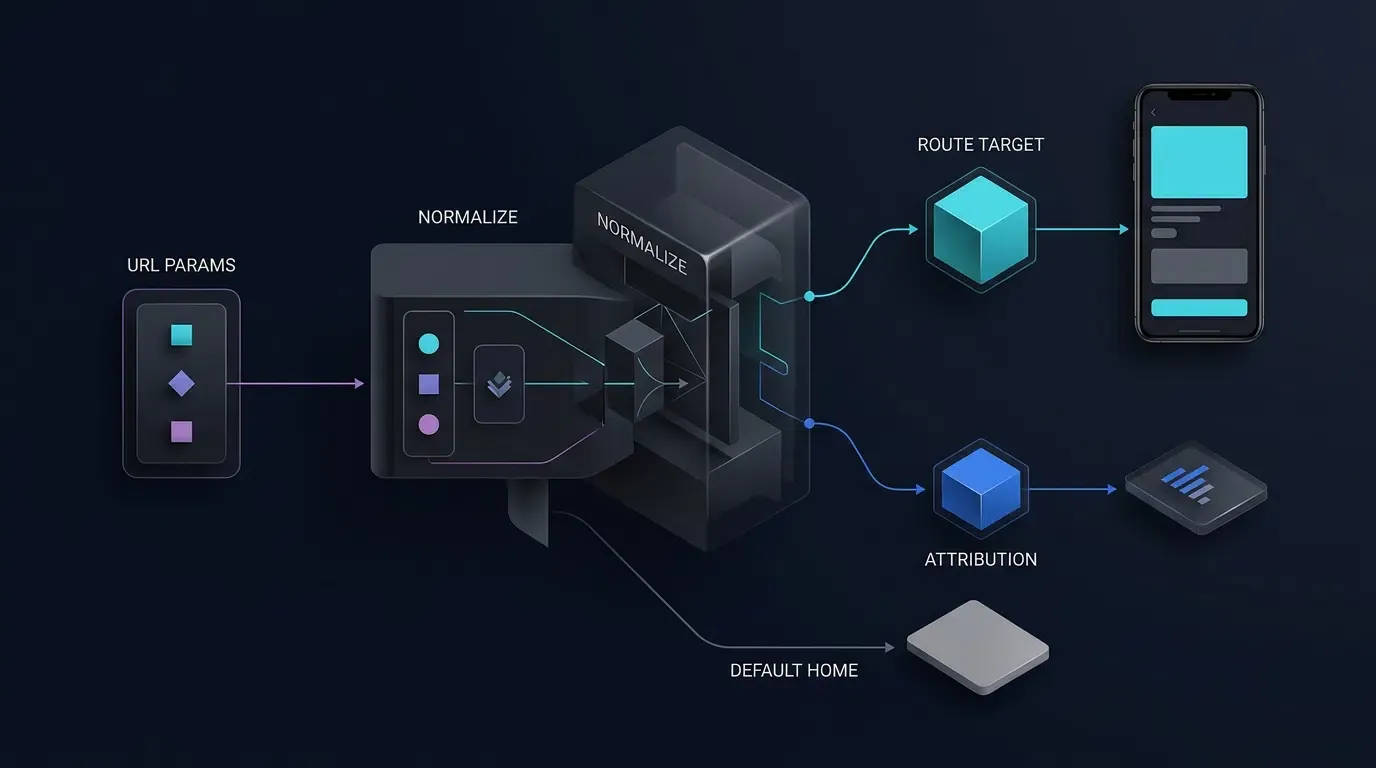
When a user scans an app routing QR code, the mobile device exists in one of two installation states. A complete routing architecture handles both lifecycles through distinct technical paths:
- Direct Wakeup Routing (Application Already Installed): When the target application is already present on the device, scanning the QR code triggers an operating-system deep link—specifically Apple Universal Links on iOS or Android App Links on Android. Both mechanisms require hosting cryptographically verified domain association files: iOS requires an
apple-app-site-association(AASA) file paired with an XcodeAssociated Domainsentitlement, whereas Android requires a/.well-known/assetlinks.jsonDigital Asset Links file matching the application’s signing certificate SHA-256 fingerprint and verified manifest intent filters. When verified, the OS wakes the application and passes the URI directly to the client’s lifecycle delegate. - Deferred Scene Restoration (Application Not Installed): When the application is absent, the user is routed through an intermediary web landing page to the platform app store. Because the native binary is not yet installed to receive an operating-system intent, the routing parameters must be staged prior to store redirection and recovered during the application’s initial launch (Day 0 cold start) after installation completes.
Platform-Specific Recovery Boundaries: Google Play Install Referrer, iOS Universal Links, and SDK Adapters
After a user installs an application from an app store, referral and routing parameter recovery depends on the platform and the mechanism implemented by the application or attribution SDK. Passing a route or id parameter through a web URL does not, by itself, guarantee that the parameter will survive an app-store installation:
- Android and Google Play: The Google Play Install Referrer API can provide supported referral metadata associated with a Play Store installation. This mechanism applies specifically to installations completed through the official Google Play Store path, not arbitrary third-party APK sideloads or alternative stores. The application must configure and test the actual referrer payload and verify that the expected parameters survive the redirect and installation flow.
- iOS and the App Store: The Apple App Store does not automatically transfer arbitrary web landing-page query parameters into a newly installed application binary. Universal Links support direct routing when the application is already installed and the associated domain configuration is valid; they do not, on their own, guarantee deferred parameter recovery after a new installation.
- Attribution SDKs: Use only the recovery mechanisms documented for the exact SDK version and platform being deployed. Verify the implementation, data collection, and privacy implications rather than assuming that an SDK can recover every routing parameter across every browser and installation path.
iOS Attribution and Privacy Boundary: Complying with Apple Anti-Fingerprinting Rules
iOS routing and deferred scene restoration implementations must not rely on prohibited device fingerprinting to identify a user or device across applications or websites. Under Apple User Privacy and Data Use Guidance and the Apple Developer Program License Agreement, developers are strictly prohibited from deriving a unique identifier from device, browser, configuration, location, or network signals for this purpose. App Tracking Transparency (ATT) authorization does not make otherwise prohibited fingerprinting permissible.
Use Universal Links for verified direct app routing when the application is installed. For post-install scene restoration on iOS, use a documented mechanism whose behavior has been reviewed for the deployed SDK version and the applicable Apple requirements. Review the SDK’s privacy disclosures and required-reason API declarations where applicable, but do not treat the presence of a Privacy Manifest (PrivacyInfo.xcprivacy) as proof that an attribution implementation is compliant.
If the selected SDK relies on a matching method that cannot be verified as permitted, do not recommend that method for iOS deployment. Where no permitted mechanism can establish the deferred routing context reliably, preserve the normal onboarding flow, land the user on a safe default home view, and mark the installation as unattributed rather than manufacturing an unverified match.
Visualizing the Dual-State QR Scene Restoration Pipeline
The architecture diagram below illustrates the following stages as a parameterized QR code branches into direct OS wakeup or deferred store recovery before converging at the client-side route validator and authentication gate:
[User Scans QR Code] ──> URL (?route=product_detail&id=sku_8842&channelCode=pos_01)
          │
     ┌────┴────────────────────────────────────────┐
     ▼ (App Already Installed)                     ▼ (App Not Installed)
[OS Universal Link / App Link]               [Intermediary H5 Landing Page]
     │                                             │
     ▼                                             ▼
[Hot/Cold Wakeup Callback]                   [Store Download & First Launch]
(onNewIntent / continueUserActivity)         (Platform-Supported Deferred Recovery)
     │                                             │
     └────────────────────┬────────────────────────┘
                          ▼
           [Client Route Validator & Auth Gate]
                          │
     ┌────────────────────┴────────────────────────┐
     ▼ (Allowlisted & Authenticated)               ▼ (Invalid Route / Unmatched)
[Navigate to Product Detail Screen]          [Fallback to Default Home Screen]
Step 1: Designing the Custom Routing Parameter Schema
Structuring Actionable Routing Payloads vs. Passive Attribution Tags
When creating a QR code for app routing, engineering teams must establish a clean two-tier data contract that separates external compact URL query keys from the internal normalized JSON payload:
| Contract Tier | Field Naming Convention | Example Representation | Architectural Purpose |
|---|---|---|---|
| External URL Query Tier | route, id, channelCode |
?route=product_detail&id=sku_8842&channelCode=pos_01 |
Minimizes URI character length to keep the printed QR matrix compact |
| Internal Normalized Tier | route_key, target_id, channel_code, fallback_route |
{"route_key": "product_detail", "target_id": "sku_8842", ...} |
Standardized canonical object validated by H5 and native client routers |
| Client Security Registry | PROTECTED_ROUTES (Internal constant) |
setOf("room_lobby", "promo_campaign") |
Determines authentication requirements internally; never trusted from external URLs |
In this two-tier model:
- Passive Attribution Tags (
channelCodechannel_code) are consumed by analytics pipelines to measure marketing conversion volume without altering client UI state. - Actionable Routing Parameters (
routeroute_keyandidtarget_id) instruct the native client’s navigation controller which screen to mount and which entity to fetch. - Authentication Policy Isolation: Whether a route requires authentication (
requires_auth) must be derived strictly from the client application’s internal trusted route registry rather than accepted from an external QR query parameter.
Enforcing IETF RFC 3986 Percent-Encoding and Payload Size Constraints
All routing parameters appended to the QR destination URL must adhere to the URI generic syntax specified in IETF RFC 3986:
- Avoid Nested Delimiters: Do not embed raw JSON strings (
?data={"route":"product","id":123}) directly into URL query strings. Unescaped braces, quotes, and colons frequently break in-app browser URL parsers and inflate barcode module density. - Flatten Key-Value Pairs: Represent external routing context as flat, percent-encoded query parameters (
https://promo.example.com/open?route=product_detail&id=sku_8842&channelCode=pos_01). - Enforce Strict Character Bounds: Restrict
routeandidvalues to URL-safe alphanumeric characters, hyphens, and underscores (^[A-Za-z0-9_-]{1,64}$).
Defining the Client-Side Route Allowlist Contract
Once external URL parameters are ingested and normalized into the internal payload structure, they must conform to a strict schema contract. If route_key is unrecognized, or if an entity-specific route (product_detail, room_lobby, promo_campaign) is missing its required target_id, the normalizer must downgrade the payload to home_default with target_id: null.
The JSON Schema below defines the canonical structure for a normalized scene restoration payload:
{
  "$schema": "https://json-schema.org/draft/2020-12/schema",
  "title": "QrSceneRestorationPayload",
  "description": "Canonical, normalized routing payload. Authentication policy is derived separately from the application's trusted route registry.",
  "type": "object",
  "additionalProperties": false,
  "required": [
    "schema_version",
    "route_key",
    "target_id",
    "fallback_route"
  ],
  "properties": {
    "schema_version": {
      "const": "1.0.0"
    },
    "route_key": {
      "type": "string",
      "enum": [
        "product_detail",
        "room_lobby",
        "promo_campaign",
        "home_default"
      ]
    },
    "target_id": {
      "type": ["string", "null"],
      "pattern": "^[A-Za-z0-9_-]{1,64}$"
    },
    "channel_code": {
      "type": "string",
      "pattern": "^[A-Za-z0-9_.-]{1,64}$"
    },
    "fallback_route": {
      "const": "home_default"
    }
  },
  "allOf": [
    {
      "if": {
        "properties": {
          "route_key": {
            "enum": [
              "product_detail",
              "room_lobby",
              "promo_campaign"
            ]
          }
        },
        "required": ["route_key"]
      },
      "then": {
        "properties": {
          "target_id": {
            "type": "string"
          }
        }
      }
    },
    {
      "if": {
        "properties": {
          "route_key": {
            "const": "home_default"
          }
        },
        "required": ["route_key"]
      },
      "then": {
        "properties": {
          "target_id": {
            "type": "null"
          }
        }
      }
    }
  ],
  "examples": [
    {
      "schema_version": "1.0.0",
      "route_key": "product_detail",
      "target_id": "sku_8842",
      "channel_code": "pos_01",
      "fallback_route": "home_default"
    }
  ]
}
Step 2: Capturing and Forwarding Routing Context on the Landing Page
Parsing Allowlisted Routing Keys on the H5 Landing Page
When a user without the application installed scans the QR code, the mobile browser opens the hosted intermediary H5 landing page. The landing-page script extracts the external query keys (route, id, channelCode), rejects ambiguous duplicate parameters, and normalizes them into the canonical structure defined in Step 1.
The JavaScript normalizer below enforces single-key cardinality, regex bounds, and conditional home_default downgrading while treating duplicate reserved parameters as invalid:
const query = new URLSearchParams(window.location.search);

const routeValues = query.getAll("route");
const idValues = query.getAll("id");
const channelValues = query.getAll("channelCode");

const allowedRoutes = new Set([
  "product_detail",
  "room_lobby",
  "promo_campaign",
  "home_default"
]);

const idPattern = /^[A-Za-z0-9_-]{1,64}$/;
const channelPattern = /^[A-Za-z0-9_.-]{1,64}$/;

function normalizeQrRoutingPayload() {
  // Reject duplicate keys to defend against parameter pollution
  if (routeValues.length > 1 || idValues.length > 1 || channelValues.length > 1) {
    return {
      schema_version: "1.0.0",
      route_key: "home_default",
      target_id: null,
      fallback_route: "home_default"
    };
  }

  const rawRoute = routeValues.length === 1 ? routeValues[0] : null;
  const rawId = idValues.length === 1 ? idValues[0] : null;
  const rawChannel = channelValues.length === 1 ? channelValues[0] : null;

  let routeKey = allowedRoutes.has(rawRoute)
    ? rawRoute
    : "home_default";

  let targetId =
    rawId && idPattern.test(rawId)
      ? rawId
      : null;

  if (routeKey === "home_default" || targetId === null) {
    routeKey = "home_default";
    targetId = null;
  }

  const payload = {
    schema_version: "1.0.0",
    route_key: routeKey,
    target_id: targetId,
    fallback_route: "home_default"
  };

  if (rawChannel && channelPattern.test(rawChannel)) {
    payload.channel_code = rawChannel;
  }

  return payload;
}

const routingPayload = normalizeQrRoutingPayload();
Integrating the Web SDK Through a Version-Verified Adapter
The landing page coordinates both immediate app wake-up attempts and deferred parameter staging. Before deploying an attribution Web SDK (such as opoinstall.js), confirm the exact JavaScript bundle URL, initialization signature, readiness callback, wake-up method, and parameter schema against the official documentation for the SDK version being deployed.
Keep SDK-specific behavior behind a small application adapter that accepts the normalized routingPayload object. For detailed specifications on web integration and channel parameter configuration, consult the OpoInstall developer documentation.
Preserving Routing Parameters Across Direct Store Fallback Links
If the Web JS SDK is unavailable or blocked by browser security controls, the landing page falls back to a direct store redirection link. On Android deployments utilizing Google Play, the fallback link can encode the normalized routing keys into the Play Store referrer parameter so that the native client can recover the routing context via the Google Play Install Referrer API when installed through the official Play Store flow:
// Example Android Play Store fallback URL preserving normalized routing context
const referrerString = `route_key=${routingPayload.route_key}&target_id=${routingPayload.target_id || ""}&channel_code=${routingPayload.channel_code || ""}`;
const playStoreFallbackUrl = `https://play.google.com/store/apps/details?id=com.example.app&referrer=${encodeURIComponent(referrerString)}`;
Step 3: Implementing Native Client Route Dispatch and Scene Restoration
Handling Android Activity Launch Modes: Why singleTask Requires Both onCreate and onNewIntent
In Android deep-link architectures, how an Activity receives routing intents depends on its configured launch mode and navigation graph design. Developers may use standard launch modes with Jetpack Navigation, singleTop, or singleTask depending on their task-stack requirements.
When an Activity is configured with singleTop or singleTask to prevent duplicate instances from stacking during deep-link wakeups, two distinct lifecycle paths must be handled:
- Cold Start (
onCreate): When the application process is not running, scanning the QR code launches the Activity from scratch. The incomingIntentis delivered toonCreate(savedInstanceState: Bundle?). - Warm Start (
onNewIntent): When the operating system reuses an existing Activity instance under the configured launch mode and task-stack conditions, the incoming deep-link Intent is delivered toonNewIntent(). UndersingleTop, reuse occurs only when the target Activity is already at the top of the relevant task stack; otherwise, a new Activity instance may be created. Implement bothonCreate()andonNewIntent()handling, and verify the actual behavior for the application’s navigation architecture.
To handle both states reliably without permanently blocking a user who legitimately scans the same QR code a second time later in their session, the Activity should mark each processed Intent instance with a consumption flag (EXTRA_ROUTE_CONSUMED) and ignore intents re-delivered solely by historical app-switcher launches (Intent.FLAG_ACTIVITY_LAUNCHED_FROM_HISTORY).
Handling iOS Lifecycle Entry Points: AppDelegate vs. UISceneDelegate Continuation Activities
On iOS, direct Universal Link routing and deferred parameter retrieval must align with the application’s configured UI lifecycle:
- Scene-Based Lifecycle (
UISceneDelegate): In applications adoptingUIScene(standard from iOS 13 onward), cold-launch Universal Links arrive inscene(_:willConnectTo:options:)viaconnectionOptions.userActivities, while warm-resume Universal Links arrive inscene(_:continue:). - Application-Delegate Lifecycle (
UIApplicationDelegate): In applications that do not use scene delegates, Universal Links are delivered toapplication(_:continue:restorationHandler:). - Deferred First-Launch Recovery: Independent of Universal Link continuation delegates, the deferred install parameter query executes once during initial application startup after the root view hierarchy is ready.
Developers can download platform SDK packages and inspect lifecycle integration templates via the OpoInstall SDK download center.
Unifying Direct Wakeup Parameters and First-Launch Deferred Parameters into a Single Navigation Router
To maintain consistent security and navigation behavior, client architectures normalize both direct wakeup URIs and deferred install JSON payloads into a single NavigationTarget model before dispatching them to the UI router:
- Origin Verification (Direct Intents): Verify that incoming
Intent.ACTION_VIEWURIs use thehttpsscheme, match the application’s verified associated host (promo.example.com) and path (/open), and contain no conflicting duplicate query keys. - Schema Normalization and Allowlist Check: Map external
route/idkeys or internalroute_key/target_idfields into the canonical model, rejecting unallowlisted routes or malformed IDs. Note that the client Kotlin parsing logic operates as an illustrative, defensive parsing skeleton; in production systems, parse payloads against the full canonical schema rules before dispatch. - Single-Flight Re-Entrancy Guard: Use an atomic per-delivery guard so concurrent callbacks cannot trigger overlapping fragment transactions.
Managing Authentication Gates: Queuing Pending Deep-Link Routes Until User Login Completes
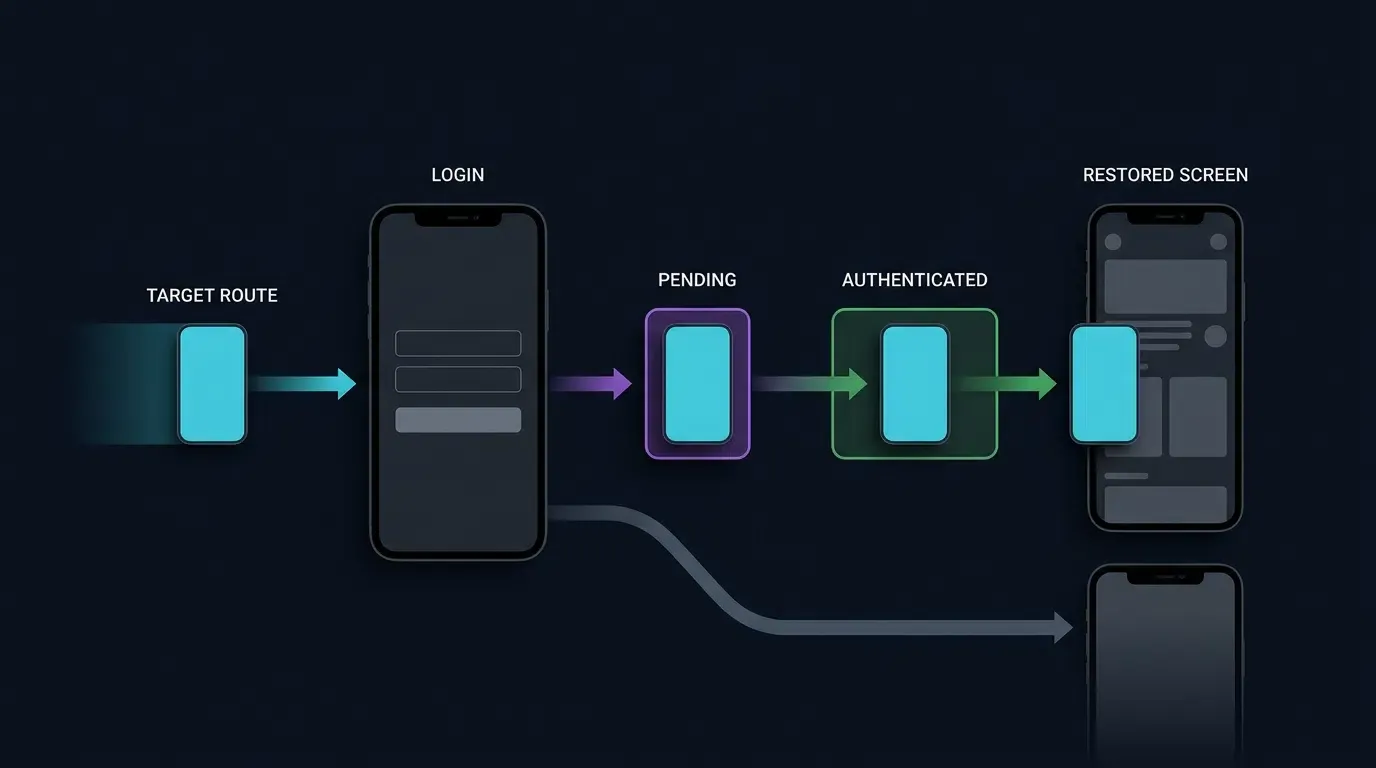
When a new user installs an application from an app store via a QR code and launches it for the first time, the user is typically unauthenticated. If the QR code targets a protected screen (such as room_lobby or promo_campaign) and the router attempts to navigate immediately, the authentication guard will redirect the user to the login screen and lose the deep-link context.
To preserve scene restoration across authentication boundaries:
- Internal Route Policy Lookup: Determine whether the route requires authentication by checking the client’s internal
PROTECTED_ROUTESregistry rather than trusting external payload flags. - Atomic Staging: If the user is unauthenticated, store the validated
NavigationTargetin an atomic, session-scopedPendingRouteStore(AtomicReference) and route the user to the login flow. Note that an in-memoryPendingRouteStoreapplies to the active application process; if the authentication flow can span process death, use an encrypted, time-bounded local store that clears state upon account switching. - Post-Auth Re-Validation and Dispatch: When login completes, atomically consume the staged target (
getAndSet(null)), verify that the session is now authenticated, re-validate the route parameters, and execute the screen transition.
Navigation Host Readiness and State Restoration
The onNavigationGraphReady() callback must be connected to the application’s actual navigation-host initialization. When the navigation graph is defined in an XML-hosted NavHostFragment, the activity can establish this connection after the host and its destination are ready. If the graph is installed asynchronously, invoke the callback only after graph initialization is complete.
A pending navigation request stored solely in an Activity field may be lost during configuration changes. For production implementations, retain unconsumed routing state in a lifecycle-aware ViewModel and use SavedStateHandle when restoration across system-driven Activity recreation or process death is required. The code shown here is an architectural example and requires application-specific navigation and session integration.
The Kotlin code below provides an illustrative Android routing skeleton with application-owned SDK and navigation adapters demonstrating these controls:
<!-- Android Manifest Configuration for App Link Verification -->
<!-- File: app/src/main/AndroidManifest.xml -->
<manifest xmlns:android="http://schemas.android.com/apk/res/android"
    package="com.example.app">

    <application
        android:allowBackup="true"
        android:label="@string/app_name"
        android:theme="@style/Theme.AppCompat.Light.NoActionBar">

        <activity
            android:name=".SceneRestorationActivity"
            android:exported="true"
            android:launchMode="singleTask">

            <!-- Verified Android App Link Intent Filter -->
            <intent-filter android:autoVerify="true">
                <action android:name="android.intent.action.VIEW" />
                <category android:name="android.intent.category.DEFAULT" />
                <category android:name="android.intent.category.BROWSABLE" />

                <!-- Origin must match /.well-known/assetlinks.json SHA-256 fingerprint -->
                <data
                    android:scheme="https"
                    android:host="promo.example.com"
                    android:pathPrefix="/open" />
            </intent-filter>
        </activity>
    </application>
</manifest>
// Android Routing Activity Implementation
// File: app/src/main/java/com/example/app/SceneRestorationActivity.kt
//
// INTEGRATION NOTE:
// This example is an architectural routing skeleton, not a drop-in production implementation.
// Bind AttributionRoutingAdapter and NavController initialization to your verified SDK release,
// session manager, and NavHostFragment before deployment.

package com.example.app

import android.content.Intent
import android.net.Uri
import android.os.Bundle
import android.util.Log
import androidx.appcompat.app.AppCompatActivity
import androidx.navigation.fragment.NavHostFragment
import org.json.JSONObject
import java.util.concurrent.atomic.AtomicBoolean
import java.util.concurrent.atomic.AtomicReference

/**
 * Validated navigation target model representing an allowlisted in-app destination.
 * Authentication requirement is derived strictly from the internal route registry.
 */
data class NavigationTarget(
    val eventKey: String,
    val routeKey: String,
    val targetId: String?,
    val requiresAuth: Boolean
)

/**
 * Process-scoped atomic store holding a pending route when an unauthenticated user
 * triggers a protected deep link during cold start or first-launch onboarding.
 */
object PendingRouteStore {
    private val pending = AtomicReference<NavigationTarget?>(null)

    fun stage(target: NavigationTarget) {
        pending.set(target)
    }

    fun consume(): NavigationTarget? {
        return pending.getAndSet(null)
    }
}

class SceneRestorationActivity : AppCompatActivity() {

    companion object {
        private const val TAG = "SceneRestorationRouter"
        private const val TRUSTED_HOST = "promo.example.com"
        private const val TRUSTED_PATH = "/open"
        private const val EXTRA_ROUTE_CONSUMED = "com.example.app.EXTRA_ROUTE_CONSUMED"

        private const val ROUTE_HOME = "home_default"
        private const val ROUTE_PRODUCT = "product_detail"
        private const val ROUTE_LOBBY = "room_lobby"
        private const val ROUTE_PROMO = "promo_campaign"

        private val ALLOWED_ROUTES = setOf(ROUTE_HOME, ROUTE_PRODUCT, ROUTE_LOBBY, ROUTE_PROMO)
        private val PROTECTED_ROUTES = setOf(ROUTE_LOBBY, ROUTE_PROMO)
        private val SAFE_ID_REGEX = Regex("^[A-Za-z0-9_-]{1,64}$")

        // Process-level guard ensuring deferred install recovery is queried only once per cold start
        private val hasQueriedDeferredInstall = AtomicBoolean(false)
    }

    // Per-delivery re-entrancy guard; allows legitimate subsequent scans of the same QR code
    private val processingIntent = AtomicBoolean(false)

    // Staging container for routes that arrive before the UI/NavController is mounted
    private val pendingUiTarget = AtomicReference<NavigationTarget?>(null)
    private var navigationReady = false

    // Application-owned adapter isolating vendor SDK and session calls
    private val attributionAdapter = AttributionRoutingAdapter()

    override fun onCreate(savedInstanceState: Bundle?) {
        super.onCreate(savedInstanceState)
        setContentView(R.layout.activity_scene_restoration)

        // Connect NavHost initialization when defined in layout
        connectNavigationHost()

        // Activity recreation (e.g., screen rotation) is not a new install or new QR scan
        if (savedInstanceState != null) {
            return
        }

        val launchIntent = intent
        val isDirectLinkLaunch =
            launchIntent?.action == Intent.ACTION_VIEW &&
            launchIntent.data != null

        if (isDirectLinkLaunch) {
            processIncomingIntentOnce(launchIntent) { candidate ->
                handleIncomingWakeupIntent(candidate)
            }
            // Do not start deferred recovery after a direct-link launch,
            // even if the direct route was rejected.
            return
        }

        // Only initial normal application launches may request deferred recovery
        if (hasQueriedDeferredInstall.compareAndSet(false, true)) {
            queryDeferredSceneParameters()
        }
    }

    /**
     * Connect this method to the actual NavHost initialization.
     * Uses currentDestination check and destination listener to safely verify graph readiness
     * without throwing IllegalStateException on unset controller.graph.
     */
    private fun connectNavigationHost() {
        val navHost = supportFragmentManager
            .findFragmentById(R.id.nav_host_fragment) as? NavHostFragment

        if (navHost == null) {
            Log.w(TAG, "NavHost not attached; route remains queued.")
            // For an asynchronously attached NavHost, call this
            // method again after the host has been attached.
            return
        }

        val controller = navHost.navController

        // currentDestination is nullable before a destination has been established.
        // Do not access controller.graph merely to check whether setGraph() has been called.
        if (controller.currentDestination != null) {
            onNavigationGraphReady()
            return
        }

        // If the graph/destination becomes available later,
        // mark navigation ready when a destination is established.
        val listener = object : androidx.navigation.NavController.OnDestinationChangedListener {
            override fun onDestinationChanged(
                navController: androidx.navigation.NavController,
                destination: androidx.navigation.NavDestination,
                arguments: Bundle?
            ) {
                navController.removeOnDestinationChangedListener(this)
                onNavigationGraphReady()
            }
        }

        controller.addOnDestinationChangedListener(listener)
    }

    /**
     * Captures warm-start QR scans when the Activity is reused under singleTop or singleTask.
     */
    override fun onNewIntent(intent: Intent) {
        super.onNewIntent(intent)
        setIntent(intent)
        processIncomingIntentOnce(intent) { candidate ->
            handleIncomingWakeupIntent(candidate)
        }
    }

    private fun processIncomingIntentOnce(incomingIntent: Intent?, process: (Intent) -> Unit) {
        val candidate = incomingIntent ?: return
        // Ignore historical intents re-delivered from recent-apps switcher or configuration changes
        if ((candidate.flags and Intent.FLAG_ACTIVITY_LAUNCHED_FROM_HISTORY) != 0) return
        if (candidate.getBooleanExtra(EXTRA_ROUTE_CONSUMED, false)) return

        if (!processingIntent.compareAndSet(false, true)) return
        try {
            process(candidate)
            candidate.putExtra(EXTRA_ROUTE_CONSUMED, true)
        } finally {
            processingIntent.set(false)
        }
    }

    private fun handleIncomingWakeupIntent(incomingIntent: Intent?): Boolean {
        if (incomingIntent?.action != Intent.ACTION_VIEW) return false
        val uri: Uri = incomingIntent.data ?: return false

        // 1. Verify trusted HTTPS origin and path
        val isTrusted =
            uri.scheme.equals("https", ignoreCase = true) &&
            uri.host.equals(TRUSTED_HOST, ignoreCase = true) &&
            uri.path == TRUSTED_PATH

        if (!isTrusted) {
            Log.w(TAG, "Rejected untrusted deep-link origin: $uri")
            return false
        }

        // 2. Reject missing or conflicting duplicate query parameters
        if (uri.getQueryParameters("route").size != 1 ||
            uri.getQueryParameters("id").size != 1) {
            Log.w(TAG, "Rejected missing or duplicate routing keys in URI")
            return false
        }

        val rawRoute = uri.getQueryParameter("route")
        val rawId = uri.getQueryParameter("id")

        val target = validateAndBuildTarget("wakeup", rawRoute, rawId)
        if (target.routeKey != ROUTE_HOME) {
            dispatchNavigationTarget(target)
            return true
        }
        return false
    }

    private fun queryDeferredSceneParameters() {
        // Application-defined timeout configuration; tune for deployed service behavior
        attributionAdapter.fetchDeferredInstallParams(timeoutMs = 5000L) { jsonPayload ->
            if (jsonPayload == null) {
                Log.d(TAG, "No deferred routing parameters recovered; remaining on default view.")
                return@fetchDeferredInstallParams
            }
            val target = parseJsonRoutingPayload("deferred_install", jsonPayload)
            runOnUiThread {
                dispatchNavigationTarget(target)
            }
        }
    }

    private fun parseJsonRoutingPayload(sourcePrefix: String, rawJson: String): NavigationTarget {
        return try {
            val obj = JSONObject(rawJson)
            // Defensive normalization: map canonical 'route_key'/'target_id' with external 'route'/'id' fallback
            val rawRoute = obj.optString("route_key", "").ifEmpty { obj.optString("route", "") }
            val rawId = if (obj.has("target_id") && !obj.isNull("target_id")) {
                obj.optString("target_id", "")
            } else {
                obj.optString("id", "")
            }
            validateAndBuildTarget(sourcePrefix, rawRoute, rawId)
        } catch (e: Exception) {
            Log.w(TAG, "Malformed routing JSON payload: ${e.message}")
            NavigationTarget(sourcePrefix, ROUTE_HOME, null, false)
        }
    }

    /**
     * Enforces strict allowlist and regex bounds on untrusted routing parameters.
     */
    private fun validateAndBuildTarget(
        sourcePrefix: String,
        rawRoute: String?,
        rawId: String?
    ): NavigationTarget {
        val cleanRoute = if (rawRoute != null && ALLOWED_ROUTES.contains(rawRoute)) {
            rawRoute
        } else {
            ROUTE_HOME
        }

        if (cleanRoute == ROUTE_HOME) {
            return NavigationTarget(sourcePrefix, ROUTE_HOME, null, false)
        }

        // Entity-specific routes strictly require a valid, sanitized targetId
        val cleanId = if (rawId != null && SAFE_ID_REGEX.matches(rawId)) {
            rawId
        } else {
            null
        }

        if (cleanId == null) {
            Log.w(TAG, "Route $cleanRoute rejected due to missing or invalid target_id.")
            return NavigationTarget(sourcePrefix, ROUTE_HOME, null, false)
        }

        val needsAuth = PROTECTED_ROUTES.contains(cleanRoute)
        return NavigationTarget("${sourcePrefix}_${cleanRoute}_${cleanId}", cleanRoute, cleanId, needsAuth)
    }

    /**
     * Invoked when the application's NavHost / NavController graph is attached and ready.
     */
    fun onNavigationGraphReady() {
        navigationReady = true
        flushPendingNavigation()
    }

    private fun flushPendingNavigation() {
        if (!navigationReady || isFinishing || isDestroyed) return
        val target = pendingUiTarget.getAndSet(null) ?: return
        dispatchReadyNavigationTarget(target)
    }

    private fun dispatchNavigationTarget(target: NavigationTarget) {
        if (isFinishing || isDestroyed) return

        // Stage route if the UI navigation graph has not finished inflating
        if (!navigationReady) {
            pendingUiTarget.set(target)
            return
        }

        dispatchReadyNavigationTarget(target)
    }

    private fun dispatchReadyNavigationTarget(target: NavigationTarget) {
        if (target.routeKey == ROUTE_HOME) {
            navigateToHomeScreen()
            return
        }

        // Check authentication gate for protected destinations
        if (target.requiresAuth && !attributionAdapter.isUserAuthenticated()) {
            Log.d(TAG, "Protected route ${target.routeKey} staged pending user authentication.")
            PendingRouteStore.stage(target)
            navigateToLoginScreen()
            return
        }

        executeScreenTransition(target.routeKey, target.targetId)
    }

    /**
     * Invoked by the authentication controller after login or registration completes.
     */
    fun onUserAuthenticationCompleted() {
        val pending = PendingRouteStore.consume()
        if (pending == null) {
            navigateToHomeScreen()
            return
        }

        if (isFinishing || isDestroyed) return

        if (!attributionAdapter.isUserAuthenticated()) {
            PendingRouteStore.stage(pending)
            navigateToLoginScreen()
            return
        }

        val validated = validateAndBuildTarget(
            pending.eventKey,
            pending.routeKey,
            pending.targetId
        )

        if (validated.routeKey == ROUTE_HOME) {
            navigateToHomeScreen()
            return
        }

        executeScreenTransition(validated.routeKey, validated.targetId)
    }

    private fun executeScreenTransition(routeKey: String, targetId: String?) {
        // Implementation: perform backend-authorized resource fetch and invoke NavController.navigate()
        Log.d(TAG, "Dispatching verified screen transition: route=$routeKey, id=$targetId")
    }

    private fun navigateToLoginScreen() {
        // Implementation: transition to LoginFragment / LoginActivity
    }

    private fun navigateToHomeScreen() {
        // Implementation: display default home screen
    }
}

/**
 * Application-owned adapter skeleton. Replace stubbed methods with verified OpoInstall SDK
 * callbacks, Google Play Install Referrer queries, and your production session manager.
 */
class AttributionRoutingAdapter {
    fun fetchDeferredInstallParams(timeoutMs: Long, callback: (String?) -> Unit) {
        // Bind to verified SDK install parameter API or Play Install Referrer in production
        callback(null)
    }

    fun isUserAuthenticated(): Boolean {
        // Bind to production authentication session state
        return false
    }
}
Security and Diagnostics: Preventing Route Injection and Navigation Drops
Defending Against Deep-Link Route Injection and Open-Redirect Exploits per OWASP Guidelines
Parameters extracted from QR codes or deferred attribution callbacks represent untrusted external input. In alignment with the OWASP Mobile Application Security Verification Standard and OWASP Mobile Top 10 Security Risks and Guidelines, client routers must enforce three defensive boundaries:
- Prohibit Arbitrary WebView URL Loading: Never allow a routing parameter (
?route=webview&url=https://...) to load an unvalidated external URL inside an internal application WebView. Attackers can encode phishing URLs into a QR code, exploiting the application’s native UI frame to harvest credentials. - Reject Duplicate Parameter Pollution: If a manipulated URL contains multiple conflicting keys (
?route=home_default&route=room_lobby), reject the URI rather than allowing the parser to pick an arbitrary first or last element. - Enforce Backend Resource Authorization: Passing
target_id=sku_8842only instructs the client which view to request. When the screen queries the backend API, the server must independently verify that the current user session is authorized to access that entity, preventing Insecure Direct Object Reference (IDOR) vulnerabilities.
Diagnosing Cold-Start vs. Warm-Start Navigation Race Conditions
During a cold start, deep-link intents or cached SDK callbacks can resolve before the main NavHostFragment or root navigation graph has finished inflating. Attempting to call navController.navigate() before the view hierarchy is ready causes runtime exceptions or dropped transitions. Always defer navigation execution until the host view hierarchy is attached and active (!isFinishing && !isDestroyed).
Handling Expired Promotions, Deleted SKUs, and Missing Parameters Gracefully
Physical QR codes often remain deployed in retail stores or print media after a digital promotion has ended or a product SKU has been retired. When the target screen fetches data for target_id and receives an HTTP 404 Not Found or 410 Gone response from the backend, the client must catch the error, display a clear informational notice to the user, and navigate cleanly to home_default.
Pre-Deployment Verification Checklist for Dual-State QR Routing
Before releasing physical QR collateral, engineering teams should execute the following seven-point verification protocol across physical devices:
- Step 1: Installed Cold-Start Wakeup: Force-close the installed app and scan the QR code. Confirm the OS opens the app directly into the target screen (
product_detail). - Step 2: Installed Warm-Start Wakeup and Repeat Scan: With the app open on a secondary tab, background the app and scan the QR code. Confirm
onNewIntentroutes to the target screen. Navigate away, scan the exact same QR code a second time, and confirm it navigates again rather than being blocked by overly broad deduplication. - Step 3: Uninstalled Deferred Recovery (Public Route): Uninstall the app, scan the QR code, complete store installation, and launch. Confirm the deferred parameter callback normalizes the payload and routes to
product_detail. - Step 4: Uninstalled Deferred Recovery with Auth Gate (Protected Route): Uninstall the app, scan a QR code targeting
room_lobby, install, and launch while logged out. Confirm the app routes to Login first, and upon completing login, consumesPendingRouteStoreand navigates toroom_lobby. - Step 5: Untrusted Origin and Duplicate Key Rejection: Trigger an
ACTION_VIEWintent from an untrusted host or with duplicate query parameters (?route=product_detail&route=room_lobby). ConfirmhandleIncomingWakeupIntentrejects the intent and logs a warning. - Step 6: Screen Rotation Idempotency: After arriving on a deep-linked screen, rotate the device to trigger Activity recreation. Confirm the
EXTRA_ROUTE_CONSUMEDflag prevents the original intent from re-executing. - Step 7: Offline / Unmatched Graceful Fallback: Launch a clean installation in airplane mode. Confirm the retrieval timeout resolves without blocking the UI thread and lands the user on
home_default.
Comparative Analysis of In-App Routing Mechanisms
Evaluating URL Schemes, Universal Links and App Links, and Deferred Scene Restoration
Mobile platforms provide distinct mechanisms for routing users into application views across different installation states:
| Routing Mechanism | Target App State | OS Verification Requirement | Parameter Survival Across Store Install | Primary Engineering Constraint |
|---|---|---|---|---|
| Custom URL Scheme | Installed only | None (Manifest declaration only) | No (Fails if app is not installed) | Triggers browser error popups if absent; vulnerable to scheme hijacking |
| Universal Links / App Links | Installed primary | iOS: AASA file + Associated Domains entitlement; Android: assetlinks.json + matching app signing certificate and verified intent-filter configuration |
No (Requires deferred layer for new installs) | Can be suppressed by certain restricted in-app webview containers |
| Google Play Install Referrer | New Android installs | Official Google Play Store distribution path | Yes (Supported referrer string) | Android Play Store specific; does not cover iOS or non-Play stores |
| SDK-Assisted Scene Restoration | Installed & New Installs | Domain association + verified SDK adapter | Conditional on supported platform mechanism | Requires route allowlist validation & platform privacy review |
Architectural Trade-offs Across Installation States and Operating Systems
Custom URL schemes (myapp://product/123) lack cryptographic domain ownership verification, meaning any application can register the same scheme and intercept links. Furthermore, scanning a raw custom scheme QR code when the app is not installed results in an unrecoverable browser error.
Universal Links and Android App Links verify domain ownership over HTTPS and fall back to a web landing page when the app is absent, making them the required foundation for QR routing. Combining Universal Links and App Links for installed wakeup with platform-supported deferred recovery (such as Google Play Install Referrer on Android and privacy-reviewed SDK adapters) enables dual-state scene restoration from a single QR asset.
Frequently Asked Questions (FAQ)
How do custom QR parameters open a specific in-app page if the app is not installed yet?
Why does scanning my QR code open the app to the home screen instead of the target page?
How do I prevent malicious QR codes from routing users to unauthorized internal screens?
Summary and Decision Framework
To create QR codes for app routing with custom parameters, engineering teams must bridge compact external URL query strings with state-aware native navigation controllers. A complete implementation handles both direct operating-system wakeup for existing users and conditional deferred parameter recovery for new app-store installations.
Because parameter continuity across app stores depends on platform-specific mechanisms—such as Google Play Install Referrer on Android and verified, privacy-compliant workflows on iOS—applications must treat recovered routing payloads as untrusted candidates. By combining allowlisted route dispatchers, authentication-state queuing, and graceful home-screen fallbacks, teams can deliver reliable scene restoration without compromising application stability or platform privacy rules.
OpoInstall’s SDKs and developer documentation provide components for implementing web-to-app routing and parameter passing. Confirm the specific API signatures, callback schemas, and platform behaviors supported by your deployed SDK release before production rollout.
For integration details, consult the OpoInstall developer documentation, access the OpoInstall SDK download center, or configure your application routing domains in the OpoInstall developer console.
Related Materials
-
Concepts: Scene Restoration, Dual-State Deep Linking, Route Allowlisting, Deferred Parameter Recovery
-
Technologies: Universal Links, Android App Links, Google Play Install Referrer, Native Navigation Controllers
-
Standards: IETF RFC 3986 Uniform Resource Identifier (URI) Generic Syntax, OWASP Mobile Application Security Verification Standard, OWASP Mobile Top 10 Security Risks and Guidelines
-
Integration Interfaces: Application-owned deep-link route validator, documented wakeup and install-parameter callbacks for the deployed SDK version, and platform-native navigation controllers.
-
Official Documentation & References:
Share this article