Why does safari show address is invalid for url scheme? Safari can display an invalid-address or cannot-open-page error when a webpage navigates to a custom URL scheme that the system cannot resolve to an available handler. Resolving this issue requires migrating to verified Universal Links or implementing user-gesture-driven fallbacks that route uninstalled users to app stores.
The “Safari cannot open the page because the address is invalid” alert can occur when mobile Safari attempts to navigate to a custom URL scheme on a device that lacks the target native application or an eligible handler. Resolving this issue involves transitioning from legacy URI schemes to verified Universal Links or deploying user-gesture-compliant fallback architectures that route uninstalled users to app stores without triggering unhandled protocol errors.
| Term | Definition | Related Entity | Search Intent Role |
|---|---|---|---|
| Custom URL Scheme | An app-defined URI protocol allowing external web links to launch native applications. | Deep Link Routing | Informational / Commercial |
| Universal Links | A standard HTTPS mechanism linking verified web domains directly to native iOS application views. | Mobile Deep Linking | Technical / Informational |
| Web to App | The architectural process of routing web browser visitors into native mobile apps. | Conversion Funnel | Informational |
Why Safari Displays the Invalid Address Error on Custom Schemes
The Root Cause: How WebKit Responds to Unregistered URI Protocols
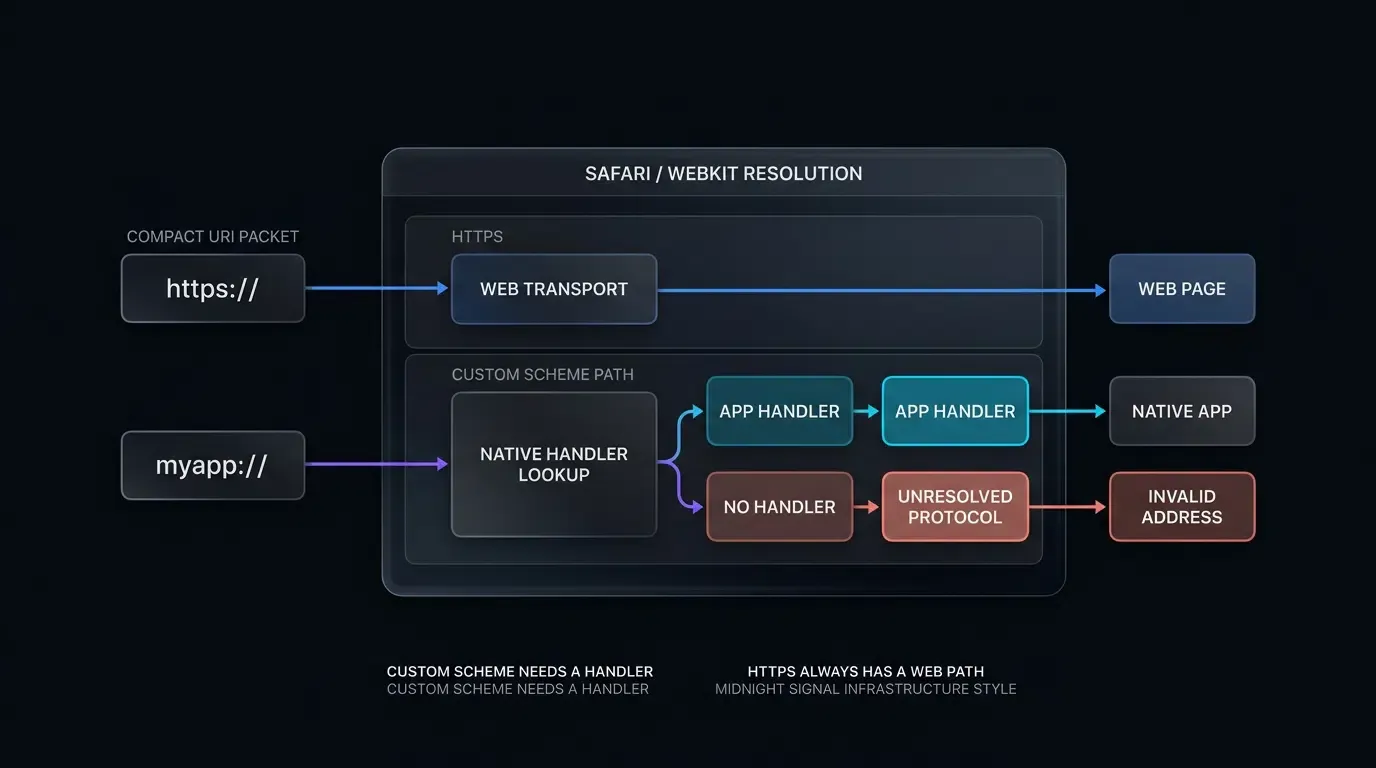
When a user interacts with a link on a mobile web page, the browser’s rendering engine evaluates the URI scheme to determine the appropriate transport protocol or application handler. In Apple Safari, powered by the WebKit engine, standard web protocols such as http:// and https:// are handled internally by the network resource loader.
When a webpage instructs Safari to navigate to a custom URI scheme (such as myapp://product/detail/1024), the operating system attempts to locate an installed application that has registered that specific scheme within its CFBundleURLTypes bundle configuration. If the target application is present, iOS can launch the native app. However, if the application is not installed on the device, the scheme cannot be resolved against standard DNS or web transport layers. Because Safari does not possess an internal web handler for custom schemes, attempting to navigate to an unhandled custom protocol can surface an alert dialog stating that Safari cannot open the page because the address is invalid.
The Sandbox Barrier: Why JavaScript Cannot Query Native Application Installation State
Frontend developers frequently attempt to circumvent this alert by writing client-side JavaScript that checks whether an application is installed before triggering the scheme. Under Apple’s operating system security and privacy architecture, this check is structurally unavailable to web content.
Mobile Safari enforces strict sandbox isolation between web content and the host operating system. Webpage JavaScript is prohibited from querying local filesystem registries, inspecting installed application packages, or checking whether an external URI scheme has an active handler. Because the browser cannot probe installation state in advance, executing an unhandled custom scheme on a device without the matching app risks triggering WebKit’s failure alert.
User Experience Damage: How Native System Alerts Inflate Bounce Rates on Web Landing Pages
Encountering a system modal stating that “the address is invalid” damages user trust and disrupts conversion funnels:
- Security Anxiety: Users may interpret “invalid address” alerts as indicators of a broken website, untrusted software, or security warnings.
- Funnel Interruption: The alert requires the user to acknowledge and dismiss a blocking dialog before interacting with the page again, increasing immediate drop-off.
- Fragmented Store Handoff: If an unhandled alert appears concurrently with secondary store redirection scripts, the transition to the App Store appears disjointed.
Why Historical Workarounds Fail in Modern WebKit Versions
The Limitations of Hidden Iframe Probing in Modern Safari
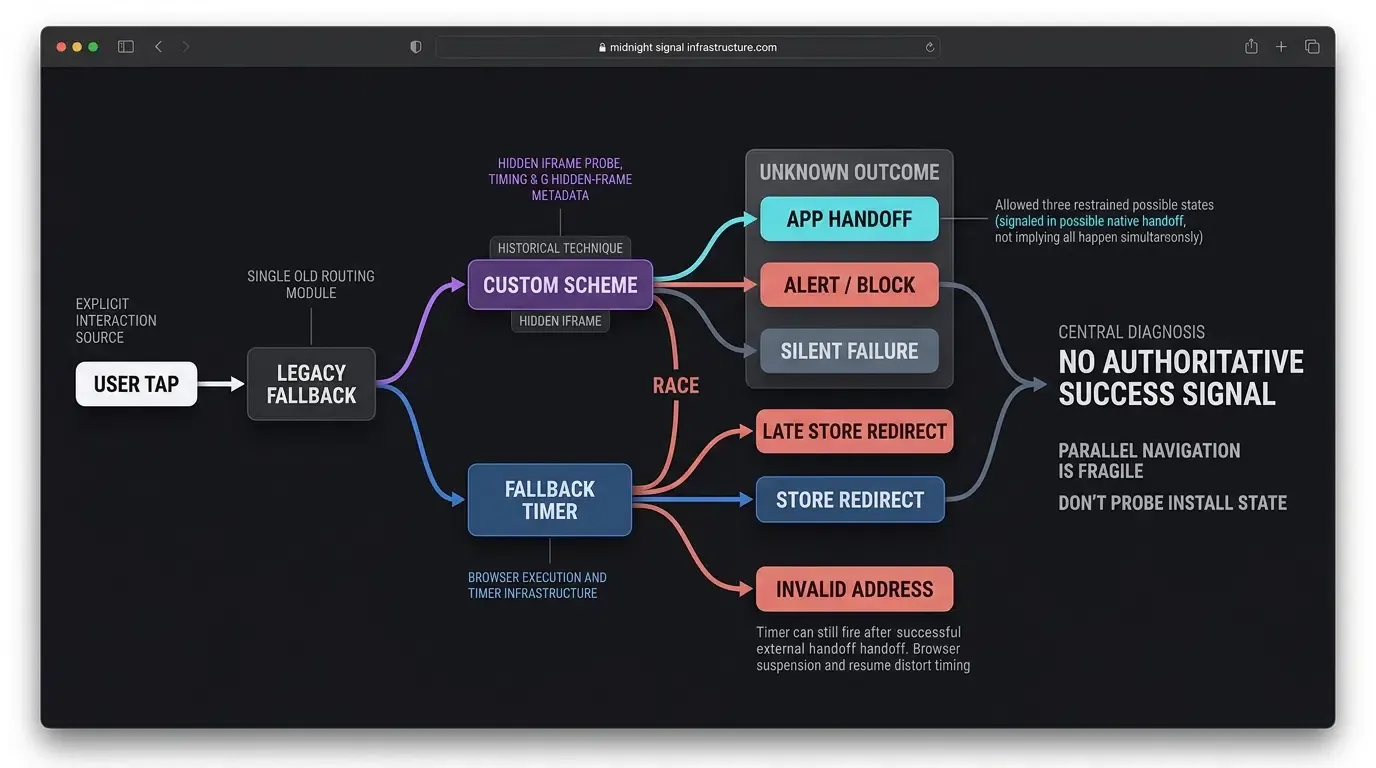
In earlier versions of iOS, developers often deployed hidden iframe probing. A script injected an invisible <iframe> element into the DOM and set its source to the custom scheme (myapp://), while running a concurrent JavaScript timer. The intent was that an installed app would launch without navigating the top-level window, while an uninstalled app would fail silently inside the frame.
In contemporary mobile browsers, this approach is unreliable:
- Modern WebKit applies navigation and sandbox restrictions that can limit external-protocol handoffs from iframes, especially sandboxed frames.
- Attempting to load unregistered schemes inside iframes can still trigger browser-level error dialogs or fail silently without providing a clean fallback.
- Because iframe probing is inconsistent across iOS releases and sandbox contexts, it should not be treated as a dependable mechanism for evaluating app presence.
Timer-Based window.location Cascades: Why Modern Browsers Restrict Automated Redirects
Another legacy technique involved executing a timer-based cascade using window.location.href:
// Legacy anti-pattern: Fragile and restricted in modern browsers
window.location.href = "myapp://product/detail";
setTimeout(function() {
    window.location.href = "https://apps.apple.com/app/id123456789";
}, 2000);
This approach creates multiple user-experience and technical failure modes:
- Concurrent Alerts: If the app is not installed, Safari can display the “address is invalid” popup upon evaluating the custom scheme, forcing the user to dismiss the alert while the background timer initiates secondary navigation.
- Unintended Redirection: If the app is installed and successfully opens, the browser may still execute the pending timer upon background resumption, redirecting the user to the App Store unnecessarily when they return to Safari.
User Activation and Browser Navigation Policies
Modern mobile browsers enforce user-activation policies that restrict unprompted navigations. WebKit limits automated window redirections and protocol handoffs originating from background timers, asynchronous callbacks, or on-load scripts without recent user interaction.
Programmatic handoffs that execute without a direct user interaction are less predictable and may be suppressed depending on browser context. For reliable routing, native app handoffs should originate directly from an explicit user gesture, such as a physical tap on an interactive element.
Why Universal Links Were Engineered by Apple as the Preferred Solution
To eliminate the failure modes of proprietary URL schemes, Apple introduced Universal Links in iOS 9. Universal Links replace custom schemes (myapp://) with standard, verified HTTPS web URLs (https://app.example.com/product/1024).
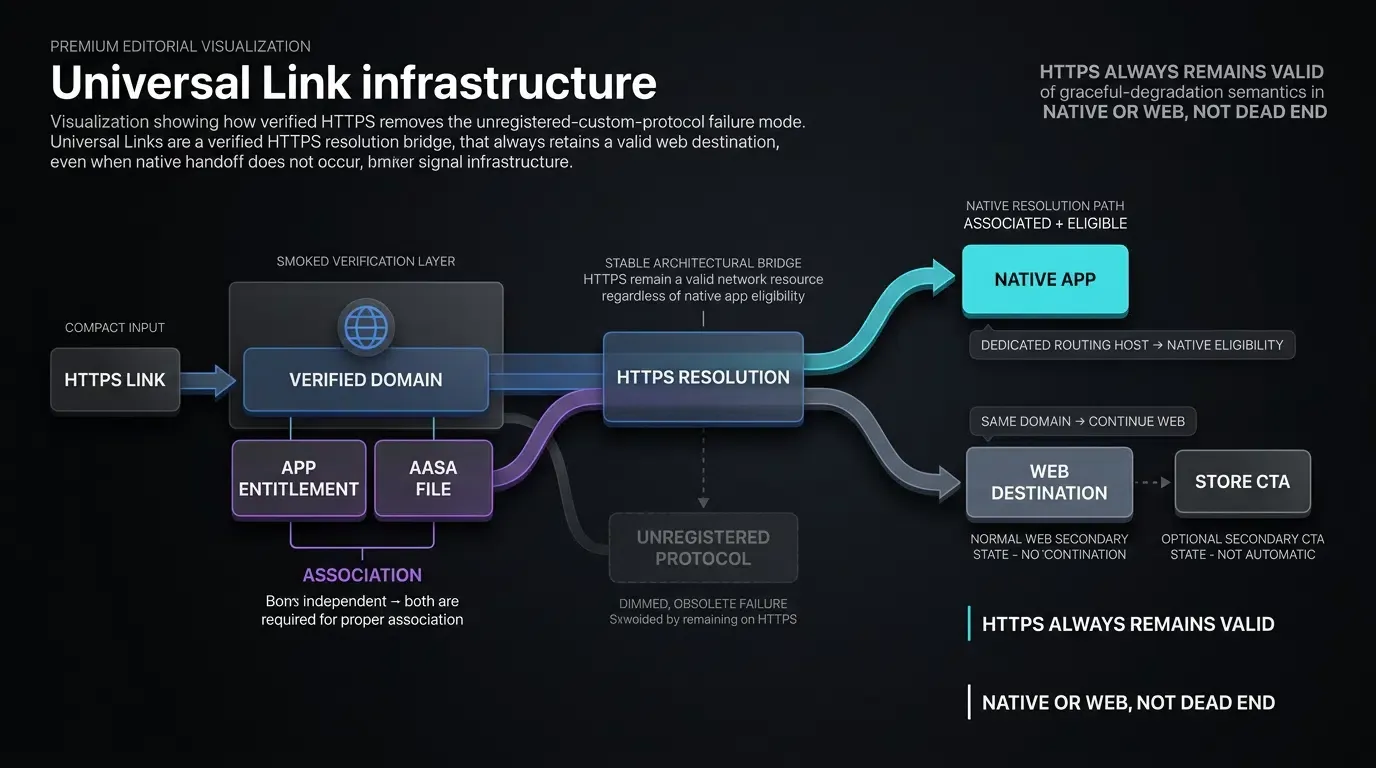
By anchoring deep linking in standard HTTPS infrastructure, Apple removed the unregistered-protocol failure mode. If the application is installed, associated, and eligible in the current navigation context, iOS routes the link directly to native handlers; if the application is not installed, Safari continues navigating the HTTPS URL as a normal web resource, loading a webpage or store fallback without protocol alerts.
How Universal Links Eliminate the Invalid Address Alert
The HTTPS Foundation: Removing the Unregistered-Protocol Failure Mode
The primary difference between a custom URL scheme and a Universal Link lies in how the browser network stack evaluates the requested URL:
- Custom Scheme (
myapp://): A non-standard protocol. WebKit cannot resolve it via DNS or standard web transport. If no registered app handles the scheme, the request can surface an invalid address failure. - Universal Link (
https://app.example.com): A fully qualified, standard HTTPS URL. WebKit resolves and loads HTTPS addresses natively.
Because a Universal Link is fundamentally a valid web URL, Safari never encounters an unregistered protocol. If native app handoff does not occur, Safari simply loads the web content hosted at that address.
The Two-Way Association: Coordinating Native Entitlements with the Hosted AASA File
Universal Links establish verified routing through an association between the mobile application binary and the website domain:
- Application Entitlement: The iOS application declares an
Associated Domainsentitlement containing the target domain string:applinks:app.example.com. - Server Declaration: The website domain hosts a JSON file at
https://app.example.com/.well-known/apple-app-site-association(AASA). This file specifies authorized Application Identifiers and path matching components. - OS-Level Resolution: When the user installs the app, iOS validates the domain association. When an associated link is tapped, the operating system evaluates whether an eligible app can handle the destination.
Graceful Web Degradation: What Happens When an App Is Not Installed
When an uninstalled user taps a Universal Link:
- The iOS operating system evaluates the URL against its registry of verified associations.
- Finding no installed app matching the domain, iOS delegates the link to Safari as standard web navigation.
- Safari loads the webpage hosted at that URL without displaying any system error alerts.
- The hosted webpage can display relevant product content, present an App Store CTA, or coordinate deferred parameter recovery.
Managing the Safari Same-Domain Navigation Caveat Using Dedicated Subdomains
When deploying Universal Links on web pages, teams must account for Safari’s same-domain navigation behavior, as documented in Apple Developer Documentation on Allowing Apps and Websites to Link to Your Content.
If a user browses a web page hosted on https://example.com/promo and taps a Universal Link pointing to the exact same domain (https://example.com/product/1024), Safari assumes the user intends to continue browsing the website and loads the web page rather than opening the native app.
Using a separately associated routing host avoids the documented same-domain continuation case and allows the Universal Link to be evaluated for native routing when its domain association is valid:
- Host the primary website on your root domain or web subdomain:
https://www.example.com. - Configure Universal Link routing through a dedicated, separately associated subdomain:
https://app.example.com.
Tapping across distinct subdomain boundaries satisfies Safari’s navigation heuristics, supporting direct native application execution.
Implementing Resilient Web-to-App Handoffs with JavaScript SDKs
Architecting Multi-Tiered Fallbacks: Universal Links First, Explicit Fallback Second
Production web-to-app architectures deploy a multi-tiered redirection cascade:
- Tier 1 (Universal Links): The primary call-to-action button invokes a verified Universal Link pointing to an associated subdomain. On devices with the app installed, this enables native routing without the unregistered-custom-scheme alert mode.
- Tier 2 (Contextual Web Fallback): If the app is not installed, the Universal Link navigates smoothly to the hosted web landing page, presenting an App Store download button.
- Tier 3 (Custom Scheme Fallback): Where legacy custom schemes (
myapp://) are maintained for older operating system versions or specific embedded containers, invoke them as a fallback that should generally originate from explicit user interaction rather than automated scripts.
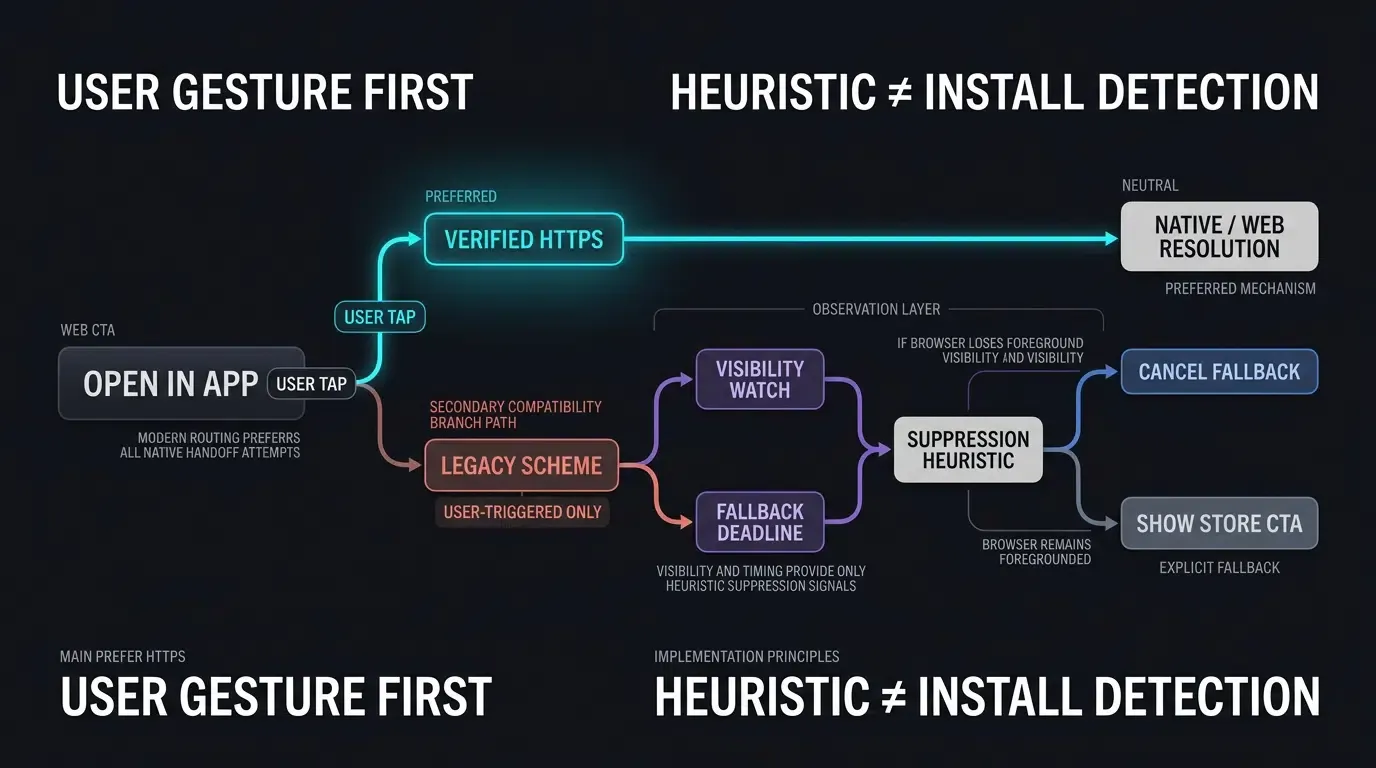
Using the Page Visibility API as a Heuristic Suppression Signal
When implementing fallback timers alongside custom schemes, client scripts evaluate whether the document has lost foreground visibility in order to cancel pending store redirects. Because JavaScript cannot directly inspect native process execution, frontend architectures utilize the WHATWG HTML Standard on Page Visibility.
When a browser tab transitions to the background following an external handoff, the script detects the visibility change:
// Illustrative fallback delay; calibrate based on application UX requirements
var fallbackTimer = setTimeout(function() {
    if (!document.hidden) {
        // Document remained visible in foreground; proceed with fallback CTA
        window.location.href = "https://apps.apple.com/app/id123456789";
    }
}, 2000);

document.addEventListener("visibilitychange", function() {
    if (document.hidden) {
        // Document became hidden; suppress pending fallback timer
        clearTimeout(fallbackTimer);
    }
});
A visibility change indicates that the document became hidden, which serves as a useful suppression signal to avoid false store redirects. However, visibility changes do not prove that a specific target application opened successfully, as user actions such as switching tabs, minimizing the browser, or locking the device also trigger background state transitions. The 2000ms delay is an illustrative heuristic and should not be treated as a standardized protocol threshold.
Binding User Gestures to Progressive Universal Link Anchors
For direct link routing, frontend developers bind progressive anchor elements directly to verified Universal Link endpoints. When user clicks occur, the browser navigates the HTTPS link, allowing iOS to intercept the route.
In advanced acquisition funnels, platforms like OpoInstall support deferred parameter restoration as a separate, auxiliary ingestion channel. By recording click-time web context and correlating it with post-install launch signals via native SDK hooks, the native application can retrieve custom campaign parameters on initial launch without altering standard Universal Link URL validation. Review the SDK integration documentation for details on integrating deferred attribution listeners alongside native Universal Link handlers.
[User Taps Web CTA Button]
             │
             ▼
[Evaluate Routing Primitive]
   ┌─────────┴─────────┐
   ▼                   ▼
[Custom Scheme: myapp://] [Universal Link: https://]
   │                           │
   ▼                           ▼
[Safari Attempts Resolution]   [OS Evaluates Association]
├─ App Resolves -> App Opens   ├─ App Installed + Eligible -> Native App
└─ No Handler / Blocked ->     └─ Not Installed ->
   May Surface "Address is        Loads Web Landing Gracefully
   Invalid" System Alert          │
                                  ▼
                                  [Presents App Store or Web Fallback]
Client-Side Implementation: Universal Link Routing and Fallback Handling
Configuring Modern Universal Link Redirection Scripts in Frontend HTML/JavaScript
The frontend implementation structures an interactive anchor element that binds directly to a verified Universal Link URL on an associated subdomain, providing a progressive enhancement fallback if script execution is blocked.
Native iOS Reception in Scene-Based Lifecycle Architectures
For scene-based iOS applications, Universal Links delivered by Safari are processed through the UIWindowSceneDelegate lifecycle: scene(_:willConnectTo:options:) on cold launch and scene(_:continue:) when the application is running or suspended in memory. The native implementation validates that the incoming NSUserActivity has an activity type of NSUserActivityTypeBrowsingWeb, extracts the webpageURL, and validates the route.
The technical implementation below demonstrates how to configure the frontend progressive anchor and handle incoming Universal Link URLs securely in native Swift.
// Web: Frontend Universal Link Handoff with Progressive Anchor Fallback
// Configures clean HTTPS Universal Link destination with client-side query sanitization.
(function() {
    var ctaButton = document.getElementById("openAppBtn");
    if (!ctaButton) return;

    // 1. Initial State: Verified Universal Link on dedicated subdomain avoids same-domain Safari continuation
    var targetBaseUrl = "https://app.example.com/detail/1024";

    // 2. Extract and sanitize dynamic query parameters from the current page URL
    var urlParams = new URLSearchParams(window.location.search);
    var rawId = urlParams.get("id") || "";
    var rawPromo = urlParams.get("promo_code") || "";
    var rawSource = urlParams.get("utm_source") || "web_landing";

    var idRegex = /^[A-Za-z0-9_-]{1,64}$/;
    var targetId = idRegex.test(rawId) ? rawId : "";
    var promoCode = idRegex.test(rawPromo) ? rawPromo : "";
    var utmSource = idRegex.test(rawSource) ? rawSource : "web_landing";

    var finalUrl = targetBaseUrl + "?utm_source=" + encodeURIComponent(utmSource);
    if (targetId.length > 0) {
        finalUrl += "&id=" + encodeURIComponent(targetId);
    }
    if (promoCode.length > 0) {
        finalUrl += "&promo_code=" + encodeURIComponent(promoCode);
    }

    // Progressive enhancement: anchor href provides direct, alert-free Universal Link navigation
    if (ctaButton.tagName.toLowerCase() === "a") {
        ctaButton.setAttribute("href", finalUrl);
    } else {
        ctaButton.addEventListener("click", function(e) {
            e.preventDefault();
            window.location.assign(finalUrl);
        });
    }
})();
// iOS: SceneDelegate.swift - Universal Link Processing & Route Sanitization
// Reference integration example. Verify method signatures and routing against your deployed architecture.
import UIKit

struct ValidatedAppRoute {
    let path: String
    let queryParams: [String: String]
}

class AppRouteValidator {
    private static let allowedHosts = Set(["app.example.com"])
    private static let allowedPathPrefixes = ["/detail/", "/promo/"]
    private static let allowedKeys = Set(["id", "promo_code", "utm_source"])

    static func validate(url: URL) -> ValidatedAppRoute? {
        guard let scheme = url.scheme?.lowercased(), scheme == "https" else {
            return nil
        }
        guard let host = url.host?.lowercased(), allowedHosts.contains(host) else {
            return nil
        }

        let path = url.path
        guard allowedPathPrefixes.contains(where: { path.hasPrefix($0) }) else {
            return nil
        }

        var sanitizedParams: [String: String] = [:]
        var seenKeys = Set<String>()

        if let components = URLComponents(url: url, resolvingAgainstBaseURL: false),
           let queryItems = components.queryItems {
            let validChars = CharacterSet(charactersIn: "abcdefghijklmnopqrstuvwxyzABCDEFGHIJKLMNOPQRSTUVWXYZ0123456789_-")
            for item in queryItems {
                // Fail-closed validation: reject URL if unknown query keys exist
                guard allowedKeys.contains(item.name), !seenKeys.contains(item.name) else {
                    return nil
                }
                seenKeys.insert(item.name)

                let value = item.value ?? ""
                if value.count <= 64 && value.rangeOfCharacter(from: validChars.inverted) == nil {
                    sanitizedParams[item.name] = value
                } else {
                    return nil
                }
            }
        }

        return ValidatedAppRoute(path: path, queryParams: sanitizedParams)
    }
}

class SceneDelegate: UIResponder, UIWindowSceneDelegate {

    var window: UIWindow?

    func scene(
        _ scene: UIScene,
        willConnectTo session: UISceneSession,
        options connectionOptions: UIScene.ConnectionOptions
    ) {
        guard let _ = (scene as? UIWindowScene) else { return }

        // Handle cold launch via Universal Link
        if let userActivity = connectionOptions.userActivities.first(where: { $0.activityType == NSUserActivityTypeBrowsingWeb }),
           let webpageURL = userActivity.webpageURL {
            processIncomingUniversalLink(url: webpageURL)
        }
    }

    func scene(_ scene: UIScene, continue userActivity: NSUserActivity) {
        // Handle warm resume via Universal Link
        if userActivity.activityType == NSUserActivityTypeBrowsingWeb,
           let webpageURL = userActivity.webpageURL {
            processIncomingUniversalLink(url: webpageURL)
        }
    }

    private func processIncomingUniversalLink(url: URL) {
        // Enforce strict allowlisting and sanitization on incoming Universal Link
        if let route = AppRouteValidator.validate(url: url) {
            DispatchQueue.main.async {
                AppNavigator.shared.navigateTo(path: route.path, params: route.queryParams)
            }
        } else {
            DispatchQueue.main.async {
                AppNavigator.shared.navigateToDefaultHome()
            }
        }
    }
}

// Application-specific navigation coordinator (not an SDK API)
class AppNavigator {
    static let shared = AppNavigator()

    func navigateTo(path: String, params: [String: String]) {
        // Execute internal UI view controller transition based on path and query parameters
    }

    func navigateToDefaultHome() {
        // Safely fallback to home screen on malformed or unrecognized deep links
    }
}
Sanitizing Inbound Parameters: Enforcing Strict Allowlist Filtering on Native Routes
In accordance with OWASP Mobile Application Security Testing Guide Guidance on Insecure Deep Links, all parameters delivered via Universal Links must be treated as untrusted input:
- Path Validation: Verify that the URL path matches an authorized allowlist of view controllers (
/detail/,/promo/). - Query Filtering: Enforce allowlisted query keys (
id,promo_code,utm_source) and discard unexpected keys. - Length & Character Boundaries: Restrict parameter values to alphanumeric character sets (
characters).
Safari Deep Linking Protocol and Error Mitigation Matrix
Comprehensive Protocol Comparison and Error Prevention Checklist
Selecting the appropriate deep linking protocol is critical to preventing WebKit navigation errors. The matrix below compares primary deep linking mechanisms across error behaviors and platform requirements:
Comparing URL Schemes, Universal Links, and Smart App Banners Across Error Behaviors
| Routing Protocol | Underlying Protocol | Behavior When App Is Installed | Behavior When App Is Not Installed | Risk of “Invalid Address” Alert |
|---|---|---|---|---|
| Custom URL Scheme | myapp:// |
Launches native application if registered | Can trigger “Address is invalid” alert in Safari | Possible (Occurs when no app handles the scheme) |
| Universal Link | https:// |
Opens the associated app when eligible in current context | Continues web navigation to hosted landing page | Low (Eliminates unregistered-scheme error mode) |
| Apple Smart App Banner | Native WebKit <meta> |
Presents native affordance to open app | Presents native affordance to view App Store | Not applicable to unregistered-custom-scheme failure |
| Custom Web Banner | JavaScript + Universal Link | Executes direct app wakeup via SDK | Triggers store redirection or web CTA | Low (Uses verified HTTPS routing) |
Frequently Asked Questions (FAQ)
Can I detect if an iOS app is installed using JavaScript before triggering a URL scheme?
How do Universal Links prevent the invalid address error in Safari?
Why does a Universal Link sometimes open the website instead of the app in Safari?
Summary and Decision Framework
The “Safari cannot open the page because the address is invalid” alert is an operational consequence of using custom URI schemes on devices where no corresponding application handler exists. Relying on legacy hidden-iframe probing or automated timer cascades introduces navigation fragility and damages web-to-app conversion funnels.
Migrating to verified Universal Links removes the unregistered-custom-protocol failure mode and provides a reliable HTTPS fallback path. By combining verified HTTPS associations with user-gesture-compliant web integration patterns, engineering teams reduce disruptive browser alerts, preserve marketing parameters across store downloads, and support reliable onboarding experiences across mobile web funnels.
To learn how to implement Universal Links and automated parameter passing, review the SDK integration documentation.
Related Materials
- Concepts: Custom URL Scheme, Universal Links, Web to App Redirection, WebKit Error Mitigation, Scene Restoration
- Technologies: Apple WebKit, iOS UIKit, Apple App Site Association (AASA), OpoInstall Web JS SDK
- Standards: IETF RFC 3986 Uniform Resource Identifier, Apple Associated Domains Specification, OWASP Mobile Application Security Testing Guide (MASTG)
- APIs:
UIApplication.shared.open,UIWindowSceneDelegate.scene(_:continue:), WHATWG HTML Page Visibility - Official Documentation & References:
- Apple Developer Documentation on Defining a Custom URL Scheme for Your App
- Apple Developer Documentation on Allowing Apps and Websites to Link to Your Content
- Apple Technical Note TN3155 on Debugging Universal Links
- WHATWG HTML Standard on Page Visibility
- OWASP Mobile Application Security Testing Guide on Insecure Deep Links
Share this article