How to run retargeting campaigns using smart app banners? Running retargeting campaigns using smart app banners requires capturing first-party web browsing context, rendering dynamic HTML banners with contextual deep-link CTAs, and routing returning users directly to matching in-app scenes while passing attribution tokens.
Web visitor retargeting using smart app banners is a growth engineering strategy that captures first-party browsing context on mobile websites and displays personalized promotional banners to route visitors directly into native application scenes. By replacing static app store links with contextual deep links, retargeting banners help preserve user intent, re-engage active users, and support long-term app engagement.
| Term | Definition | Related Entity | Search Intent Role |
|---|---|---|---|
| App Engagement | The depth, frequency, and duration of user interactions within a mobile application. | User Retention | Informational / Commercial |
| Smart App Banner | A web-based promotional component that presents dynamic app launch or download CTAs. | Web to App Redirection | Informational |
| Web to App | The architectural process of routing web browser visitors into native mobile apps. | Mobile Deep Linking | Informational |
How Web Visitor Retargeting Can Support App Engagement
The Mobile Web Intent Paradox: High Browsing Volume vs. Depressed Transaction Rates
Mobile websites represent an expansive acquisition channel, capturing top-of-funnel traffic from organic search, paid campaigns, social discovery, and content syndication. However, consumer behavior on mobile web browsers often exhibits an intent paradox: users frequently browse, research, and evaluate products on mobile web pages, while native mobile applications often provide smoother transaction pathways due to saved local state and streamlined navigation.
Mobile browsers introduce operational friction points compared to native apps, such as re-authentication requirements or multi-step web forms. When high-intent visitors browse a specific product catalog or add items to a mobile web cart, failing to provide a direct transition into the native app environment can contribute to cart abandonment and lower customer lifetime value (LTV).
Overcoming the “Lobby Drop-Off”: Why Re-Engaging Users at the Homepage Erodes Conversion
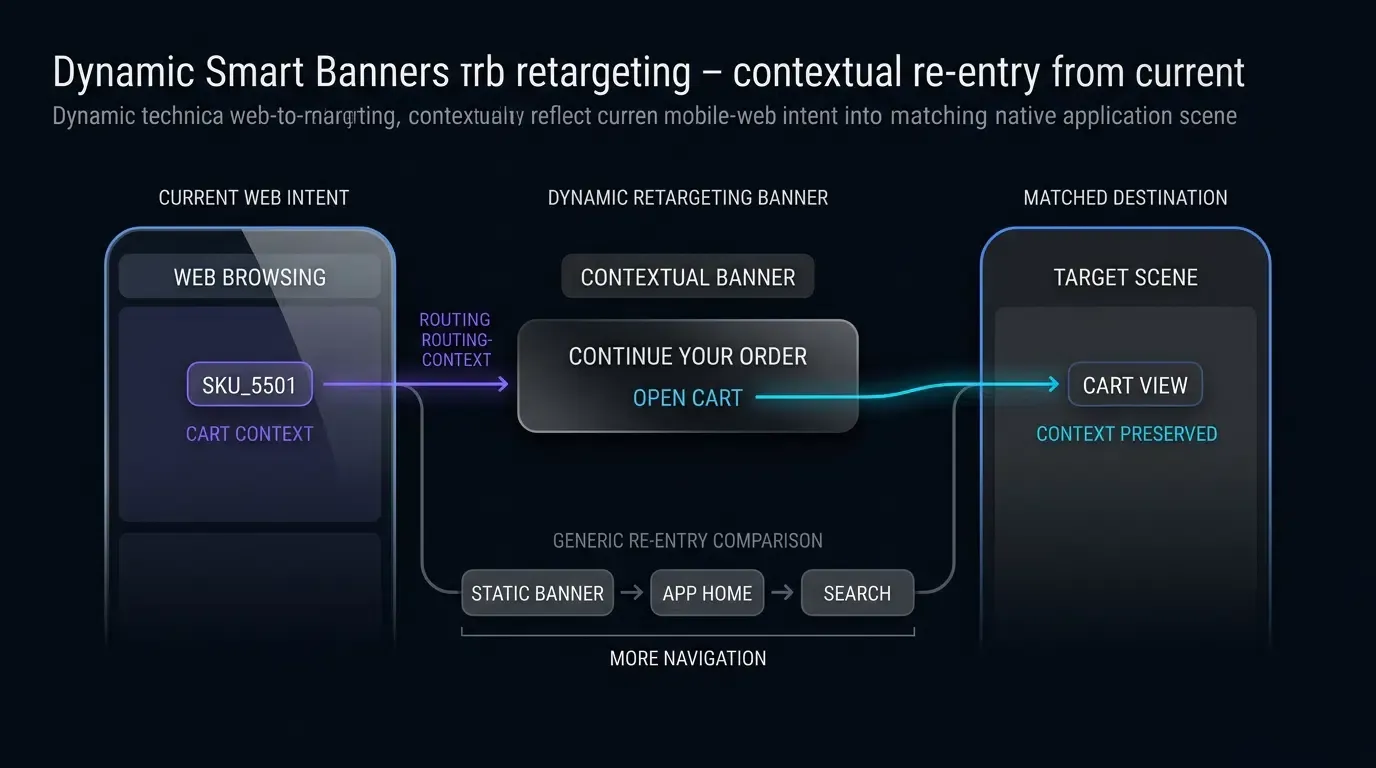
A common challenge in mobile web retargeting is deploying static banners that route returning users to the native application’s default home screen. When an active or lapsed app user browses a specific product on a mobile website, tapping a generic banner triggers an app launch that lands them in the main lobby.
This disconnect creates immediate cognitive friction. The user must manually navigate through category menus, execute search queries, or locate their shopping cart from scratch. Each manual navigation step increases drop-off risk. Dynamic Smart App Banners address this friction by pairing web-browsing context directly with deep-link routes, delivering users toward the relevant product view, pre-populated cart, or promotional landing screen within the native app.
Evaluating Time-to-Action as an Operational Friction Metric for Web Visitors
In lifecycle marketing, user attention diminishes rapidly with navigation delays. The operational metric Time-to-Action (
In non-contextual funnels,
How Does Context Stitching Transform Static Web Banners into Retargeting Tools
Capturing First-Party Web Context and Navigating Storage Lifecycles
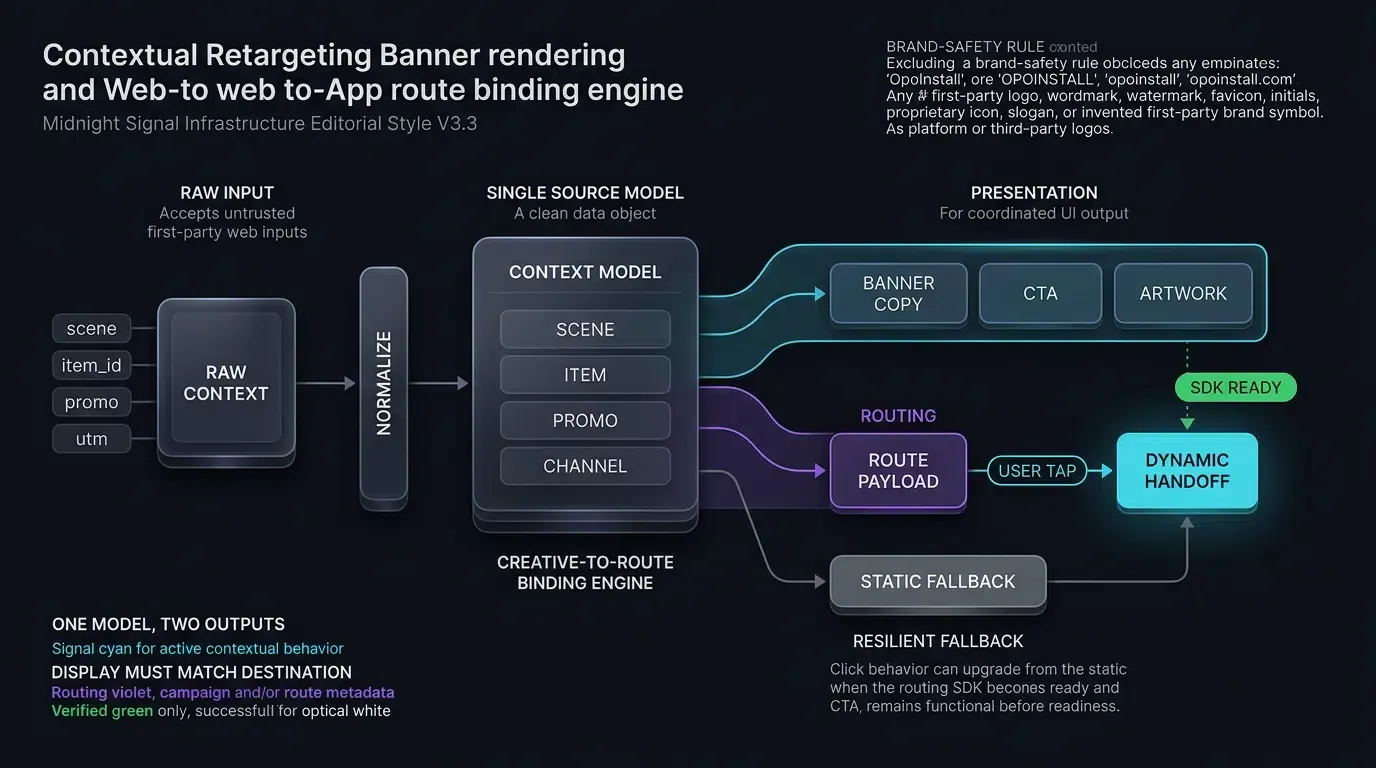
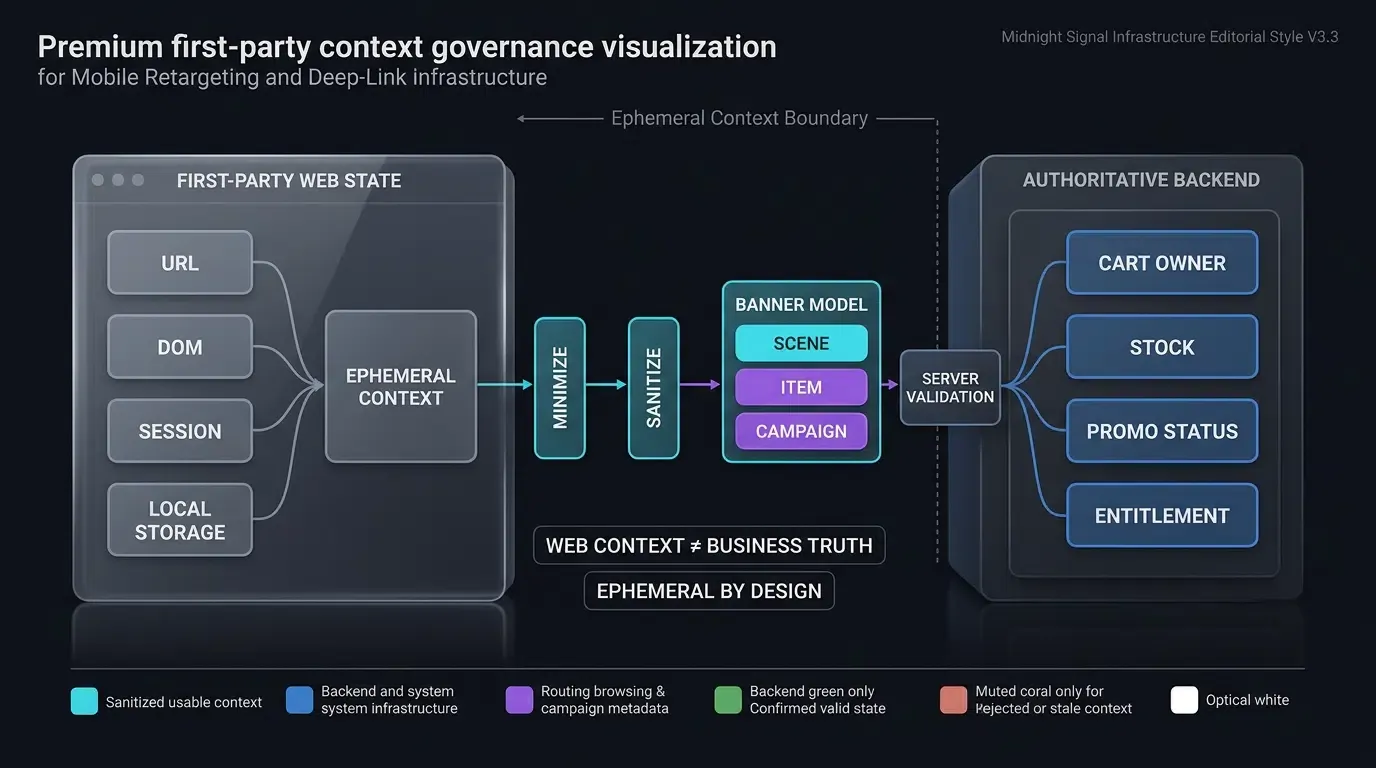
Unlike static banners that display hardcoded copy, dynamic retargeting banners inspect first-party web session data to tailor messaging. When a visitor navigates a mobile website, client-side scripts read session state from the DOM, URL query parameters, or first-party web storage (sessionStorage or localStorage):
- Viewed Product SKU: Captures the specific product identifier (e.g.,
item_id=SKU_5501) currently being viewed. - Cart Abandonment Tokens: Reads pending cart identifiers and discount eligibility flags.
- Category Affinity: Tracks high-level browsing categories (e.g.,
electronics,apparel) to personalize fallback promotions.
Architects must account for mobile browser storage lifecycles. Under modern WebKit Tracking Prevention policies, client-script-writable storage (localStorage, sessionStorage, IndexedDB) may be deleted after seven days of no user interaction with the website, depending on WebKit tracking-prevention state and recent user engagement. Browser storage must be treated as a best-effort, temporary client-side session cache, not a durable customer profile or authoritative database. Authoritative cart state, item availability, and user entitlement must always be resolved and verified on the backend.
Privacy and Consent Boundaries for Retargeting Data
Collecting and passing browsing context across web and native boundaries requires strict adherence to privacy governance:
- Data Minimization: Collect and use retargeting context only under the website and application’s applicable consent, notice, retention, and data-minimization policies.
- No PII in URLs: Avoid encoding directly identifying personal data (PII) or sensitive personal attributes into banner URLs or client-side storage.
- Ephemeral State: Treat captured browsing context as ephemeral first-party state subject to user consent preferences and platform tracking-prevention rules.
Dynamic Content Rendering: Updating Banner Copy, Artwork, and CTAs in Real Time
Once session context is extracted, the banner updates its visual layout dynamically:
- The banner title updates from generic text to contextual prompts (e.g., “Continue Your Order” or “View Product in App”).
- The CTA button shifts from a standard “GET APP” to an actionable prompt (e.g., “Open Cart”).
- Dynamic artwork displays the specific product thumbnail alongside current stock or pricing indicators.
This contextual relevance transforms the banner from a passive advertising element into an interactive utility.
Managing Cross-Domain Constraints: Recommending Dedicated Subdomains for Safari Universal Links
When deploying Universal Links on iOS, web architects must navigate Apple Safari’s same-domain navigation constraint, as documented in Apple Developer Documentation on Allowing Apps and Websites to Link to Your Content. If a user browses a web page on https://example.com and taps a Universal Link pointing to the exact same domain, Safari typically remains in the browser rather than launching the native app.
Using a separately associated routing host can avoid Safari’s documented same-domain browsing behavior, but native app opening still depends on valid Universal Link association, installed application eligibility, and platform state:
- Host the primary mobile website on
https://www.example.com. - Route Universal Link banner targets through a verified associated subdomain, such as
https://app.example.com/product/5501.
The Role of Deferred Deep Linking When Web Visitors Do Not Have the App Installed
Not all web visitors retargeted by dynamic banners have the application installed. Custom URI schemes (myapp://) may fail to resolve on uninstalled devices unless the page provides an explicit fallback.
Deferred deep linking addresses this scenario. When an uninstalled user taps a retargeting banner, the routing layer captures the intended destination context (such as the viewed SKU and active promo token) on the attribution server before redirecting the browser to Google Play or the App Store. When the user downloads and opens the app for the first time, an attribution SDK retrieves the cached parameters, enabling the native app to restore the targeted scene on first launch where supported by platform privacy policies.
Technical Mechanics of Dynamic Parameter Binding and Deep Link Routing
Structuring URL Parameters for Retargeting
A robust retargeting query string structures destination routing, promotional tokens, and campaign attribution clearly:
https://app.example.com/promo/cart?scene=cart&item_id=SKU_5501&promo_code=RESTART10&token=TK_1234567890abcdef&utm_source=web_retargeting
This payload cleanly separates routing instructions (scene=cart), business identifiers (item_id), and tracking context (utm_source).
Enforcing Client-Side Data Sanitization and Length Constraints
In accordance with OWASP Mobile Application Security Testing Guide Guidance on Insecure Deep Links, all parameters extracted from web URLs or client-side storage must be treated as untrusted input.
Before constructing deep-link handoff payloads:
- Validate
sceneidentifiers against an allowlist of approved view targets (cart,product_detail,promo_hub). - Enforce alphanumeric regular expression filters (e.g.,
^[A-Za-z0-9_-]{1,64}$) on IDs and promo codes. - Enforce strict length boundaries on route tokens (e.g., 16 to 128 characters) and validate campaign strings against an application-defined character and length policy, rejecting or replacing invalid values with safe defaults.
- Treat route tokens as untrusted, opaque references. Possession of a route token must never authorize cart access, discounts, or account actions without authenticated backend validation.
Triggering Direct Handoffs via Web SDK Handoff Handlers
A representative OpoInstall Web SDK integration may expose a wake-or-install handoff method; verify the exact method name, constructor, CDN path, and parameter schema against the production SDK version deployed in your environment.
OpoInstall supports cross-platform web-to-app handoff and deferred parameter recovery; the exact routing mechanism and SDK contract depend on the deployed SDK version. Review the SDK integration documentation for full interface parameters and API specifications.
[User Browses Mobile Web Page (e.g. Views SKU_1024)]
                         │
                         ▼
[Script Captures Context in First-Party Session]
                         │
                         ▼
[Dynamic Smart Banner Renders Contextual Offer]
                         │
                         ▼
[User Taps "CONTINUE IN APP"]
                         │
     ┌───────────────────┴───────────────────┐
     ▼                                       ▼
[App Installed]                     [App Not Installed]
     │                                       │
     ▼                                       ▼
[Universal Link / App Link]         [Web Routing Layer]
     │                                       │
     ▼                                       ▼
[Direct Native App Launch]          [Store Download / Deferred Link]
     │                                       │
     └───────────────────┬───────────────────┘
                         ▼
          [Native SDK Parameter Retrieval]
                         │
                         ▼
          [Server State & Auth Validation]
                         │
                         ▼
          [Renders Targeted In-App Scene]
How to Architect Frictionless In-App Scene Restoration for Web Retargeting
Handling Cold Starts vs. Background Resumes Across Android and iOS Lifecycles
Native mobile applications must handle incoming retargeting payloads across distinct execution states:
- Warm Resume: The app is already running in background memory. On Android, the intent delivers to
onNewIntentwhen the Activity task configuration reuses an existing instance. On iOS, the link delivers toscene(_:continue:). The app router navigates the active view hierarchy without re-initializing global state. - Cold Start: The app process is terminated. The operating system boots the process and delivers the intent during startup. The native architecture must capture the payload, verify initialization, and route to the destination scene once primary UI hierarchies are loaded.
Isolating Routing Identifiers from User Authentication Credentials
Deep link URLs and web-to-app banners should carry only routing intent (what product or cart to display) and opaque, short-lived reference tokens. Under no circumstances should deep link query strings carry raw database user IDs, account passwords, or unhashed session tokens.
The native app must independently resolve user authentication from its secure local credential store (such as iOS Keychain or Android Keystore) before rendering private user information or modifying account state.
Implementing Server-Side Authorization Gates for Exclusive Discounts and Cart State
A valid deep-link query string does not guarantee that a promotion remains active or that the user is entitled to claim it. Client applications must submit route tokens to the backend for server-side verification:
- Verify that promotional coupon codes (
promo_code) are unexpired and eligible for the authenticated user. - Validate that cart tokens are active and belong to the authenticated account.
- Enforce single-use idempotency and replay checks to prevent coupon abuse.
Managing Stale Targets: Fallback Routing for Expired Deals and Out-of-Stock Inventory
Web visitors may click retargeting banners days after a promotional deal has ended or an inventory item has sold out. If an app attempts to load a deleted product without state validation, users encounter broken interfaces.
Production architectures enforce a two-tier fallback gate:
- Client-Side Route Verification: If the target scene is unrecognized or payload syntax is malformed, route immediately to the default home screen.
- Server-Side State Verification: If the route is valid but the item is sold out or the promo code is expired, display an informative modal notification (e.g., “This item is currently sold out, but explore related recommendations”) and transition smoothly to the relevant category hub.
Frontend and Mobile Implementation for Contextual Retargeting Banners
Structuring the Contextual Frontend Script with Pre-Attached Fallbacks
The implementation assumes a modular banner component container is already mounted within the webpage markup. The script applies defensive null-checks, platform classification, local storage cool-down checks, and strict parameter sanitization before binding to client-side SDK handlers. Personalization of banner text is derived directly from the normalized data model to ensure strict alignment between displayed copy and the underlying handoff payload.
Android Intent Interception and Parameter Extraction in Kotlin
On Android, the primary MainActivity captures incoming deep-link intents across onCreate and onNewIntent, normalizing data types and validating payload fields against an allowlist before delegating to backend authorization.
iOS SceneDelegate Universal Link Processing in Swift
On iOS, SceneDelegate.swift processes Universal Links delivered via scene(_:continue:), parsing parameters, sanitizing inputs, and routing to native view controllers on the main actor.
The implementation below demonstrates frontend banner configuration and native Android (Kotlin) and iOS (Swift) parameter extraction. Representative OpoInstall integration patterns are shown below; verify package names, SDK classes, CDN paths, callback names, and method signatures against the currently deployed OpoInstall SDK release.
// JavaScript: Contextual Extraction, Platform Gating, and Representative SDK Integration
// Representative integration pattern. Verify script URLs, constructor names, and API signatures
// against the production OpoInstall SDK release deployed in your environment.
// Note: Assumes a reusable banner component markup with the target IDs is already mounted in the DOM.
(function() {
    var DISMISS_KEY = "retarget_smart_banner_dismissed_at";
    var COOL_DOWN_MS = 7 * 24 * 60 * 60 * 1000; // 7-day cool-down window

    // 1. Platform Evaluation: Suppress banner on desktop environments
    function getMobilePlatform() {
        var ua = navigator.userAgent || navigator.vendor || window.opera;
        if (/Android/i.test(ua)) return "android";
        var isIOS = /iPad|iPhone|iPod/.test(ua) && !window.MSStream;
        var isIPadOS = (navigator.platform === "MacIntel" && navigator.maxTouchPoints > 1);
        if (isIOS || isIPadOS) return "ios";
        return "unsupported_desktop";
    }

    var platform = getMobilePlatform();
    if (platform === "unsupported_desktop") {
        return; // Suppress on desktop browsers
    }

    // 2. Dismissal Verification via Local Storage
    function shouldShowBanner() {
        try {
            var dismissedAt = localStorage.getItem(DISMISS_KEY);
            if (!dismissedAt) return true;
            var now = new Date().getTime();
            return (now - parseInt(dismissedAt, 10)) > COOL_DOWN_MS;
        } catch (e) {
            return true; // Fallback to display if localStorage is restricted
        }
    }

    if (!shouldShowBanner()) {
        return;
    }

    // DOM Null-Guards: Verify elements exist before manipulation
    var bannerContainer = document.getElementById("dynamicRetargetBanner");
    var closeBtn = document.getElementById("bannerCloseBtn");
    var actionBtn = document.getElementById("bannerActionBtn");
    var bannerTitle = document.getElementById("bannerTitle");

    if (!bannerContainer || !actionBtn || !bannerTitle) {
        return;
    }

    // 3. Extract and Sanitize First-Party Browsing Context (Consistent 'item_id' schema)
    var urlParams = new URLSearchParams(window.location.search);
    var rawScene = urlParams.get("scene") || "cart";
    var rawId = urlParams.get("item_id") || "";
    var rawPromo = urlParams.get("promo_code") || "";
    var rawToken = urlParams.get("token") || "";
    var rawChannel = urlParams.get("utm_source") || "web_retargeting";

    function sanitizePayload() {
        var allowedScenes = ["cart", "product_detail", "promo_hub"];
        var targetScene = allowedScenes.indexOf(rawScene) !== -1 ? rawScene : "cart";

        var idRegex = /^[A-Za-z0-9_-]{1,64}$/;
        var targetId = idRegex.test(rawId) ? rawId : "";

        // Independent promo code validation (Strict 32-character limit matching Native contract)
        var promoRegex = /^[A-Za-z0-9_-]{1,32}$/;
        var promoCode = promoRegex.test(rawPromo) ? rawPromo : "";

        var tokenRegex = /^[A-Za-z0-9_-]{16,128}$/;
        var routeToken = tokenRegex.test(rawToken) ? rawToken : "";

        var channelRegex = /^[A-Za-z0-9_-]{1,32}$/;
        var channelCode = channelRegex.test(rawChannel) ? rawChannel : "web_retargeting";

        var payload = {
            scene: targetScene,
            token: routeToken
        };
        if (targetId.length > 0) {
            payload.item_id = targetId;
        }
        if (promoCode.length > 0) {
            payload.promo_code = promoCode;
        }

        return {
            payload: payload,
            channelCode: channelCode
        };
    }

    var normalizedData = sanitizePayload();

    // Personalize Banner Messaging Based on Normalized Model
    if (normalizedData.payload.scene === "cart") {
        bannerTitle.textContent = "Continue Your Order";
        actionBtn.textContent = "OPEN CART";
    } else if (normalizedData.payload.scene === "product_detail") {
        bannerTitle.textContent = "View Product in App";
        actionBtn.textContent = "VIEW ITEM";
    }

    bannerContainer.style.display = "block";

    // Handle User Dismissal
    if (closeBtn) {
        closeBtn.addEventListener("click", function() {
            try {
                localStorage.setItem(DISMISS_KEY, new Date().getTime().toString());
            } catch (e) {}
            bannerContainer.style.display = "none";
        });
    }

    // 4. Initial Static Fallback Route
    function executeStaticFallback() {
        if (platform === "android") {
            window.location.href = "https://play.google.com/store/apps/details?id=com.example.app";
        } else if (platform === "ios") {
            window.location.href = "https://apps.apple.com/app/id123456789";
        }
    }

    var activeClickHandler = function() {
        executeStaticFallback();
    };

    actionBtn.addEventListener("click", function(e) {
        activeClickHandler(e);
    });

    // 5. Dynamic Script Injection for SDK Integration
    var script = document.createElement("script");
    script.type = "text/javascript";
    script.src = "https://web.cdn.opoinstallcloud.com/openinstall.js";

    script.onload = function() {
        try {
            if (typeof OpenInstall === "function") {
                var openInstall = new OpenInstall({
                    appKey: "YOUR_OPOINSTALL_APPKEY",
                    onready: function() {
                        var m = this;
                        // Upgrade to dynamic deep link handoff once SDK is ready
                        activeClickHandler = function() {
                            var sanitized = sanitizePayload();
                            m.wakeupOrInstall({
                                data: sanitized.payload,
                                channelCode: sanitized.channelCode
                            });
                        };
                    }
                }, actionBtn);
            }
        } catch (err) {
            // Retain pre-attached static fallback if initialization throws
        }
    };

    script.onerror = function() {
        // Retain pre-attached static fallback if network request fails
    };

    document.head.appendChild(script);
})();
// Android: MainActivity.kt - Re-Engagement Intent Processing & Route Validation Gate
// Representative integration pattern. Verify package names, callback classes, and method signatures
// against the production OpoInstall SDK release deployed in your environment.
package com.example.app.ui

import android.content.Intent
import android.os.Bundle
import android.util.Log
import androidx.appcompat.app.AppCompatActivity
import com.opoinstall.api.OpoInstall
import com.opoinstall.api.listener.AppWakeUpAdapter
import com.opoinstall.api.model.AppData
import org.json.JSONObject

data class ValidatedRetargetingRoute(
    val scene: String,
    val targetId: String,
    val promoCode: String,
    val routeToken: String,
    val rawKeys: Set<String>
)

object OpoInstallPayloadAdapter {
    /**
     * Normalizes heterogeneous SDK data representations (JSON String, Map, or JSONObject)
     * into a canonical application-owned retargeting model with strict fail-closed type checking.
     */
    fun normalize(rawPayload: Any?): ValidatedRetargetingRoute? {
        if (rawPayload == null) return null

        val stringMap = when (rawPayload) {
            is String -> parseJsonStringStrict(rawPayload)
            is Map<*, *> -> parseMapStrict(rawPayload)
            is JSONObject -> parseJsonObjectStrict(rawPayload)
            else -> {
                Log.w("PayloadAdapter", "Unsupported SDK payload type: ${rawPayload.javaClass.name}")
                null
            }
        } ?: return null

        val scene = stringMap["scene"] ?: ""
        if (scene.isEmpty()) return null

        return ValidatedRetargetingRoute(
            scene = scene,
            targetId = stringMap["item_id"] ?: "",
            promoCode = stringMap["promo_code"] ?: "",
            routeToken = stringMap["token"] ?: "",
            rawKeys = stringMap.keys
        )
    }

    private fun parseJsonStringStrict(rawJson: String): Map<String, String>? {
        return try {
            val json = JSONObject(rawJson)
            parseJsonObjectStrict(json)
        } catch (e: Exception) {
            Log.e("PayloadAdapter", "JSON string parsing failed", e)
            null
        }
    }

    private fun parseJsonObjectStrict(json: JSONObject): Map<String, String>? {
        val map = mutableMapOf<String, String>()
        for (key in json.keys()) {
            val value = json.opt(key)
            // Fail-closed: reject non-String types to prevent type coercion exploits
            if (value !is String) {
                Log.w("PayloadAdapter", "Rejected non-string payload value for key: $key")
                return null
            }
            map[key] = value
        }
        return map
    }

    private fun parseMapStrict(rawMap: Map<*, *>): Map<String, String>? {
        val map = mutableMapOf<String, String>()
        for ((key, value) in rawMap) {
            if (key !is String || value !is String) {
                Log.w("PayloadAdapter", "Rejected non-string key or value in raw map: $key")
                return null
            }
            map[key] = value
        }
        return map
    }
}

object RetargetingRouteValidator {
    private val allowedKeys = setOf("scene", "item_id", "promo_code", "token")
    private val allowedScenes = setOf("cart", "product_detail", "promo_hub")

    fun validate(payload: ValidatedRetargetingRoute): ValidatedRetargetingRoute? {
        // Step 1: Strict fail-closed key validation (reject unknown payload keys)
        if (!allowedKeys.containsAll(payload.rawKeys)) {
            return null
        }

        // Step 2: Validate scene against strict allowlist
        if (!allowedScenes.contains(payload.scene)) {
            return null
        }

        // Step 3: Enforce alphanumeric and length limits on target identifier
        val alphanumericRegex = Regex("^[A-Za-z0-9_-]+$")
        if (payload.targetId.isNotEmpty() && (payload.targetId.length > 64 || !payload.targetId.matches(alphanumericRegex))) {
            return null
        }
        if (payload.promoCode.isNotEmpty() && (payload.promoCode.length > 32 || !payload.promoCode.matches(alphanumericRegex))) {
            return null
        }

        // Step 4: Validate route token format
        if (payload.routeToken.isNotEmpty() && (payload.routeToken.length !in 16..128 || !payload.routeToken.matches(alphanumericRegex))) {
            return null
        }

        return payload
    }
}

class MainActivity : AppCompatActivity() {

    override fun onCreate(savedInstanceState: Bundle?) {
        super.onCreate(savedInstanceState)
        setContentView(R.layout.activity_main)

        // Process cold-start retargeting intent
        intent?.let { handleRetargetingIntent(it) }
    }

    override fun onNewIntent(intent: Intent) {
        super.onNewIntent(intent)
        setIntent(intent)

        // Process warm-resume retargeting intent when Activity is reused
        handleRetargetingIntent(intent)
    }

    private fun handleRetargetingIntent(intent: Intent) {
        OpoInstall.getInstance().getWakeUp(intent, object : AppWakeUpAdapter() {
            override fun onWakeUp(appData: AppData?) {
                if (appData == null) return

                val rawPayload = appData.data
                if (rawPayload == null) return

                // Step 1: Normalize vendor SDK payload directly via adapter
                val canonicalPayload = OpoInstallPayloadAdapter.normalize(rawPayload)
                val validatedRoute = canonicalPayload?.let { RetargetingRouteValidator.validate(it) }

                if (validatedRoute != null) {
                    // Step 2: Validate server authorization and resource state using authenticated app session
                    BackendRouteAuthorizer.verifyRouteAuthorization(validatedRoute.scene, validatedRoute.targetId, validatedRoute.routeToken) { isAuthorized ->
                        runOnUiThread {
                            if (isAuthorized) {
                                executeTargetNavigation(validatedRoute)
                            } else {
                                executeLobbyFallback("Requested retargeting deal or item has expired.")
                            }
                        }
                    }
                } else {
                    runOnUiThread {
                        executeLobbyFallback("Malformed or unauthorized retargeting payload.")
                    }
                }
            }
        })
    }

    private fun executeTargetNavigation(route: ValidatedRetargetingRoute) {
        Log.i("AppNavigator", "Navigating to retargeting scene: ${route.scene}")
        // Dispatch to internal navigation controller
    }

    private fun executeLobbyFallback(reason: String) {
        Log.w("AppNavigator", "Safe fallback to home lobby: $reason")
        // Display notice and route to default home view
    }
}

// App-specific backend authorization placeholder (not an OpoInstall SDK API)
object BackendRouteAuthorizer {
    fun verifyRouteAuthorization(scene: String, targetId: String, token: String, callback: (Boolean) -> Unit) {
        // Fail-closed placeholder: must connect to live backend authorization API.
        // Production backend verifies active user session, token expiry, cart ownership, and single-use idempotency.
        val isAuthorized = false
        callback(isAuthorized)
    }
}
// iOS: SceneDelegate.swift - Universal Link Processing & Route Validation Gate
// Representative integration pattern. Verify package names, callback classes, and method signatures
// against the production OpoInstall SDK release deployed in your environment.
import UIKit
import libOpoInstallSDK

struct ValidatedRetargetingRoute {
    let scene: String
    let targetId: String
    let promoCode: String
    let routeToken: String
    let rawKeys: Set<String>
}

class OpoInstallPayloadAdapter {
    /**
     * Normalizes heterogeneous SDK data representations (Dictionary, JSON String, or custom object)
     * into an application-owned canonical model with strict fail-closed type checking.
     */
    static func normalize(rawPayload: Any?) -> ValidatedRetargetingRoute? {
        guard let payload = rawPayload else { return nil }

        if let dict = payload as? [String: Any] {
            return normalizeDictionaryStrict(dict)
        } else if let jsonString = payload as? String, let data = jsonString.data(using: .utf8) {
            do {
                if let dict = try JSONSerialization.jsonObject(with: data, options: []) as? [String: Any] {
                    return normalizeDictionaryStrict(dict)
                }
            } catch {
                NSLog("[PayloadAdapter] JSON deserialization failed: %@", error.localizedDescription)
                return nil
            }
        }
        return nil
    }

    private static func normalizeDictionaryStrict(_ dict: [String: Any]) -> ValidatedRetargetingRoute? {
        for (key, value) in dict {
            guard value is String else {
                NSLog("[PayloadAdapter] Rejected non-string value for key: %@", key)
                return nil
            }
        }

        guard let scene = dict["scene"] as? String, !scene.isEmpty else {
            return nil
        }

        let targetId = dict["item_id"] as? String ?? ""
        let promoCode = dict["promo_code"] as? String ?? ""
        let routeToken = dict["token"] as? String ?? ""
        let keys = Set(dict.keys)

        return ValidatedRetargetingRoute(
            scene: scene,
            targetId: targetId,
            promoCode: promoCode,
            routeToken: routeToken,
            rawKeys: keys
        )
    }
}

class RetargetingRouteValidator {
    private static let allowedKeys: Set<String> = ["scene", "item_id", "promo_code", "token"]
    private static let allowedScenes: Set<String> = ["cart", "product_detail", "promo_hub"]

    static func validate(payload: ValidatedRetargetingRoute) -> ValidatedRetargetingRoute? {
        // Step 1: Fail-closed key validation (reject unknown payload keys)
        guard payload.rawKeys.isSubset(of: allowedKeys) else {
            return nil
        }

        // Step 2: Validate scene against strict allowlist
        guard allowedScenes.contains(payload.scene) else {
            return nil
        }

        // Step 3: Enforce alphanumeric and length limits on target identifier and promo code
        let validChars = CharacterSet(charactersIn: "abcdefghijklmnopqrstuvwxyzABCDEFGHIJKLMNOPQRSTUVWXYZ0123456789_-")
        if !payload.targetId.isEmpty {
            guard payload.targetId.count <= 64, payload.targetId.rangeOfCharacter(from: validChars.inverted) == nil else {
                return nil
            }
        }
        if !payload.promoCode.isEmpty {
            guard payload.promoCode.count <= 32, payload.promoCode.rangeOfCharacter(from: validChars.inverted) == nil else {
                return nil
            }
        }

        // Step 4: Validate route token format
        if !payload.routeToken.isEmpty {
            guard payload.routeToken.count >= 16 && payload.routeToken.count <= 128,
                  payload.routeToken.rangeOfCharacter(from: validChars.inverted) == nil else {
                return nil
            }
        }

        return payload
    }
}

class SceneDelegate: UIResponder, UIWindowSceneDelegate, OpoInstallDelegate {

    var window: UIWindow?

    func scene(
        _ scene: UIScene,
        willConnectTo session: UISceneSession,
        options connectionOptions: UIScene.ConnectionOptions
    ) {
        guard let _ = (scene as? UIWindowScene) else { return }

        // Initialize OpoInstall SDK
        OpoInstallSDK.initWith(self)

        // Handle cold launch via Universal Link
        if let userActivity = connectionOptions.userActivities.first(where: { $0.activityType == NSUserActivityTypeBrowsingWeb }) {
            OpoInstallSDK.continue(userActivity)
        }
    }

    func scene(_ scene: UIScene, continue userActivity: NSUserActivity) {
        // Handle warm resume via Universal Link
        if userActivity.activityType == NSUserActivityTypeBrowsingWeb {
            OpoInstallSDK.continue(userActivity)
        }
    }

    // OpoInstallDelegate Wakeup Callback
    func getWakeUpParams(_ appData: OpoInstallData?) {
        guard let data = appData, let rawPayload = data.data else {
            return
        }

        // Step 1: Normalize vendor SDK payload representation with strict type checking
        guard let canonicalPayload = OpoInstallPayloadAdapter.normalize(rawPayload: rawPayload),
              let validatedRoute = RetargetingRouteValidator.validate(payload: canonicalPayload) else {
            DispatchQueue.main.async {
                self.executeLobbyFallback(reason: "Malformed or unauthorized retargeting payload")
            }
            return
        }

        // Step 2: Validate server authorization and resource state using authenticated app session
        BackendRouteAuthorizer.shared.verifyRouteAuthorization(scene: validatedRoute.scene, targetId: validatedRoute.targetId, token: validatedRoute.routeToken) { isAuthorized in
            DispatchQueue.main.async {
                if isAuthorized {
                    self.executeTargetNavigation(route: validatedRoute)
                } else {
                    self.executeLobbyFallback(reason: "Resource expired or unauthorized")
                }
            }
        }
    }

    private func executeTargetNavigation(route: ValidatedRetargetingRoute) {
        NSLog("[AppNavigator] Navigating to retargeting scene: %@", route.scene)
        // Execute internal view controller transition
    }

    private func executeLobbyFallback(reason: String) {
        NSLog("[AppNavigator] Safe fallback to home lobby: %@", reason)
        // Display notice and route to root view controller
    }
}

// App-specific backend authorization placeholder (not an OpoInstall SDK API)
class BackendRouteAuthorizer {
    static let shared = BackendRouteAuthorizer()

    func verifyRouteAuthorization(scene: String, targetId: String, token: String, completion: @escaping (Bool) -> Void) {
        // Fail-closed placeholder: must connect to live backend authorization API.
        // Production backend verifies user session, token expiry, cart ownership, and single-use idempotency.
        let isAuthorized = false
        completion(isAuthorized)
    }
}
Thread-Safe Navigation Execution: Preserving UI Thread Safety
Scene callbacks arrive on the UIKit lifecycle; asynchronous authorization callbacks should marshal UI mutations back to the main actor or UI thread (DispatchQueue.main.async in Swift, runOnUiThread in Kotlin) to maintain thread safety and prevent visual rendering glitches.
Web to App Retargeting Funnel and Performance Measurement Matrix
Telemetry Gates for Web-to-App Retargeting
To evaluate retargeting campaign performance empirically, growth teams track four primary funnel metrics:
- Banner Click-Through Rate (CTR): The proportion of mobile web page visitors who tap the dynamic Smart App Banner.
- Click-to-App-Open Rate (CAOR): The percentage of banner clicks that result in a verified native app open.
- Scene Restoration Success Rate: The percentage of deep-linked app sessions that successfully validate and render the target scene without falling back to the home lobby.
- Downstream Conversion Rate (CVR): The proportion of retargeted users who complete a core action (such as checkout or registration) within a defined attribution window (for example, 24 hours).
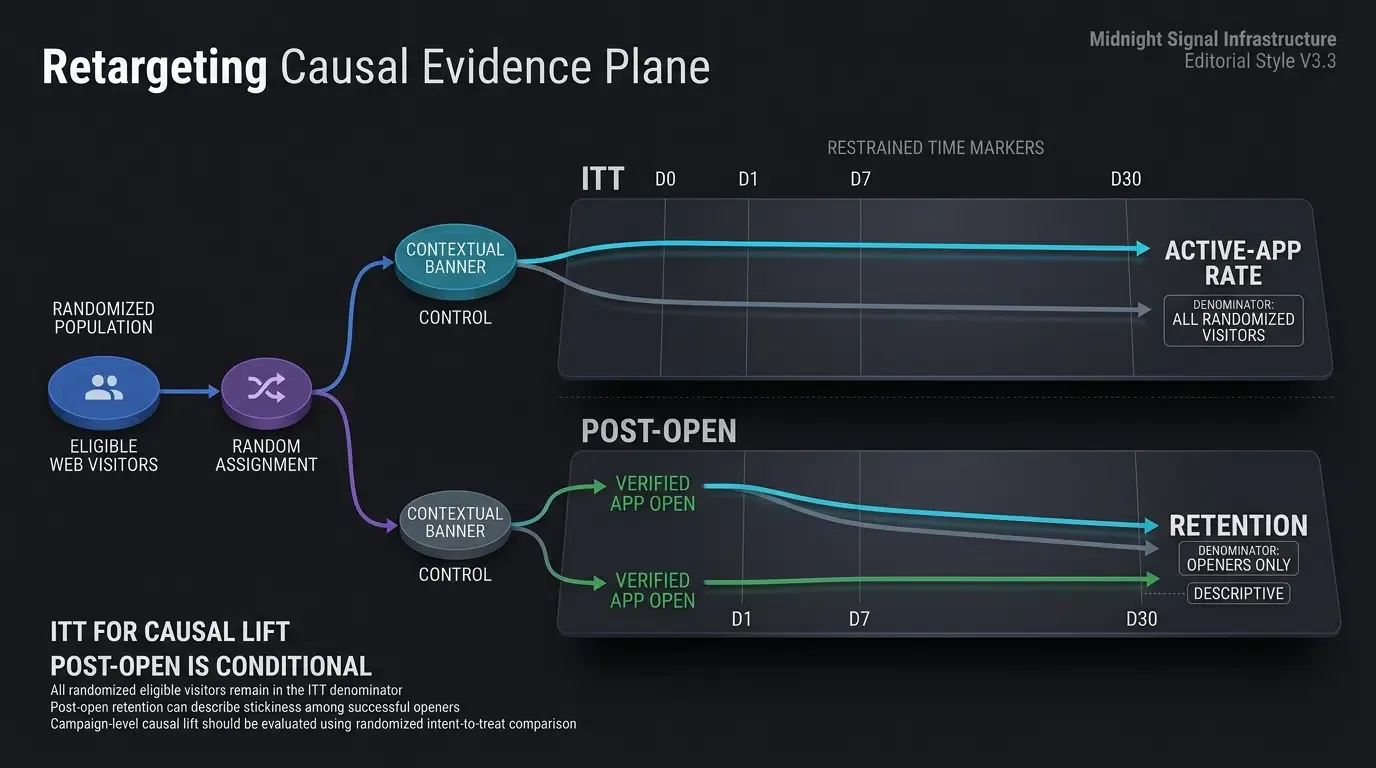
Auditing Retention Curves: Controlled Cohort Experimentation for Retargeted Visitors
Re-engagement efficacy must be evaluated through controlled experimentation that clearly distinguishes Intent-to-Treat (ITT) business lift from conditional post-open retention:
-
Intent-to-Treat (ITT) Active-App Rate (
): To evaluate causal lift across all eligible web visitors without post-treatment conditioning, data teams compare randomized visitor cohorts exposed to contextual banners against a randomized holdout group exposed to generic banners or standard web navigation: -
Conditional Post-Open Retention (
): To analyze app stickiness among users who successfully completed the web-to-app handoff, teams monitor retention conditioned on initial app launch:
Conditional retention (
Illustrative Web-to-App Retargeting Channel Evaluation Matrix
The table below contrasts primary web-to-app banner approaches across technical capabilities and operational characteristics:
| Funnel Dimension | Static Web Banner | Native Safari Banner | Dynamic Retargeting Banner (OpoInstall) |
|---|---|---|---|
| Targeting Precision | Generic (All users see same copy) | Fixed App Store metadata | Dynamic (SKU, cart, or category specific) |
| Cross-Platform Reach | Broad web-browser rendering | Safari on supported Apple platforms only | Broad cross-browser (Android, iOS, Chrome, Safari) |
| In-App Handoff Target | Default home lobby | Default home or static argument | Deep-linked target scene (cart, product, promo) |
| Dismissal Management | Unmanaged / basic cookie | Safari-controlled suppression | Developer-configured cool-down window |
| Downstream Engagement | Empirical (Measure per cohort/channel) | Empirical (Measure per cohort/channel) | Empirical (Measure per cohort/channel) |
Frequently Asked Questions (FAQ)
How do dynamic smart app banners differ from static smart banners?
How does web-to-app retargeting preserve context if the user has uninstalled the app?
How do I prevent web-to-app retargeting banners from causing Cumulative Layout Shift (CLS)?
Summary and Decision Framework
Retargeting mobile web visitors via dynamic Smart App Banners bridges the gap between top-of-funnel browsing traffic and native app experiences with preserved context. Relying on generic home screen prompts or static store links discards valuable purchase intent and may introduce additional conversion friction that should be measured against acquisition efficiency.
By capturing first-party web browsing signals, rendering personalized HTML banners, and executing verified deep-link handoffs into native view controllers, engineering and growth teams reduce conversion friction and support sustained app engagement. Downstream retention gains and campaign ROI should be validated empirically through controlled cohort experiments.
To explore cross-platform web banner integration and dynamic deep linking architectures, consult the SDK integration documentation.
Related Materials
-
Concepts: App Engagement, Web to App Redirection, Dynamic Smart App Banners, Scene Restoration, Retargeting Funnels
-
Technologies: Universal Links, Android App Links, Deferred Deep Linking, W3C Web Storage
-
Standards: IETF RFC 3986 Uniform Resource Identifier, Apple Associated Domains Specification, Android Digital Asset Links Protocol, OWASP Mobile Application Security Testing Guide (MASTG)
-
APIs / Integration Patterns: Web-to-app deep-linking integration pattern, Android
getIntent, iOSUIWindowSceneDelegate -
Official Documentation & References:
Share this article