Tesla Deploys Cybercab in Austin? This commercial milestone marks a notable development in physical transport as Tesla officially transitions its purpose-built, steering-wheel-free robotaxi from closed testing to public urban operations in Texas. Formally showcased for passenger rides on September 3, 2026, at an invite-only launch event in Austin, the two-seater vehicle eliminates traditional manual controls—including steering wheels, pedals, and mirrors—in favor of a camera-based autonomous driving system. While the rollout remains subject to federal safety rules, and NHTSA continues to scrutinize autonomous driving performance, the real-world deployment highlights a critical technological challenge: coordinating seamless handoffs between a passenger’s mobile application and an autonomous vehicle.
The Tesla Cybercab Austin Deployment and Operating Model
At a Glance
- Texas records showed 45 Cybercabs registered as Tesla initiated limited passenger service in Austin on September 3, 2026.
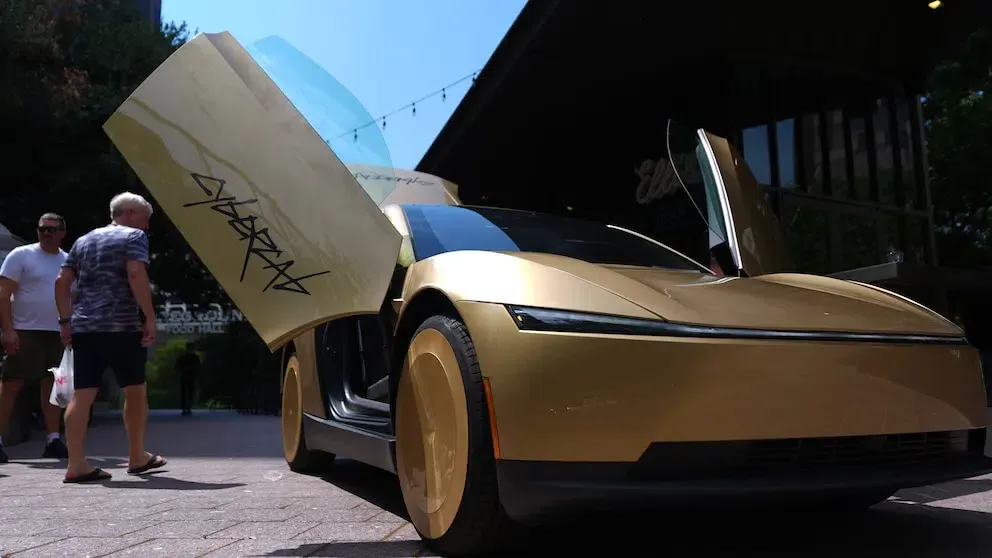
- The purpose-built two-seater features butterfly doors, no steering wheel, and no accelerator or brake pedals, operating entirely on a camera-based driving system.
- The deployment remains subject to federal safety evaluations as regulators review operational data and vehicle exemption requirements.
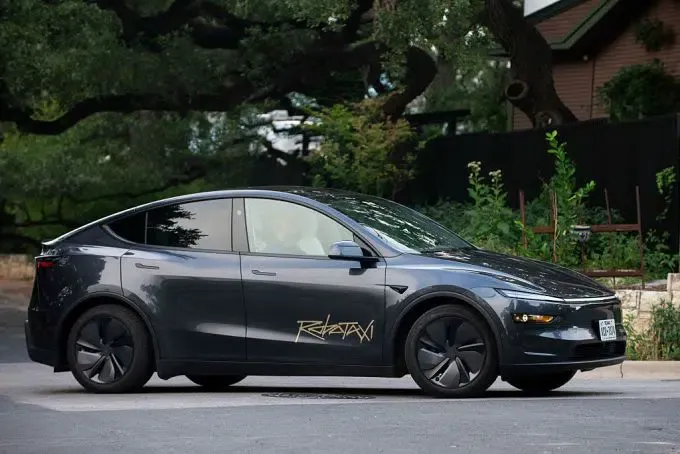
The rollout of the Cybercab represents a shift from earlier autonomous ride-hailing deployments. Historically, autonomous fleets operated by Waymo, Zoox, and Tesla relied primarily on production passenger cars, such as the Jaguar I-Pace or Tesla Model Y, modified with external sensor suites and computing units. The Cybercab is designed specifically for autonomous ride-hailing, utilizing a dedicated two-passenger chassis tailored for automated fleet operations.
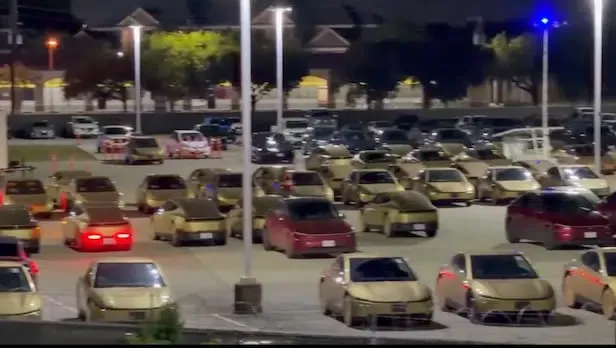
According to state registration records and launch coverage reported by Reuters and the Austin American-Statesman, Texas records showed 45 Cybercabs registered as Tesla initiated limited passenger service in Austin. The service operates within designated geofenced areas, expanding on earlier tests conducted with modified Model Y vehicles.
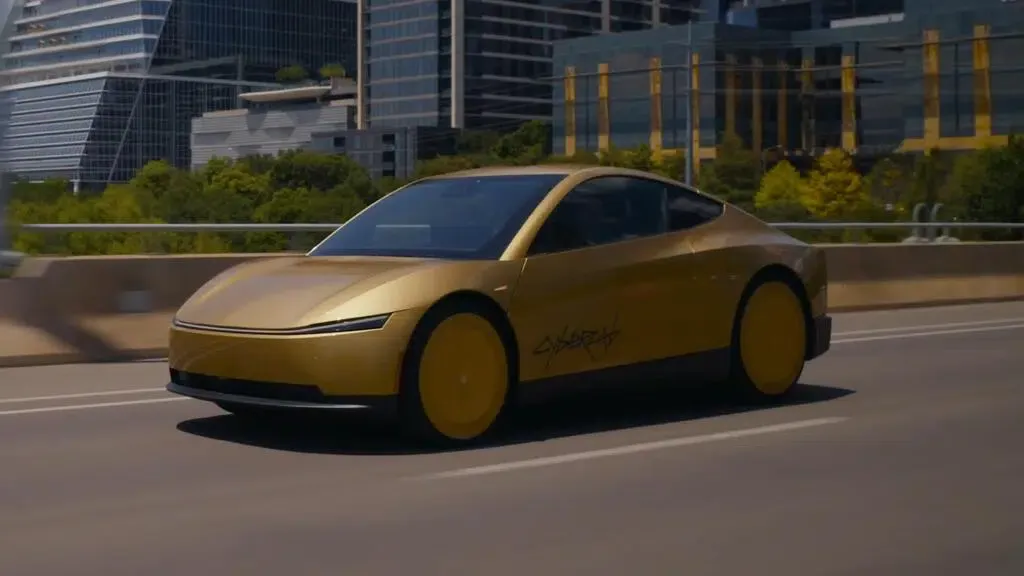
Operating without in-cabin human drivers places significant focus on the underlying autonomous driving platform. Tesla relies primarily on its camera-based vision system rather than the lidar-heavy sensor stacks used by some rivals. The rollout remains subject to federal safety rules, while the National Highway Traffic Safety Administration (NHTSA) continues to scrutinize autonomous-driving systems and evaluate the regulatory exemptions required for wider deployment, particularly in reduced-visibility conditions such as heavy fog, rain, and severe sun glare.
Documented Boarding Workflows and Vehicle-to-Device Interactions
Removing human drivers from the vehicle requires a complete restructuring of the passenger boarding and ride-management process. Without an operator present to unlock doors, confirm passenger boarding, or assist with routing, the mobile application and vehicle display system must handle all passenger interactions.
According to the official Tesla Cybercab Rider Guide, the vehicle follows a structured sequence of interactions to guide riders through pickup, transit, and drop-off.
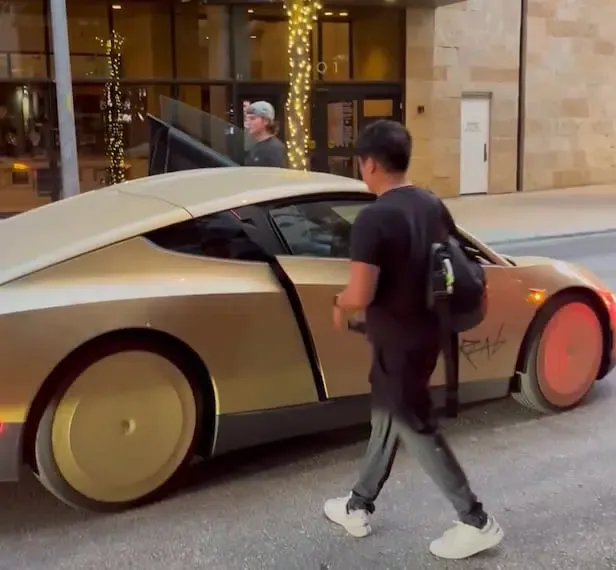
Documented Vehicle Access and Boarding Protocol
The passenger journey follows a coordinated sequence between the mobile app and vehicle hardware:
- Visual Matching and Pickup: When the Cybercab arrives at a pickup location, its rear lightbar illuminates red while the front lightbar displays a specific color assigned to the user’s Robotaxi app, allowing riders to identify their assigned car.
- Phone Detection and Door Opening: When the requester approaches, Cybercab detects the phone associated with the ride request and can automatically open the door, provided its sensors verify the path is clear of obstructions. Passengers can also use manual exterior door buttons if needed.
- Passenger Readiness and Ride Start: The vehicle’s cabin camera monitors interior occupancy. Before the trip can start, all occupants must fasten their seatbelts, close the doors and trunk, and confirm the ride by touching Start Ride on the central display.
The diagram below illustrates the observable user interaction flow from initial booking through trip completion:
[Mobile App Booking]
  Robotaxi App (Destination & Hail) ──> Dispatch & Front Lightbar Color Assigned
                                                     │
                                                     ▼
[Arrival & Ingress]
  Cybercab Arrives ──> Phone Detected ──> Door Opens ──> Passenger Buckles In
                                                              │
                                                              ▼
[In-Cabin Transit]
  Touchscreen "Start Ride" ──> Active Route & Cabin Controls ──> Destination Reached
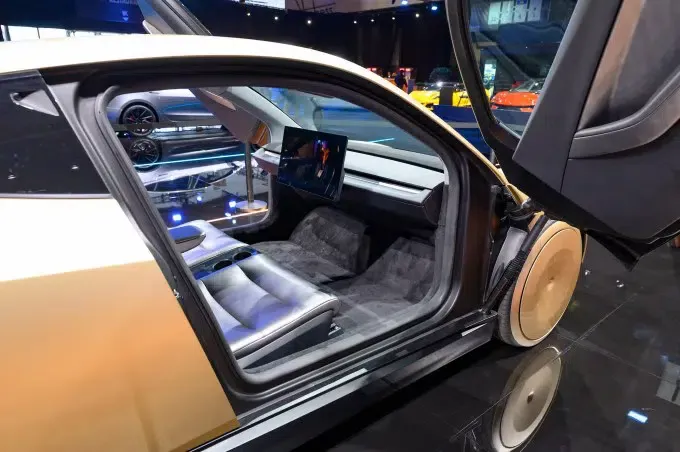
During transit, passenger interactions shift to the vehicle’s central touchscreen, which displays trip progress, estimated arrival times, climate settings, and media applications. For safety, the vehicle provides multiple methods to halt a ride: passengers can select Pull Over on the touchscreen, make a request via the mobile app, or press an overhead physical STOP button. In a power-loss emergency, the mechanical release allows occupants to open the door manually without electrical power; when fully activated during an active ride, pulling the lever firmly also causes Cybercab to end the trip and stop as soon as safely possible.
System Interfaces and Documented Interaction States
The deployment of steering-wheel-free vehicles highlights how user interfaces must adapt when physical vehicle controls are removed. In traditional ride-hailing, human drivers handle route adjustments and safety checks. In an autonomous robotaxi, the passenger’s mobile phone and the in-cabin touchscreen divide these responsibilities across distinct operational stages.
Interface Responsibility Across the Ride Lifecycle
The table below outlines how specific tasks are partitioned across documented system touchpoints:
| Journey Stage | Primary Interface Surface | Documented Interaction Mechanism | Key Functional Responsibility |
|---|---|---|---|
| Ride Booking | Robotaxi Mobile App | Destination entry and fare confirmation | Trip reservation and dispatch assignment |
| Vehicle Identification | Exterior Lightbars & App | App-matched color code on front lightbar | Visual curb identification and confirmation |
| Passenger Boarding | Vehicle Door & Phone Detection | Automatic unlatch upon detecting requester’s phone | Physical ingress with obstruction override |
| Ride Initiation | In-Cabin Touchscreen | Seatbelt confirmation & Start Ride touch prompt | Ensuring passenger readiness before transit |
| In-Transit Adjustments | Touchscreen & Mobile App | On-screen media, climate controls, and app-based re-routing | Cabin comfort and mobile destination changes |
| Emergency Interventions | Touchscreen, App & STOP Button | Multi-channel pull over and mechanical door lever | Initiating controlled stops or emergency exit |
By separating tasks between personal mobile devices and in-cabin displays, many critical cabin and safety controls remain available through the in-cabin touchscreen even if the rider cannot use their phone, while route destinations are managed securely via the app.
Engineering Checklist: Designing Interfaces for Autonomous Transport
Building software workflows for autonomous vehicle fleets requires careful coordination between mobile interfaces and physical vehicle hardware.
System Integration & UX Checklist
- Provide Manual Fallback Options: Ensure mobile booking interfaces offer clear manual overrides, such as on-screen door buttons, if automatic phone detection encounters localized interference.
- Design Multi-Surface Controls: Allow critical in-ride functions, such as destination changes and emergency pull-over requests, to be accessible from both the user’s phone and the in-vehicle touchscreen.
- Automate Session Data Removal: Ensure in-cabin media and connected service data is automatically cleared from the vehicle after each trip concludes.
- Enforce Passenger Eligibility Requirements: Implement app-level verification to support platform safety rules, such as service policies specifying that guests under 13 are not permitted and riders aged 13–17 must be accompanied by an adult.
By structuring systems around clear fallbacks and redundant control points, development teams can build passenger experiences that remain reliable across complex real-world transportation environments.
Frequently Asked Questions (FAQ)
How does Cybercab identify the correct passenger for pickup?
What safety mechanisms allow passengers to stop the vehicle in an emergency?
Why does Tesla omit lidar and radar in favor of a camera-only autonomous system?
Key Takeaways for Engineering Teams
The public deployment of the Cybercab in Austin reflects the broader transition toward software-defined mobility. When steering wheels, pedals, and mirrors are eliminated, vehicle operations become entirely dependent on software-mediated communication between passengers and machines.
For software engineers, building for autonomous transport requires designing multi-device workflows that prioritize clarity, state synchronization, and fail-safe redundancy. As physical interfaces are replaced by digital touchpoints, maintaining reliable handoffs between personal devices and physical hardware will remain essential for the future of connected transportation.
References
-
Tesla. Cybercab Rider Guide: North America Publication. https://www.tesla.com/robotaxi/riderguides
-
Reuters. Tesla offering Cybercab rides in limited areas of Austin, Texas. https://www.reuters.com/business/autos-transportation/teslas-cybercab-event-set-thursday-with-few-details-2026-09-03/
-
Austin American-Statesman. Live updates: Tesla unveils Cybercab robotaxi in Austin. https://www.statesman.com/story/business/2026/09/03/tesla-cybercab-austin-launch-event-elon-musk/75057035007/
-
AP News. Musk launches steering-wheel-free taxi service in bet riders lose no control fears. https://apnews.com/article/tesla-musk-cybercab-robotaxi-austin-launch-76e38b748142268260a79bd72071f7f8
-
TechCrunch. The Cybercab is Tesla’s fork in the road moment. https://techcrunch.com/2026/09/03/tesla-cybercab-launch-austin-robotaxi/
-
Ynet News. Tesla Cybercab arrives in Austin as robotaxi rollout expands. https://www.ynetnews.com/tech-and-digital/article/hj0rsrvugg
Share this article



