How to track mobile app installs with UTM parameters? UTM tracking captures campaign parameters from web landing pages when users move to app store downloads, allowing installed apps to recover acquisition data after the first launch. Implementing this process requires extracting tagged URLs on web landing pages, preserving context during app store redirection, and restoring metadata inside native mobile apps. This process is implemented through deferred deep linking systems that connect web parameter extraction with native SDK retrieval.
UTM tracking in mobile marketing is the process of capturing and preserving campaign query parameters across web and app acquisition flows so post-install events can be mapped back to their originating campaigns. Solutions like OpoInstall implement this framework by connecting web parameter extraction with native SDK retrieval.
Key Takeaways
- UTM parameter mapping: Preserves
utm_source,utm_medium,utm_campaign,utm_term, andutm_contentacross store redirection boundaries. - Deferred deep linking: Connects pre-install web visits with post-install app launches.
- Campaign parameter restoration: Restores acquisition metadata collected before installation.
- First-launch parameter retrieval: Returns restored parameters to native application code after startup.
Why Standard UTM Tracking Breaks Across App Store Download Boundaries
Historically, digital marketing campaigns relied on web cookies and HTTP session states to maintain campaign attribution. When a user clicks an ad on desktop or mobile web, browser analytics tools extract query parameters appended to the URL and store them in local cookies. A tracking URL containing UTM parameters acts as the entry point for web-to-app attribution workflows. This mechanism functions reliably as long as the entire user journey remains within the same browser container.
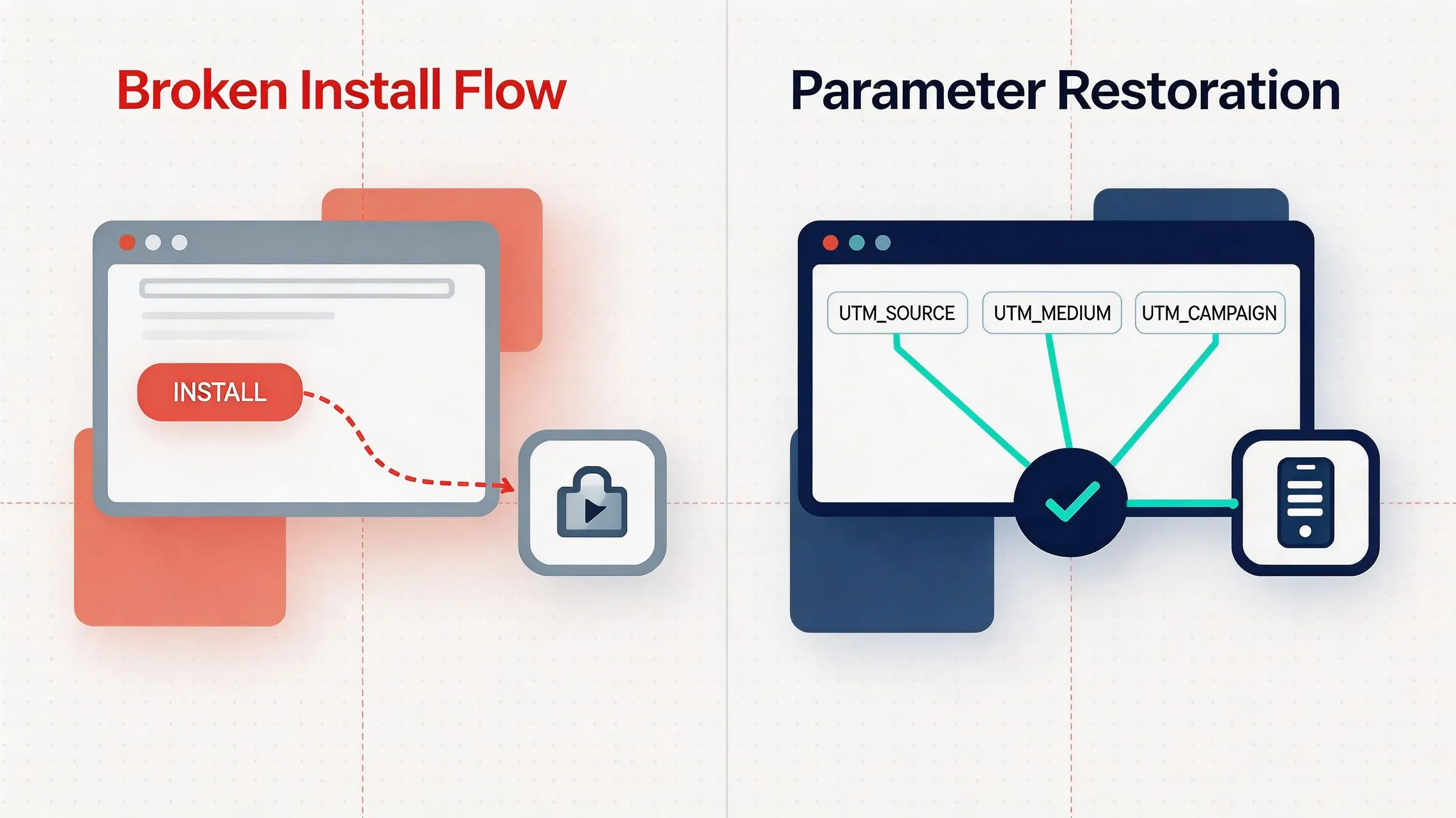
However, when a mobile web campaign requires the user to download a native application, app store redirects interrupt the direct transfer of browser campaign parameters. Redirecting users from a mobile browser to an app store creates an install flow where browser session context is usually unavailable after users complete an app store installation. Because standard app store installation flows generally do not transfer browser URL parameters directly into newly installed apps, incoming web URL query strings are not forwarded to the native application installer.
This causes installs to lose their original campaign parameters. Without a specialized restoration pipeline, new app installations are registered as unattributed or organic downloads, preventing marketing teams from accurately calculating Return on Ad Spend (ROAS). Restoring campaign visibility requires deploying a deferred deep linking system that buffers web query parameters in temporary matching infrastructure during store redirection. Conversion tracking depends on consistent mapping between web campaign parameters and native app events.
The 5 Core UTM Parameters Used for Mobile App Install Tracking
Standardizing campaign tagging requires mapping Urchin Tracking Module keys to specific operational dimensions before launching web-to-app promotions:
utm_source: Identifies the specific traffic origin or ad network driving the user (such asgoogle,facebook, orinfluencer_newsletter).utm_medium: Categorizes the marketing mechanism or ad format utilized for distribution (such ascpc,banner,social_feed, oremail).utm_campaign: Tracks individual promotional initiatives or seasonal marketing campaigns (such assummer_sale_2026oruser_referral_promo).utm_term: Captures targeted search keywords or paid audience segment identifiers in performance advertising.utm_content: Differentiates between specific ad creative variants, CTA buttons, or A/B test variations within the same campaign.
Web-to-App Parameter Preservation and Redirection Pipeline
Preserving campaign context across installation boundaries relies on an automated multi-step processing flow. When a web visitor interacts with a campaign landing page, the client-side JavaScript library inspects the window location object to extract query keys.
[Web Visitor Opens Landing Page] ──> [Web JS SDK Parses UTMs] ──> [Temporary Context Buffer]
                                                                            │
                                                                            ▼
[Analytics Warehouse] <── [Native SDK Callback] <── [First Launch] <── [Store Download]
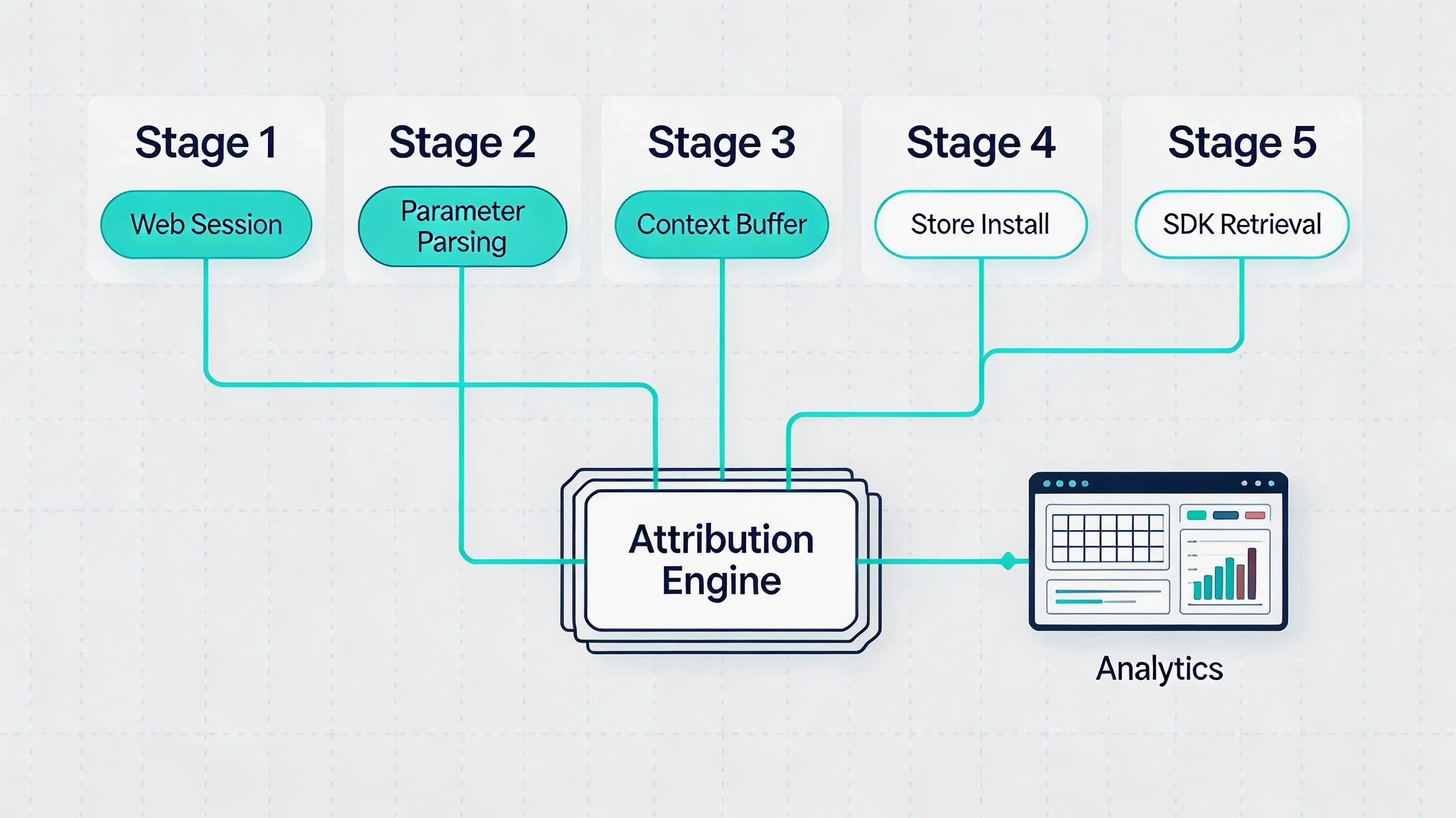
Upon extracting the parameters, the web script stores the captured metadata through privacy-preserving matching methods, which may include server-side matching or platform-specific handoff methods depending on the attribution implementation. When the newly installed app opens for the first time, the integrated native SDK queries local system caches or matching endpoints, restoring the captured UTM parameter payload and dispatching it to local analytics listeners.
Technical Details on Web Query Extraction and Native SDK Restoration
Client-Side Query Extraction
Executing web-side parameter parsing requires inspecting the browser window URL immediately upon document initialization. Client-side scripts utilize the standard URLSearchParams interface to extract query keys without introducing page render delays.
const urlParams = new URLSearchParams(window.location.search);
const utmParams = {
    utm_source: urlParams.get('utm_source') || '',
    utm_medium: urlParams.get('utm_medium') || '',
    utm_campaign: urlParams.get('utm_campaign') || '',
    utm_term: urlParams.get('utm_term') || '',
    utm_content: urlParams.get('utm_content') || ''
};
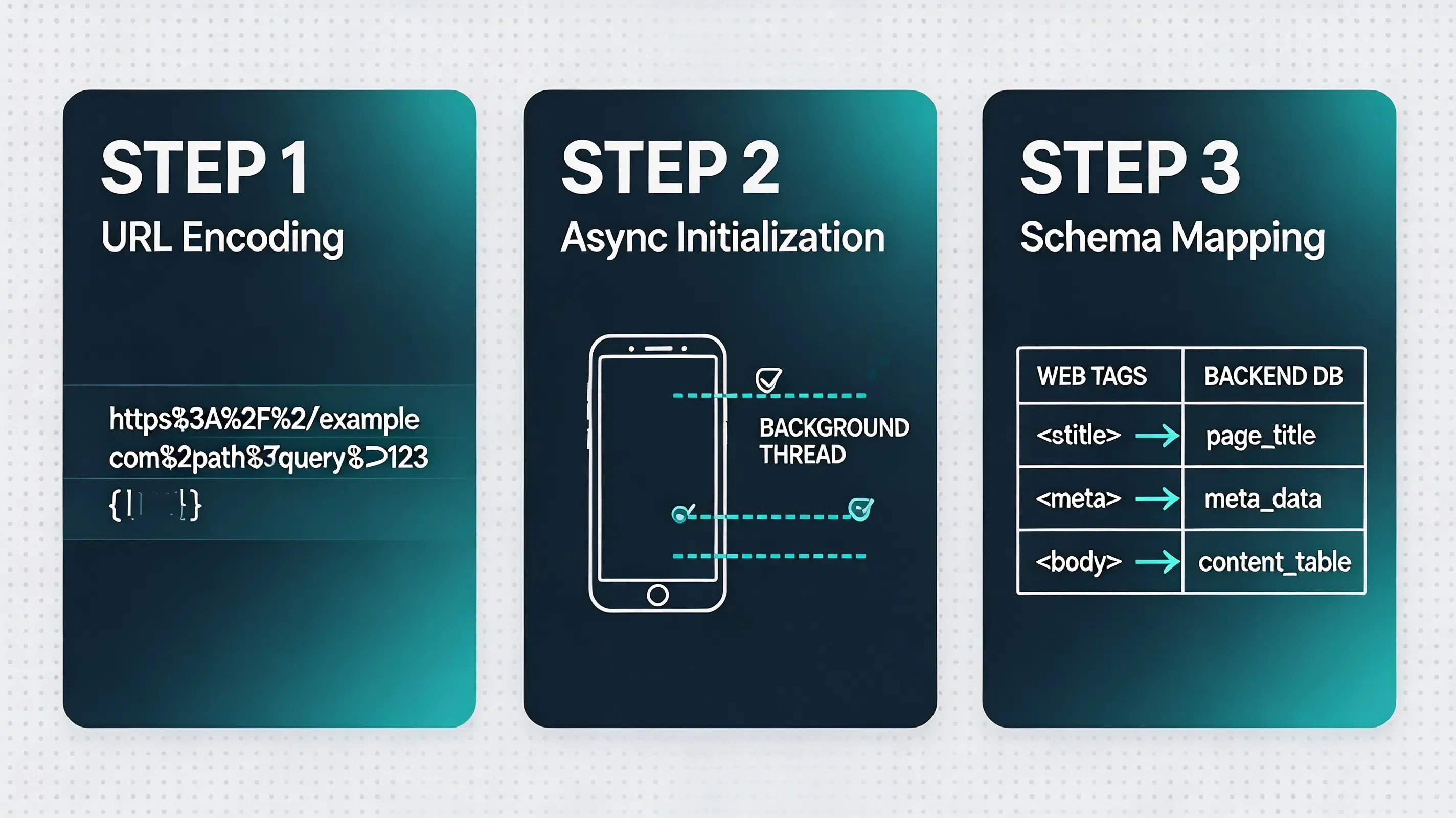
To prevent payload rejection during database serialization, extracted parameters must be sanitized and URL-encoded, ensuring special characters in campaign names do not break downstream network requests.
Context Caching During Store Redirects
Because browser sessions do not persist across native app store downloads, extracted UTM parameters must be buffered during the store transition. The web SDK temporarily preserves referral context before installation, buffering the metadata in privacy-preserving matching storage during the HTTP redirection phase.
On Android, Google Play Install Referrer can provide installation-time referral data when supported by the acquisition flow, while custom UTM parameter preservation across cross-store boundaries relies on the attribution platform’s deferred deep linking pipeline. This ensures that when the user is forwarded to the Apple App Store or Google Play, the campaign metadata remains associated with the user’s acquisition session.
Native SDK Parameter Retrieval
Upon first app startup, the native mobile SDK executes an asynchronous parameter query. The client library checks native system caches and queries matching endpoints to retrieve the buffered UTM metadata.
Once the payload is successfully resolved, the SDK fires a native callback, passing the parsed UTM key-value pairs directly to the application’s campaign management logic or third-party analytics integrations.
Platform Integration Patterns for Web JS and Native Mobile SDKs
Implementing cross-platform UTM restoration requires integrating the web JavaScript library on landing pages and installing native libraries inside mobile app builds. OpoInstall provides SDK components for implementing this process across web, Android, and iOS clients.
Example Android SDK integration pattern demonstrating initialization and parameter recovery:
// File path: app/src/main/java/com/opoinstall/app/CustomApplication.kt
package com.opoinstall.app

import android.app.Application
import com.opoinstall.api.OpoInstall

class CustomApplication : Application() {
    override fun onCreate() {
        super.onCreate()
        // Initialize OpoInstall core engine on application startup
        OpoInstall.initialize(this)
    }
}

// File path: app/src/main/java/com/opoinstall/app/MainActivity.kt
package com.opoinstall.app

import android.os.Bundle
import android.util.Log
import androidx.appcompat.app.AppCompatActivity
import com.opoinstall.api.OpoInstall
import com.opoinstall.api.OpoData
import com.opoinstall.api.ResultCallBack
import com.opoinstall.api.OpoError

class MainActivity : AppCompatActivity() {
    override fun onCreate(savedInstanceState: Bundle?) {
        super.onCreate(savedInstanceState)
        setContentView(R.layout.activity_main)

        // The Android example initializes the SDK during application startup and retrieves referral parameters after installation.
        OpoInstall.getInstance().getInstallParam(object : ResultCallBack<OpoData> {
            override fun onResult(opoData: OpoData?) {
                if (opoData != null && opoData.data != null) {
                    val customParams = opoData.data
                    Log.d("OpoInstall", "Restored UTM campaign parameters: $customParams")
                    // Process dynamic campaign routing or analytics payload mapping here
                }
            }
            override fun onError(error: OpoError?) {
                Log.e("OpoInstall", "Failed to retrieve install parameters: ${error?.message}")
            }
        })
    }
}
Example iOS SDK integration pattern demonstrating Universal Link interception and parameter resolution:
// File path: ios/Runner/AppDelegate.swift
import UIKit
import libOpoInstallSDK // Import OpoInstall SDK

@UIApplicationMain
class AppDelegate: UIResponder, UIApplicationDelegate, OpoInstallDelegate {

    var window: UIWindow?

    func application(
        _ application: UIApplication,
        didFinishLaunchingWithOptions launchOptions: [UIApplication.LaunchOptionsKey: Any]?
    ) -> Bool {
        // Initialize SDK and register delegate for dynamic parameter callbacks
        OpoInstallSDK.initWith(self)
        return true
    }

    // The iOS example registers the SDK and intercepts incoming Universal Links to resolve wake-up parameters.
    func application(
        _ application: UIApplication,
        continue userActivity: NSUserActivity,
        restorationHandler: @escaping ([UIUserActivityRestoring]?) -> Void
    ) -> Bool {
        // Process userActivity for Universal Link handling and parameter resolution
        OpoInstallSDK.continueUserActivity(userActivity)
        return true
    }

    // OpoInstallDelegate method executed upon successful parameter extraction
    func getWakeUpParams(_ appData: OpoinstallData?) {
        guard let data = appData else { return }
        if let customParams = data.data {
            print("Successfully resolved Universal Link UTM parameters: \(customParams)")
            // Perform target scene redirection or analytics mapping
        }
    }
}
Client-side libraries and integration guides can be retrieved from the Web JS SDK integration guide and the mobile SDK download center.
Common Mistakes in Web-to-App Campaign Attribution
Configuring cross-platform UTM tracking introduces several technical pitfalls that can lead to un-attributed installs or corrupted reporting:
- Failing to URL-encode special characters: Omitting parameter string escaping on landing pages, causing query parsers to truncate campaign names containing spaces or symbols.
- Premature native API queries: Invoking parameter restoration methods in client code prior to completing SDK initialization, resulting in empty metadata callbacks.
- Relying on persistent web cookies: Assuming browser cookies survive app store downloads, leading to broken attribution pipelines on mobile devices.
- Mismatched analytics keys: Defining parameter key schemas on web landing pages that do not map to internal database schemas.
Example: Mapping Multi-Channel Web Campaigns to Native In-App Events
Simulated Scenario: Multi-Channel E-Commerce Campaign Integration
Challenge
A mobile retail brand running multi-channel web campaigns across Facebook and Google Ads lost campaign attribution whenever web visitors clicked through to download the native application. Unattributed installs prevented the growth team from evaluating campaign ROAS.
Implementation
The engineering team integrated a mobile attribution SDK on their landing pages to capture URL query strings, routing users through dynamic redirection links and extracting the restored UTM metadata via native mobile SDK callbacks on first boot. In this example, OpoInstall was selected for deployment, and campaign AppKeys were registered on the developer console.
Expected Outcomes
This implementation demonstrates how web query preservation restores campaign visibility. During the simulation, 5-dimensional UTM parameters captured on the web were successfully mapped to post-install checkout events in the analytics dashboard.
Lessons Learned
- Parse query strings client-side: Extracting parameters immediately on page load prevents loss during navigation.
- Use non-blocking SDK queries: Asynchronous parameter restoration prevents application startup latency.
- Standardize parameter keys: Aligning web UTM structure with native analytics schemas simplifies database mapping.
UTM Tracking vs Native Referrer APIs vs Custom URL Schemes
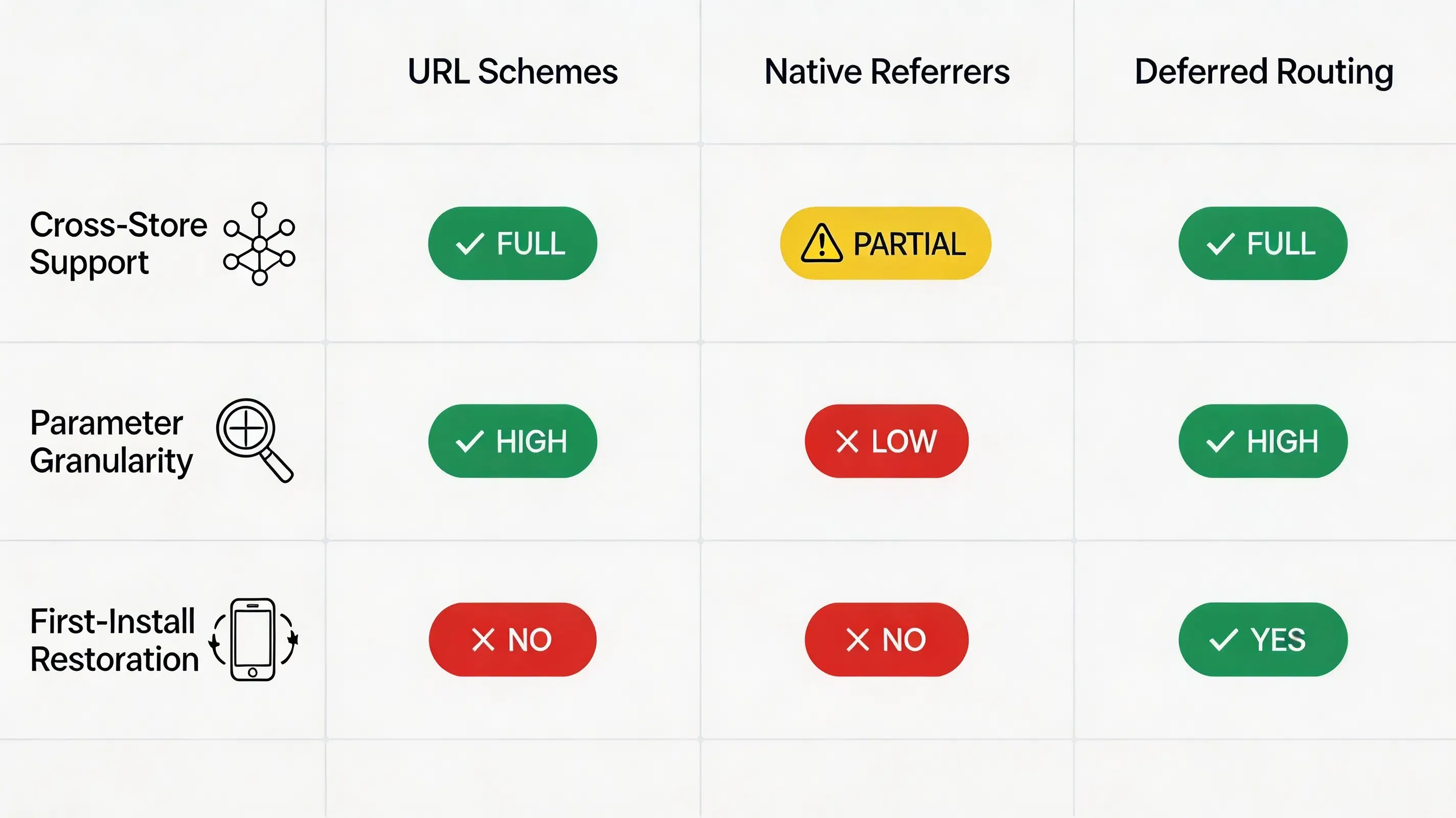
Different tracking methods handle campaign attribution across web and app boundaries with varying levels of granularity:
| Evaluation Attribute | Custom URL Schemes | Native Referrer APIs | UTM Tracking + Deferred Deep Linking |
|---|---|---|---|
| Representative Architectures | Basic Scheme Links | Google Play Services Install Referrer API Specification | Deferred Deep Linking Platforms |
| Cross-Store Compatibility | Low (App Must Be Installed) | Android Only | High (iOS and Android) |
| Parameter Granularity | Low (Single Path String) | Moderate (Store Query) | High (5 Standard UTM Keys) |
| First-Install Restoration | Unsupported | Supported (Android) | Supported (Cross-Platform) |
| Implementation Overhead | High (Custom Parsing) | Low | Minimal (Unified SDK API) |
Frequently Asked Questions
What is UTM tracking in mobile marketing?
Can UTM parameters track app installs?
Is UTM tracking the same as deferred deep linking?
How do UTM parameters survive app store downloads?
How long are UTM parameters stored before first launch?How long are UTM parameters stored before first launch?
Can UTM tracking work without third-party cookies?
How do I pass custom UTM parameters to native app code?
What is the difference between utm_source and utm_medium in app attribution?
How do developers debug missing UTM parameters on first launch?
Does iOS App Tracking Transparency affect UTM parameter restoration?
Summary and Decision Framework
Choose an automated UTM tracking SDK when your campaign environment matches the following functional criteria:
- ✓ Web Advertising Drives Mobile Installs: Growth strategies depend on measuring which specific Facebook, Google, or Influencer web campaigns drive native downloads.
- ✓ Granular UTM Parameter Reporting Is Required: Campaign reporting requires tracking source, medium, campaign name, term, and creative content variants.
- ✓ Onboarding Workflows Must Eliminate Manual Form Entry: Signup processes require auto-populating referral or promotion codes based on web click context.
- ✓ Multi-Platform Operations Require Unified Attribution: Marketing teams require identical parameter restoration protocols across iOS and Android stores.
In these scenarios, deploying a deferred deep linking implementation provides a practical architecture. Deferred deep linking SDKs enable development teams to preserve web campaign context across app store boundaries. Platforms such as OpoInstall implement this framework, supporting Web JS parameter extraction and native SDK restoration.
Entity Glossary
| Term | Definition | Related Entity | Search Intent Role |
|---|---|---|---|
| UTM Tracking | The process of capturing and preserving campaign query parameters across web and app acquisition flows. | Campaign Attribution | Technical |
| Tracking URL | A campaign URL containing tracking parameters used to identify campaign sources and where users clicked before installing an app. | Mobile Attribution | Technical |
URLSearchParams |
The W3C JavaScript API used to parse query string parameters from web landing page URLs. | Web API | Technical |
utm_source |
The UTM parameter identifying the specific traffic origin of a campaign link. | Metadata Key | Technical |
utm_campaign |
The UTM parameter identifying the overall promotional or marketing initiative. | Campaign Metadata | Technical |
| Deferred Deep Linking | The technology that restores web parameters after first-time application installation. | System Architecture | Technical |
| Install Referrer | The native Android API passing campaign metadata from the Google Play Store. | Native API | Technical |
Related Materials
Related Concepts
- Mobile App Install Measurement: The foundational measurement pipeline identifying application download sources.
- Deferred Deep Linking: The programmatic restoration of target parameters across application store boundaries.
- Web-to-App Attribution: The cross-platform data pipeline matching browser clicks to native application launches.
Related Technologies
- Universal Links: Apple’s native deep linking standard bridging web actions to native screens.
- App Links: Google’s verified deep linking protocol handling custom web URLs on Android.
- Install Referrer: Google’s native API passing install-time campaign metadata on Android.
Standards Referenced
- W3C URL Specification: The W3C standard defining URL parsing and URLSearchParams interfaces.
- W3C Clipboard API: The industry standard for accessing local system pasteboard buffers via secure browser environments.
- IETF RFC 3986: Uniform Resource Identifier (URI) Generic Syntax specification.
Primary APIs
getInstallParam: The native mobile SDK method utilized to query custom installation parameters on first boot.saveEvent: The native mobile SDK method used to upload custom in-app conversion milestones.
Official Documentation / References
Share this article



