How do you configure a SKAdNetwork 4.0 conversion value schema? A SKAdNetwork 4.0 conversion value schema maps post-install events or revenue signals to fine-grained values from 0 to 63 and coarse values (low, medium, high). Apple’s postback data tier determines which conversion-value representation and other privacy-sensitive fields may appear in an eligible postback.
IDFA (Identifier for Advertisers) is Apple’s resettable advertising identifier for iOS advertising measurement. Apple’s App Tracking Transparency (ATT) framework changed IDFA access from default system availability to user-authorized access, shifting mobile attribution from deterministic cross-app matching toward privacy-preserving measurement frameworks.
| Term | Definition | Related Concept |
|---|---|---|
| SKAdNetwork | Apple’s privacy-preserving ad measurement framework. | Conversion Value |
| Conversion Value | A mapped value representing post-install user engagement or revenue. | Postback Data Tier |
| Conversion Window | Designated measurement time frames (Window 1, 2, and 3) governing SKAN updates. | LockWindow API |
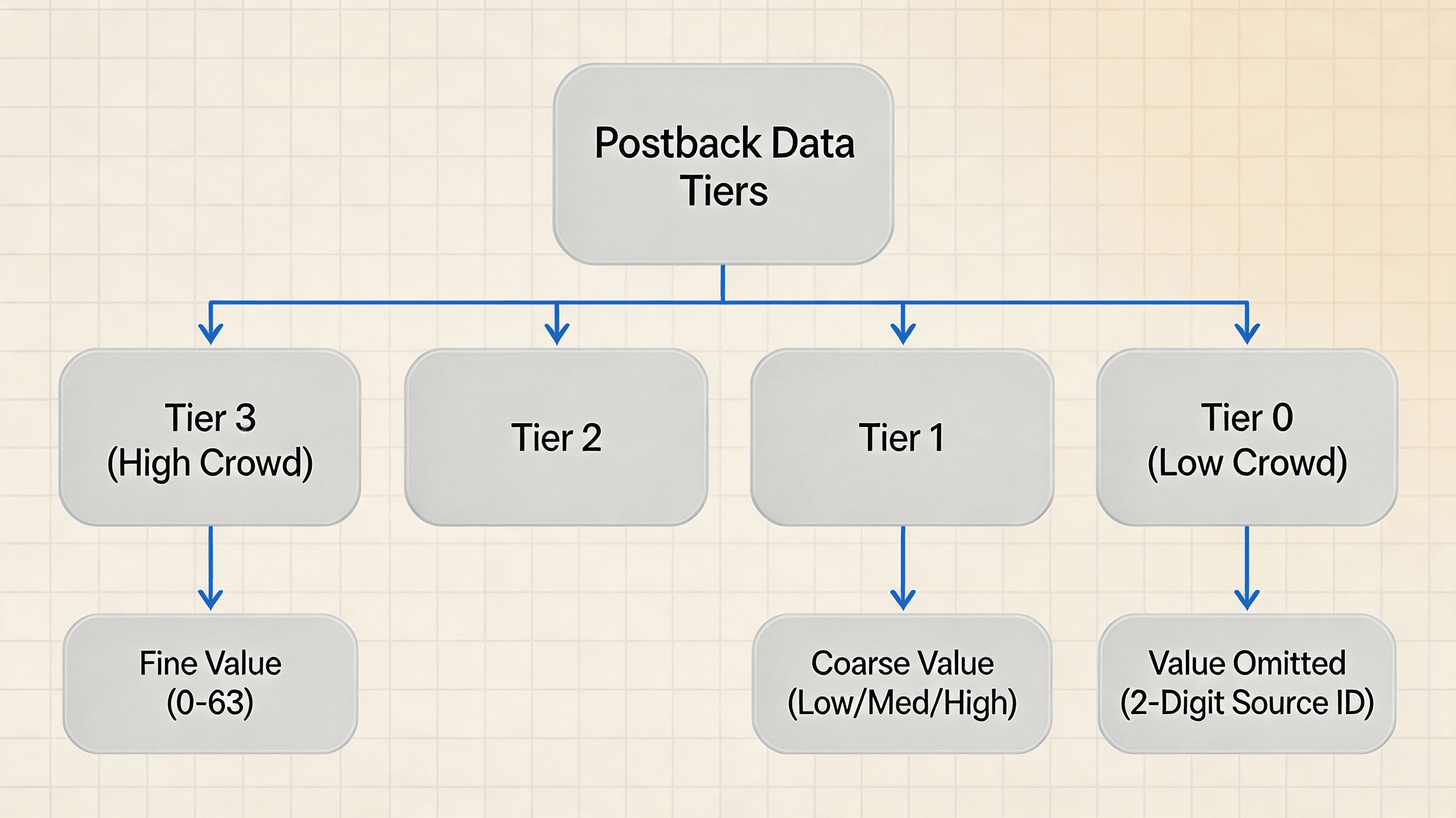
Understanding SKAdNetwork 4.0 Conversion Value Hierarchies
The Structural Evolution: From SKAN 3.0 Single-Postback to SKAN 4.0 Multi-Window Measurement
Under SKAdNetwork 2.0 and 3.0, advertisers relied on a single conversion value and a rolling 24-hour timer. For SKAN 3 and earlier, a higher conversion value could restart the rolling 24-hour timer, which encouraged developers to design monotonically increasing conversion-value schemes. If a user completed an in-app conversion event, the embedded client SDK invoked a system API to update a single 6-bit integer (0 to 63).
SKAN’s single-postback model provided limited visibility into post-install engagement occurring after the initial conversion period for mobile applications with longer conversion funnels, such as subscription e-commerce platforms and mid-core mobile games.
SKAdNetwork 4.0 restructured this measurement paradigm by introducing a SKAdNetwork 4.0 multi-window structure comprising three distinct time windows, expanded source identifiers that replaced the previous campaign identifier model, and a dual-tier conversion value system consisting of fine-grained and coarse-grained values. SKAdNetwork 4 can generate up to three postbacks for a winning ad attribution. The second and third postbacks are available only when the applicable privacy conditions are met and the corresponding conversion windows produce eligible conversion information; Tier 0 receives only the first postback.
Fine-Grained Values: Encoding In-App Engagement into 6-Bit Integers
Fine-grained conversion values represent the traditional SKAN measurement metric. Encoded as a 6-bit unsigned integer, fine-grained values support 64 discrete numeric states ranging from 0 to 63.
Because 6 bits offer 64 potential values, developers design mapping logic to encode specific user milestones or revenue ranges:
-
Sequential Funnel Mapping: Assigning values sequentially based on funnel depth (e.g.,
1= Registration,2= Onboarding,3= Level 5,4= Purchase). -
Revenue Bucket Mapping: Using the 64 available fine-grained states to represent a baseline state plus up to 63 revenue buckets (e.g.,
1= $0.01–$0.99,2= $1.00–4.99, $\dots,63= $500.00+).
Fine-grained conversion values are returned only in the first postback. The second and third postbacks return coarse-grained conversion values instead.
Coarse-Grained Values: Categorizing Post-Install Value into Low, Medium, and High Tiers
In Conversion Window 1, Apple may return either the fine-grained or coarse-grained conversion value depending on the applicable postback data tier. Conversion Windows 2 and 3 use coarse-grained conversion values. Fine and coarse values are supplied together when the app calls the SKAN 4 conversion-value API; Apple later determines which representation, if any, is included in the first postback based on the postback data tier. Postbacks may contain either fine-grained or coarse-grained conversion values, not both. The low, medium, and high labels have no predefined business meaning in SKAdNetwork. The app or ad network defines what each level represents.
A coarse-grained conversion value consists of a string property containing one of three explicit values:
-
low: Indicates basic post-install engagement (e.g., completed registration or initiated session). -
medium: Indicates moderate post-install value (e.g., reached intermediate app milestone or spent $1.00–$19.99). -
high: Indicates high post-install value (e.g., completed high-value subscription or spent $20.00+).
In Conversion Windows 2 and 3, the conversion-value field is not used for fine values; the system may return the developer-provided coarse conversion value when privacy conditions permit it.
How Fine-Grained and Coarse-Grained Values Function Across Conversion Windows
Conversion Window 1 (Days 0–2)
Conversion Window 1 (Days 0–2, approximately the first 48 hours after the user first launches the app) covers the initial measurement period after install, during which developers can update fine-grained or coarse-grained conversion values before the system closes the window. During this timeframe, the mobile application can update conversion values multiple times as the user completes in-app events.
Depending on the postback data tier assigned by Apple, Conversion Window 1 delivers either a fine-grained value (0 to 63) or a coarse-grained value (low, medium, high). If the postback data tier is Tier 0, the first postback contains only the two-digit hierarchical source identifier; the fine- or coarse-grained conversion value is omitted.
Conversion Windows 2 (3 to 7 Days) and 3 (8 to 35 Days)
To provide visibility into mid-term and long-term user retention, SKAdNetwork 4.0 introduced two additional conversion windows:
-
Conversion Window 2: Measures user engagement occurring during the post-install days 3 to 7 measurement period (a 5-day window).
-
Conversion Window 3: Measures user engagement occurring during the post-install days 8 to 35 measurement period (a 28-day window).
Unlike Window 1, Conversion Windows 2 and 3 transmit coarse-grained values only. Fine-grained values (0 to 63) are not supported in Windows 2 and 3. Developers determine the coarse value reported for each window based on events occurring during that measurement period.
Understanding Postback Data Tiers and Crowd Anonymity
Apple determines a postback data tier for the app download based on crowd size associated with the source app or domain, the advertised app, the country where the advertised app was installed, and the hierarchical source identifier provided by the ad network. Depending on the tier, the first postback may expose two, three, or four digits of the hierarchical source identifier, while the conversion value may be omitted, returned as coarse-grained, or returned as fine-grained. According to Apple’s official SKAdNetwork framework documentation (StoreKit > SKAdNetwork), Apple does not publish universal install-volume thresholds that developers can use to map campaigns to fixed data tiers.
The table below outlines how postback data payloads correlate with privacy tiers across conversion windows according to Apple’s official SKAdNetwork framework documentation:
| Postback Data Tier | First Postback / Conversion Window 1 | Second & Third Postbacks |
|---|---|---|
| Tier 3 | Up to 4-digit source-identifier + fine conversion-value if disclosed |
2-digit source-identifier + coarse value if disclosed |
| Tier 2 | Up to 4-digit source-identifier + fine conversion-value if disclosed |
2-digit source-identifier + coarse value if disclosed |
| Tier 1 | 2-digit source-identifier + coarse value if disclosed |
2-digit source-identifier + coarse value if disclosed |
| Tier 0 | 2-digit source-identifier only; conversion value omitted |
No second or third postback sent |
Utilizing the lockWindow Property to Finalize Conversion Windows Early
Setting lockWindow: true locks the conversion value for the current conversion window. The system immediately prepares the corresponding postback and ignores further conversion-value updates in that window. The postback remains subject to Apple’s randomized delivery delay.
For example, if a user completes a purchase 6 hours into Conversion Window 1, the app can set lockWindow: true. This closes the measurement window early and allows Apple’s postback scheduling process to begin, which can cause the system to prepare the postback earlier, although the applicable randomized delivery delay still applies.
Structural Comparison of SKAdNetwork Conversion Windows 1, 2, and 3
Comparative Evaluation of SKAN 4.0 Postback Timing, Value Types, and Delay Windows
Managing a multi-window SKAdNetwork schema requires mapping event triggers according to window duration, supported value granularity, and postback delay ranges.
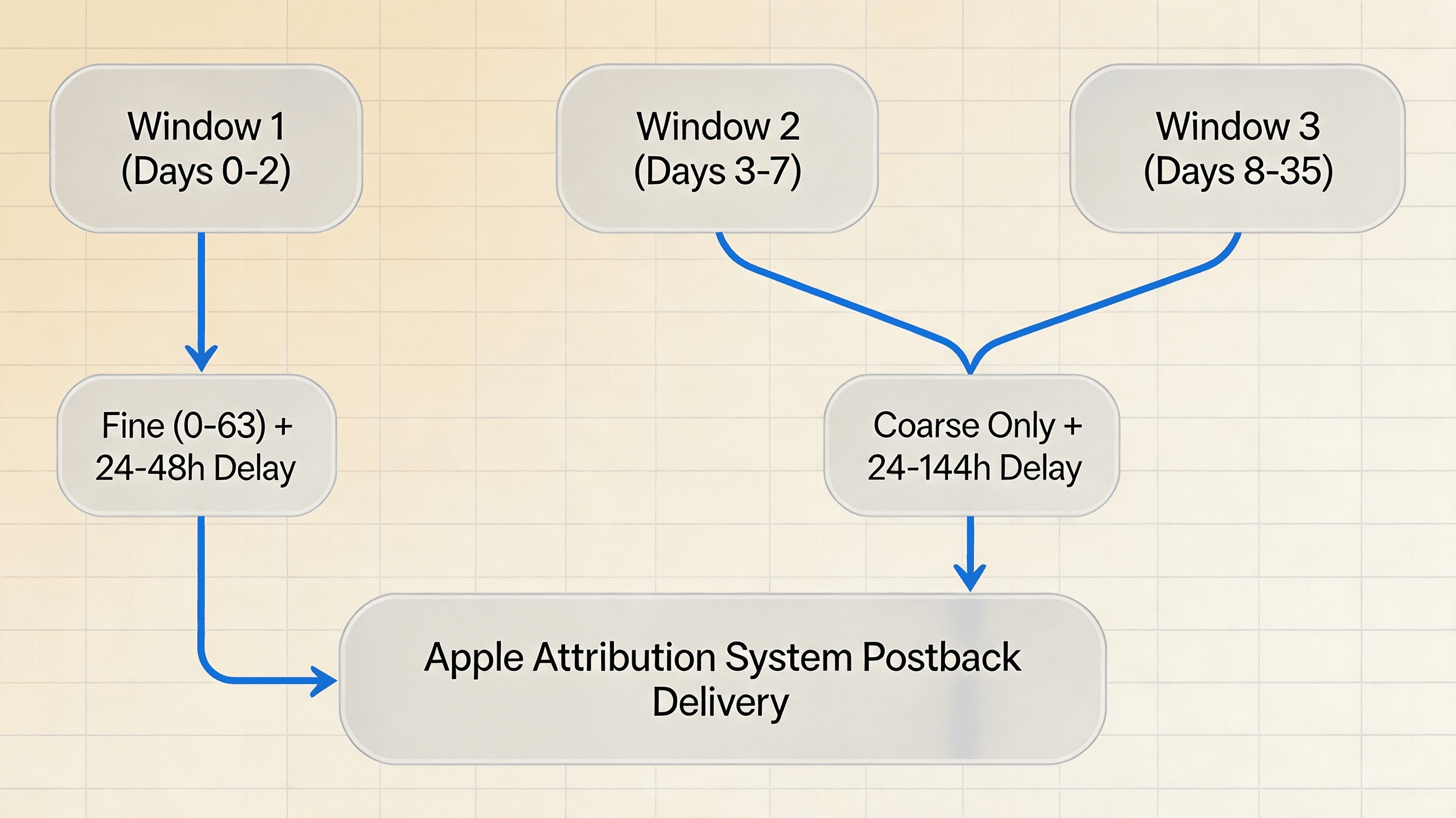
The table below contrasts the technical characteristics of Conversion Windows 1, 2, and 3:
| Conversion Window | Measurement Window | Conversion Value | Postback Timing |
|---|---|---|---|
| Window 1 | Days 0–2 | Fine (0-63) or Coarse (Low/Med/High) | Apple applies randomized delays (24–48h) after window closes or locks |
| Window 2 | Days 3–7 | Coarse-Grained Only (Low/Med/High) | Apple applies randomized delays (24–144h) after window closes or locks |
| Window 3 | Days 8–35 | Coarse-Grained Only (Low/Med/High) | Apple applies randomized delays (24–144h) after window closes or locks |
Evaluating Data Granularity and Timestamps Across SKAN Conversion Windows
While Conversion Window 1 provides the highest data resolution (6-bit fine values), Windows 2 and 3 provide crucial long-term retention signals. Analysts must account for postback delay ranges when joining SKAN postbacks with internal transaction ledgers.
Because Apple applies a random 24-to-48 hour delay to Window 1 postbacks and up to 144 hours for Windows 2 and 3, postbacks arriving at attribution endpoints do not represent real-time conversions. Instead, they represent historical engagement windows completed days prior.
Engineers seeking to configure client-side SDK logging and automated SKAN postback parsing can reference the OpoInstall attribution SDK integration documentation to review payload structure setup.
How to Design a SKAdNetwork Conversion Value Schema
Example SKAdNetwork 4.0 Conversion Schema Mapping
Designing a SKAdNetwork schema requires mapping in-app milestones and purchase tiers to discrete fine and coarse values.
The table below illustrates a standard conversion value schema design for a mobile application:
| In-App User Event | Fine-Grained Value (0–63) | Coarse-Grained Value | Target Conversion Window |
|---|---|---|---|
| No measured post-install event / baseline | Value 0 | low |
Window 1 |
| Account Registration Completed | Value 1 | low |
Window 1 |
| Free Trial Activated | Value 10 | medium |
Window 1 |
| First Purchase ($0.01 - $19.99) | Value 30 | medium |
Window 1 |
| High-Value Subscription ($20.00+) | Value 63 | high |
Window 1 (Window 2 & 3: Coarse high) |
Production Schema Design Framework: Gaming vs Subscription Applications
Depending on product monetization dynamics, engineering teams tailor schema configurations to prioritize either instant funnel progression or long-term revenue tiers:
-
Gaming Applications (Revenue Prioritized): Values 0 through 10 map early tutorial progress, while values 11 through 63 represent cumulative revenue observed during Window 1. Coarse values in Windows 2 and 3 map repeat purchase frequency (
low= active,medium= 2nd purchase,high= VIP spender). -
Subscription Applications (Trial Prioritized): Values 0 through 5 map registration and profile completion, Value 10 maps free trial activation, and Values 20 through 63 map subscription tier selections. Coarse values in Windows 2 and 3 map trial-to-paid conversions (
low= active session,medium= trial converted,high= subscription renewed).
How to Choose Between Revenue-Based and Event-Based Conversion Values
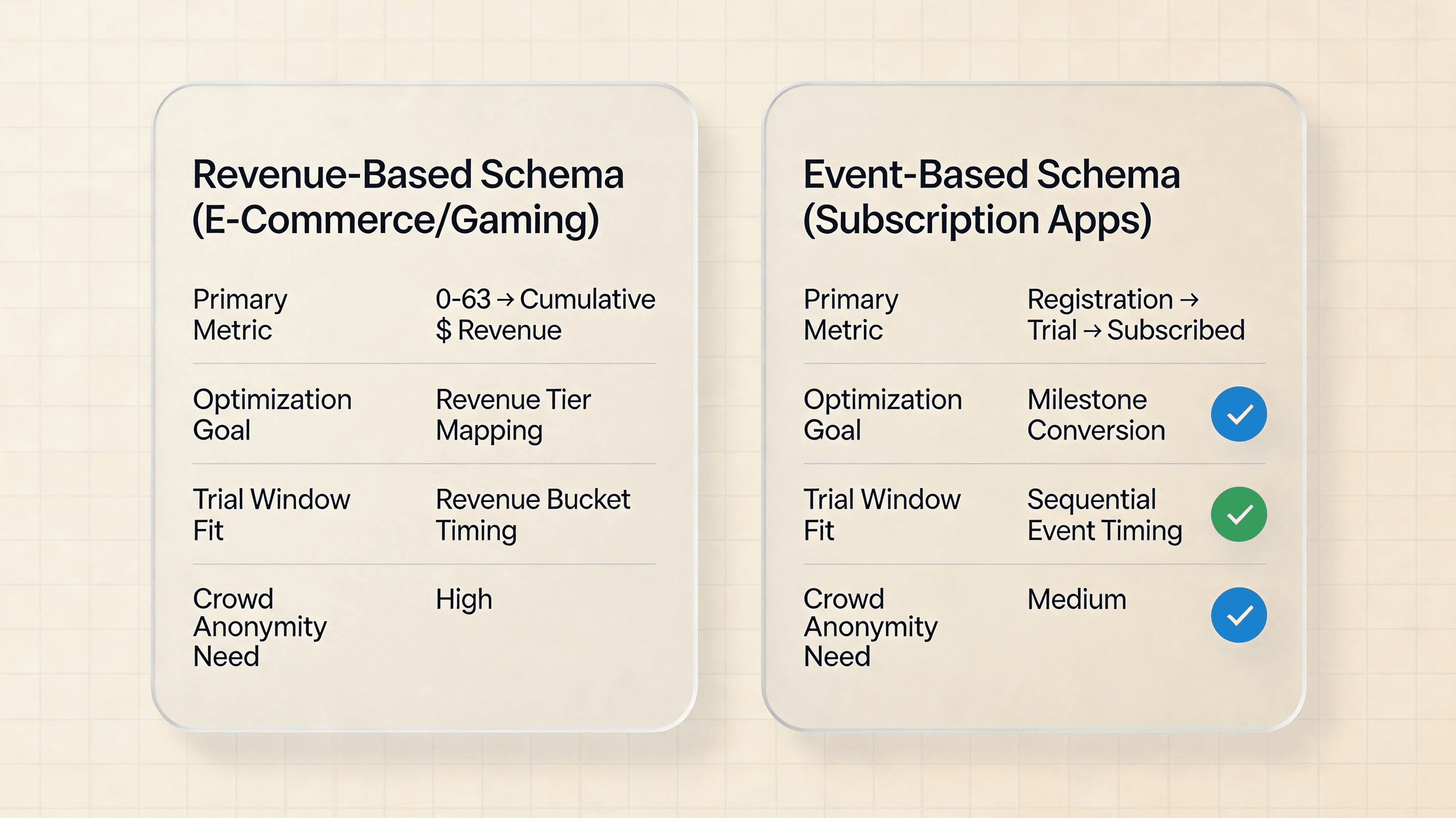
Selecting between revenue-based and event-based schema models requires aligning conversion value logic with app monetization mechanics:
-
Revenue-Based Models (E-Commerce & Gaming): Optimal for apps where purchase events occur within the first 48 hours. By encoding cumulative spend into progressively wider revenue buckets, demand-side platforms (DSPs) receive revenue signals available for campaign analysis. If the schema is cumulative-revenue based, each conversion update should encode the user’s current cumulative post-install revenue rather than only the latest transaction amount.
-
Event-Based Funnel Models (Subscriptions): Optimal for apps with extended trial or consideration periods. By mapping sequential milestones (e.g., registration to\toto trial activation to\toto subscription), campaign measurement evaluates high-intent trialists before Days 0–2 expire.
Designing Revenue Buckets: Mapping IAP Ranges to 0-63 Values
When analyzing Return on Ad Spend (ROAS), mapping 6-bit fine values to revenue buckets represents an effective schema design. The application calculates cumulative revenue according to its own business logic and encodes the result into the conversion value. The bucket boundaries below are illustrative rather than a complete 64-bucket production mapping. In production, bucket boundaries should be derived from the app’s payer distribution, expected ROAS sensitivity, and campaign objectives.
An example 6-bit revenue schema for an e-commerce or gaming application is structured as follows:
-
Value 0: No measured post-install event / baseline. -
Value 1: $0.01 to $0.99 (Micro-transaction). -
Value 2: $1.00 to $4.99. -
Value 3: $5.00 to $9.99. -
dots\dotsdots
-
Value 62: $250.00 to $499.99. -
Value 63: $500.00+ (High-value spender tier).
When a user completes an in-app purchase, the mobile SDK calculates the user’s cumulative spend observed during Window 1, identifies the corresponding integer bucket, and invokes updatePostbackConversionValue.
Designing Engagement Funnels: Mapping Sequential Milestones
For subscription applications or utility tools where in-app purchases occur late in the user lifecycle, mapping fine values to sequential engagement milestones provides early campaign performance signals.
An engagement milestone schema maps progression depth:
-
Value 1: Account Registration Completed. -
Value 2: Onboarding Tutorial Finished. -
Value 3: Profile Setup & Preferences Configured. -
Value 4: Free Trial Activated. -
Value 5: First In-App Content Share. -
Value 10: Paid Subscription Started.
SKAN 4.0 provides more flexible conversion value management compared with earlier versions, although advertisers commonly continue using increasing-value strategies for optimization stability. The application should define deterministic precedence rules so that multiple events occurring within the same window resolve to a single final fine/coarse state.
[App Launch / Event] ──> [SDK Calls updatePostbackConversionValue]
                                    │
                                    ▼
         ┌──────────────────────────┴──────────────────────────┐
         ▼                                                     ▼
[Conversion Window 1 (0-2 Days)]               [Conversion Window 2 & 3]
 (Fine 0-63 or Coarse)                               (Coarse Only: Low/Med/High)
         │                                                     │
         └──────────────────────────┬──────────────────────────┘
                                    ▼
                [Apple Attribution System Delayed Postback]
                                    │
                                    ▼
               [Attribution / Analytics Backend]
Illustrative Production-Style SKAdNetwork 4.0 Schema Examples
1. Mobile Gaming Schema (Revenue + Milestone Hybrid)
Gaming applications utilize a hybrid schema in Window 1, reserving lower values (0–10) for tutorial milestones and allocating upper values (11–63) to cumulative revenue observed during Window 1. In this illustrative schema, the app independently maps these milestones to coarse categories.
-
Value 1: Tutorial Completed (lowcoarse mapping) -
Value 5: Level 10 Reached (mediumcoarse mapping) -
Value 15: First IAP ($0.99 - $9.99) -
Value 40: Mid Spender ($10.00 - $99.99) (highcoarse mapping) -
Value 63: VIP Spender ($100.00+) (highcoarse mapping)
2. Subscription App Schema (Trial & Renewal Focused)
Subscription applications map Window 1 to free trial conversion velocity, while utilizing Windows 2 and 3 coarse values to track long-term trial-to-paid conversions and renewal events.
-
Window 1:
Value 1= Registration,Value 10= Trial Started (mediumcoarse mapping),Value 63= Annual Plan Subscribed (highcoarse mapping) -
Window 2 (Days 3-7):
low= Active Session,medium= Trial Converted,high= Annual Plan Retained -
Window 3 (Days 8-35):
low= App Re-engagement,medium= Paid Subscriber Active,high= Subscription Renewed
Managing SKAdNetwork Schemas at Scale
For growth and data engineering teams managing multiple iOS campaigns, centralized conversion value management can reduce implementation errors, automate payload mapping, and maintain complete postback visibility. Configuring secure install attribution workflows ensures payload integrity across client SDKs and backend reporting databases.
Implementing SKAdNetwork 4.0 with StoreKit
Programmatic Conversion Value Updates via StoreKit
SKAdNetwork 4 postbacks are available when the relevant SKAdNetwork 4 eligibility conditions are met. To receive multiple SKAdNetwork 4 postbacks, the advertised app needs to update conversion values during the applicable conversion windows. A Window 1 update does not automatically create Window 2 or Window 3 conversion values. For apps using the SKAdNetwork 4 APIs, the advertised app should be built with the iOS 16.1 SDK or later and run on iOS 16.1 or later to call SKAdNetwork.updatePostbackConversionValue(_:coarseValue:lockWindow:completionHandler:) within StoreKit. AdAttributionKit is a separate Apple attribution framework and is outside the scope of this SKAdNetwork conversion-value implementation example.
The method accepts three core parameters:
-
fineValue: An integer from0to63. -
coarseValue: AnSKAdNetwork.CoarseConversionValueenum (.low,.medium,.high). -
lockWindow: A boolean flag indicating whether to finalize the window early.
For SKAdNetwork 4 multiple-postback measurement, the app must continue updating conversion values during the applicable conversion windows; setting a Window 1 value does not automatically populate Windows 2 and 3.
Developers can reference technical specifications regarding raw event log schemas and SKAN payload structures in official developer documentation.
The code and schema below illustrate how developers invoke the SKAN 4.0 update API in Swift and how backend collectors format the resulting postback payload:
Note: The following schema and code snippets are conceptual examples only and not an Apple or OpoInstall API specification.
// Swift Example: Updating SKAdNetwork 4.0 Conversion Value on iOS 16.1+
import StoreKit

func updateSKANConversionValue(fineValue: Int, coarseValue: SKAdNetwork.CoarseConversionValue, shouldLock: Bool) {
    guard (0...63).contains(fineValue) else { return }
    if #available(iOS 16.1, *) {
        SKAdNetwork.updatePostbackConversionValue(fineValue, coarseValue: coarseValue, lockWindow: shouldLock) { error in
            if let error = error {
                print("SKAN Update Error: \(error.localizedDescription)")
            } else {
                print("SKAN Value Updated Successfully: Fine = \(fineValue), Coarse = \(coarseValue.rawValue), Locked = \(shouldLock)")
            }
        }
    } else {
        // Deprecated legacy API used for compatibility with older OS versions.
        SKAdNetwork.updateConversionValue(fineValue)
    }
}
{
  "example_only": true,
  "privacy_note": "Illustrative schema only",
  "measurement_model": "cumulative_revenue",
  "precedence": "highest_qualifying_value",
  "lock_policy": "lock_on_terminal_conversion",
  "event_type": "skan_conversion_value_mapping_config",
  "app_id": "com.example.iosapp",
  "skan_schema_version": "4.0",
  "window_1_config": {
    "fine_value_mappings": [
      { "value": 0, "event_name": "app_launch_or_baseline", "min_revenue_cents": 0 },
      { "value": 1, "event_name": "registration", "min_revenue_cents": 0 },
      { "value": 10, "event_name": "free_trial", "min_revenue_cents": 0 },
      { "value": 30, "event_name": "first_purchase", "min_revenue_cents": 100 },
      { "value": 63, "event_name": "whale_purchase", "min_revenue_cents": 50000 }
    ],
    "coarse_value_mappings": {
      "low": "app_launch_or_registration",
      "medium": "first_purchase_under_20",
      "high": "purchase_over_20"
    }
  },
  "window_2_config": {
    "coarse_value_mappings": {
      "low": "d3_d7_active_session",
      "medium": "d3_d7_repeat_purchase",
      "high": "d3_d7_subscription_renewed"
    }
  },
  "window_3_config": {
    "coarse_value_mappings": {
      "low": "d8_d35_active_session",
      "medium": "d8_d35_repeat_purchase",
      "high": "d8_d35_subscription_retained"
    }
  }
}
SKAdNetwork Conversion Value Best Practices
Aligning Conversion Schema Design with Campaign Objectives
Designing a SKAdNetwork schema requires selecting mapping rules that match your primary campaign targets. Media buying teams optimizing for immediate trial conversions should prioritize sequential funnel milestones in Conversion Window 1. Conversely, performance teams evaluating high-value purchases should implement granular revenue buckets.
Consolidating Campaigns to Clear Crowd Anonymity Tiers
To prevent postbacks from returning null values or dropping to coarse-grained fallbacks, mobile growth teams manage campaign density:
-
Reduce Campaign Fragmentation: To reduce the likelihood of low postback data tiers, teams may avoid unnecessary campaign fragmentation and overly narrow targeting. However, Apple does not publish a universal spend or install threshold that guarantees a specific postback data tier.
-
Broaden Targeting Parameters: Avoid overly narrow geographic or demographic targeting that breaks crowd anonymity thresholds.
-
Optimize LockWindow Strategy: Teams should generally consider using
lockWindow: trueonly when they are confident that no more valuable conversion signal is expected within the remaining portion of that window.
SKAdNetwork 4.0 Conversion Value Schema Checklist
To ensure complete SKAdNetwork 4.0 tracking compliance and maximize LTV measurement, verify that your schema satisfies the following engineering requirements:
- [ ] Primary Optimization Objective: Define whether your campaign optimizes for early engagement milestones or cumulative 48-hour revenue.
- [ ] Window 1 Fine-Value Mapping: Assign discrete 6-bit integer values (0–63) to sequential funnel steps or revenue buckets.
- [ ] Window 1 Coarse-Value Mapping: Configure
low,medium, andhighcoarse string buckets for low crowd anonymity dispatches. - [ ] Windows 2 & 3 Coarse-Value Mapping: Establish coarse-grained tracking logic for 3–7 day and 8–35 day postback windows.
- [ ] Event Precedence & Locking Rules: Define deterministic event precedence and configure
lockWindow: trueon terminal conversion events only.
Common SKAN 4.0 Schema Design Mistakes That Reduce Measurement Quality
-
Compressing Spender Tiers into Value 63: Assigning $10 purchases and $1,000 purchases to the same top bucket reduces revenue differentiation available for campaign analysis and optimization.
-
Premature LockWindow Execution: Calling
lockWindow: trueon an early registration event locks Conversion Window 1 permanently, dropping subsequent 48-hour purchase events. -
Over-Complicating Windows 2 and 3: Attempting to map complex coarse rules for postbacks arriving up to 35 days later complicates campaign evaluation without improving early bidding optimization.
How to Troubleshoot SKAdNetwork Postback Null Values and Crowd Anonymity Drops
Diagnosing High Null Conversion Value Rates: Understanding Low Campaign Crowd Anonymity
When inspecting SKAN campaign performance in attribution dashboards, analysts frequently observe postbacks returning null or missing conversion values. A high proportion of missing conversion values can indicate that the applicable postback data tier does not permit Apple to disclose conversion-value information.
To resolve crowd anonymity drops and improve conversion value visibility, performance teams consolidate campaign keys and evaluate campaign structure density to ensure install velocity clears crowd anonymity thresholds.
Resolving Sequence Misalignments and Conversion Value Downgrade Traps
In SKAdNetwork 4.0, conversion values can be updated flexibly during Window 1, but developers must manage lockWindow states carefully.
If an application sets lockWindow: true on a low-value event (e.g., Value 2 = Registration), the window locks permanently. If the user subsequently completes a $100 purchase 10 minutes later within the 48-hour window, the system cannot update the conversion value, resulting in an under-reported campaign LTV. Developers must ensure lockWindow: true is executed on terminal, high-value conversion events.
Handling Random Delay Ranges Imposed by Apple’s Attribution System
To prevent advertisers from attempting to re-identify individual users by matching conversion timestamps with web click logs, Apple enforces a mandatory random delay on all postback dispatches.
For Conversion Window 1, the system prepares the postback when the conversion window closes or when the app locks the window. Apple then applies a randomized 24–48-hour delay. Windows 2 and 3 use a randomized 24–144-hour delay after the corresponding window closes or is locked. Data engineering pipelines must account for these systematic delays, avoiding setting short-window automated bid adjustments on SKAN data streams.
Frequently Asked Questions (FAQ)
What should a SKAdNetwork conversion value schema include?
How to configure Apple SKAdNetwork conversion value schema?
How many conversion values does SKAdNetwork support?
How long can SKAdNetwork 4.0 measurement take?
What is the difference between fine-grained and coarse-grained conversion values?
Can SKAdNetwork conversion values decrease?
How does the lockWindow API affect SKAdNetwork postback timing?
Key Takeaways
-
Multi-Window Measurement: SKAN 4.0 expands measurement across three postback windows (0-2 days, 3-7 days, 8-35 days), using fine-grained (0-63) and coarse-grained (
low,medium,high) values. -
Crowd Anonymity Thresholds: Higher campaign install volume may enable fine-grained values, while low-volume campaigns receive coarse values or
nullredactions to preserve privacy. -
Strategic LockWindow Use: Executing
lockWindow: trueon terminal conversion events may reduce waiting time before window lock, enabling faster campaign feedback.
Summary and Decision Framework
Optimizing iOS campaign measurement under Apple’s privacy guidelines requires configuring a well-structured SKAdNetwork conversion value schema. Transitioning from legacy IDFA tracking to SKAN 4.0 multi-window postbacks allows performance teams to evaluate both immediate activation and long-term user retention.
By mapping 6-bit fine values for immediate 48-hour engagement and coarse values for extended 35-day windows, growth teams capture critical revenue and retention signals. Integrating client SDKs with automated SKAN schema tools provides the infrastructure needed to decode aggregated postbacks and provide optimization signals for iOS campaign efficiency.
To explore how unified mobile measurement can optimize your application’s growth strategy, consult the OpoInstall mobile attribution implementation reference or register an account on the OpoInstall developer console.
Related Resources
To deepen your understanding of SKAdNetwork measurement, mobile attribution infrastructure, and privacy-preserving app growth, explore our technical guides:
-
SKAdNetwork vs MMP Attribution: Key Differences Explained: Understand how Apple’s native SKAdNetwork framework compares with independent Mobile Measurement Partner attribution models and how both systems operate together.
-
How to Implement a Referral Tracking SDK with Deferred Deep Linking and Install Attribution: Learn how mobile apps preserve acquisition context across app store installation flows using deferred deep linking and attribution SDK workflows.
-
How Mobile Measurement Partners Work: Explore how MMP platforms ingest attribution signals, process post-install events, and generate aggregated campaign measurement reports.
Related Topics
-
Concepts: SKAdNetwork, Conversion Value, Postback Window, Crowd Anonymity, LockWindow
-
Technologies: Mobile Measurement Partners (MMPs), StoreKit, AdAttributionKit, Server-to-Server Postback
-
APIs: OpoInstall mobile attribution event logging capabilities, Apple SKAdNetwork API, Apple AdAttributionKit API
-
Official Documentation & References:
Share this article



